Selfly Store v1.0.40
Selfly Store is a complete, easy to set up solution that enables you to run your own unmanned self-service micro-store.
What is Intelligent Cabinet
Selfly Intelligent Cabinets are at the core of the Selfly Store solution. The automated, unmanned and always open cabinets are designed for frictionless purchasing experiences. Easy to set up cabinets provide plenty of opportunities in various business settings ranging from single point-of-service with 1-2 cabinets in for example restaurants, offices, or fitness centers to complete unmanned convenience stores with dozens of cabinets.
For more information, please visit https://www.selflystore.com/
Selfly Cloud Architecture Overview
In order to introduce the Selfly Cloud API to the developer, it is important to highlight the overall cloud architecture of the solution. There are few things to learn about before you can use the API.
Terminology
| Term | Meaning |
|---|---|
| Cabinet | The physical device that is connected to the cloud, containing the products inside, equipped with the door, lock, screen and RFID-enabled. |
| Selfly Cloud, Cloud | A set of services hosted on Microsoft Azure, providing orchestration and data flows, data store, RESTful APIs, Authentication and authorization layers. |
| Digital twin, Digitwin | The digital representation of the cabinet in the cloud, that keeps the copy of cabinet's state, implements payment provider API and collects necessary data about user's behavior. |
| Third Party System, System | The customer's system that wants to collect the information about cabinet's inventory, transactions, analytics reports, health status of the cabinet, etc. |
Design
Each cabinet is constantly connected to the Internet.
Cabinet reports its transactions, health status and alerts to Selfly Cloud via RESTful API or messaging services. Cabinet also receives the messages from the cloud in real time when user is signed in, signed out and when product list is updated.
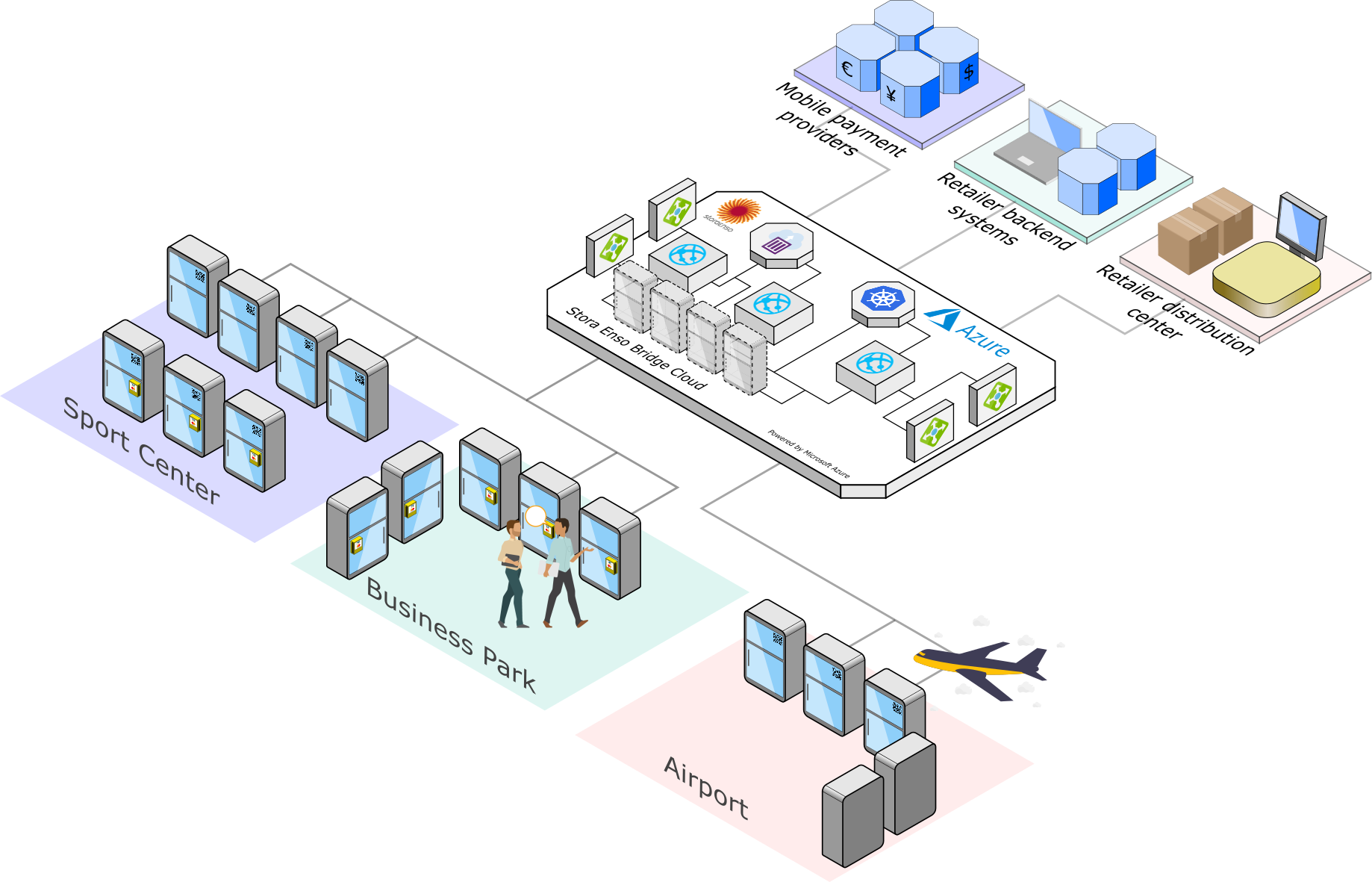
Every communication between Cabinet and the Third Party system is happening via the Cloud. There is no way to directly connect to the individual cabinet via the Internet.
Possible Communication Scenarios
- System needs to fetch the list of available cabinets and see if they are online or offline;
- System needs to fetch the current inventory of the cabinet;
- System needs to fetch the quality data of the tags that are inside the cabinet to analyse the content;
- System wants to fetch the list of transactions per cabinet;
- System wants to fetch the list of alerts per cabinet;
- System wants to fetch the daily sales statistics;
- etc.
See examples in the Examples section
Endpoints
The following endpoints are used to make an API queries:
| Endpoint | Purpose |
|---|---|
| https://passport.selflystore.com | The authentication access point, need to be used to get an access token before querying the API below. |
| https://api.selflystore.com | The main API endpoint for cabinet new-retail data, eg. transactions, cabinet inventory, etc. |
| https://core-api.selflystore.com | The main access point to fetch the data about device health, alerts and current state. |
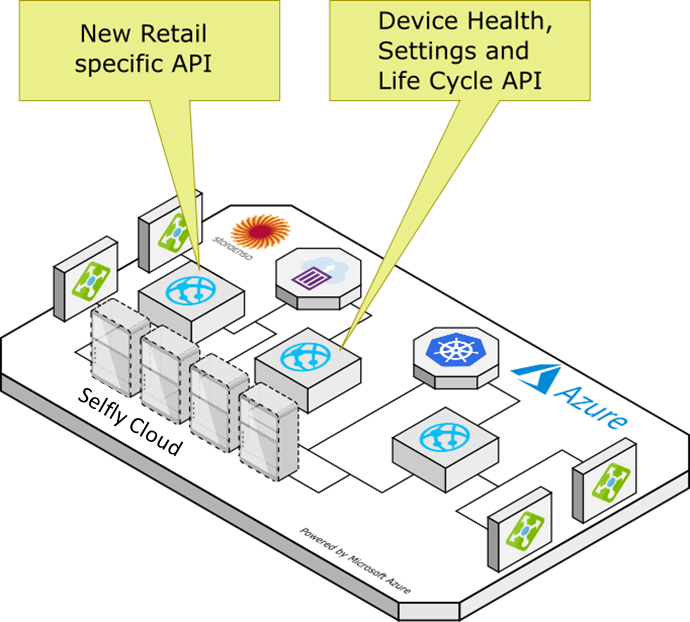
To explain more, there are two API engines deployed - new retail cabinet specific API and device health and life cycle generic API.
| URL | Purpose |
|---|---|
| https://api.selflystore.com | New Retail Specific API with real time notifications. Used for new retail devices only and encapsulates only the features related to the new retail projects. |
| https://core-api.selflystore.com | The generic device health and life cycle API. Used for all types of devices in Selfly Cloud platform. |
Basic User Flow - Mobile Payment
Before moving to API specification it is important to go through the most common user flow of purchase. Refill flow for cabinet operators is mostly the same, but will be described in the next section.
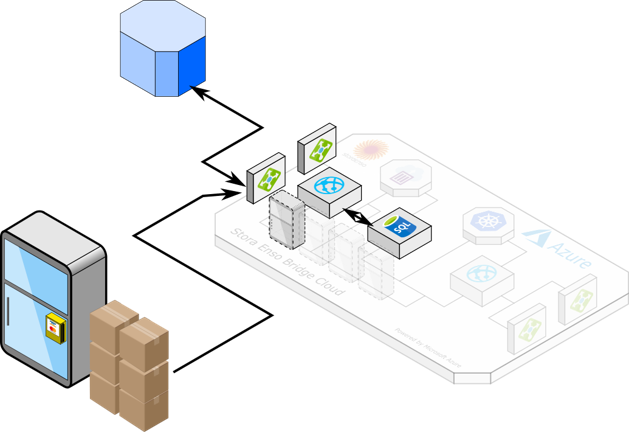
Image below shows the basic user purchase flow.
.png)
SE Backend on the picture is the Cloud service - also known as Selfly Cloud Backend.
To describe the sequence in human-language, it contains several steps:
- User authenticate him/herself in the payment mobile application (or via credit card reader);
- Once authenticated, the payment provider notifies Selfly Cloud Backend about it, so we know that user has signed in;
- Selfly Cloud Backend notifies the cabinet, the one, the user has just signed in to use to. Each cabinet has a unique identifier;
- Cabinet unlocks the door, if the door is not opened within 30 seconds, the door is locked again;
- User opens the door, takes the desired goods out;
- User closes the door;
- Cabinet makes an RFID inventory cycle - calculates the missing items;
- Cabinet sends the inventory changes report to Selfly Cloud Backend;
- Selfly Cloud Backend reports the purchase sum to the payment provider to perform the purchase transaction;
- Once done, Selfly Cloud saves the transaction content to the store, as well as transaction payment result from the payment provider backend.
Credit Card Payment Flow
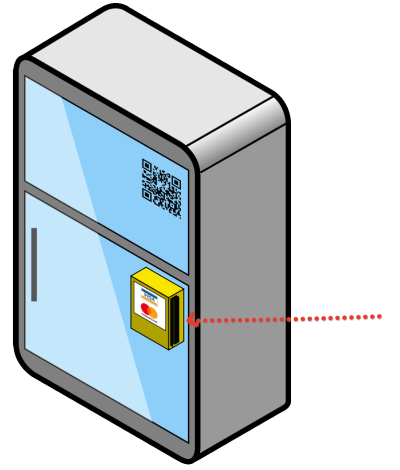
Slightly different flow is applied during the card payment. Credit card terminal must support the pre-authorization step.
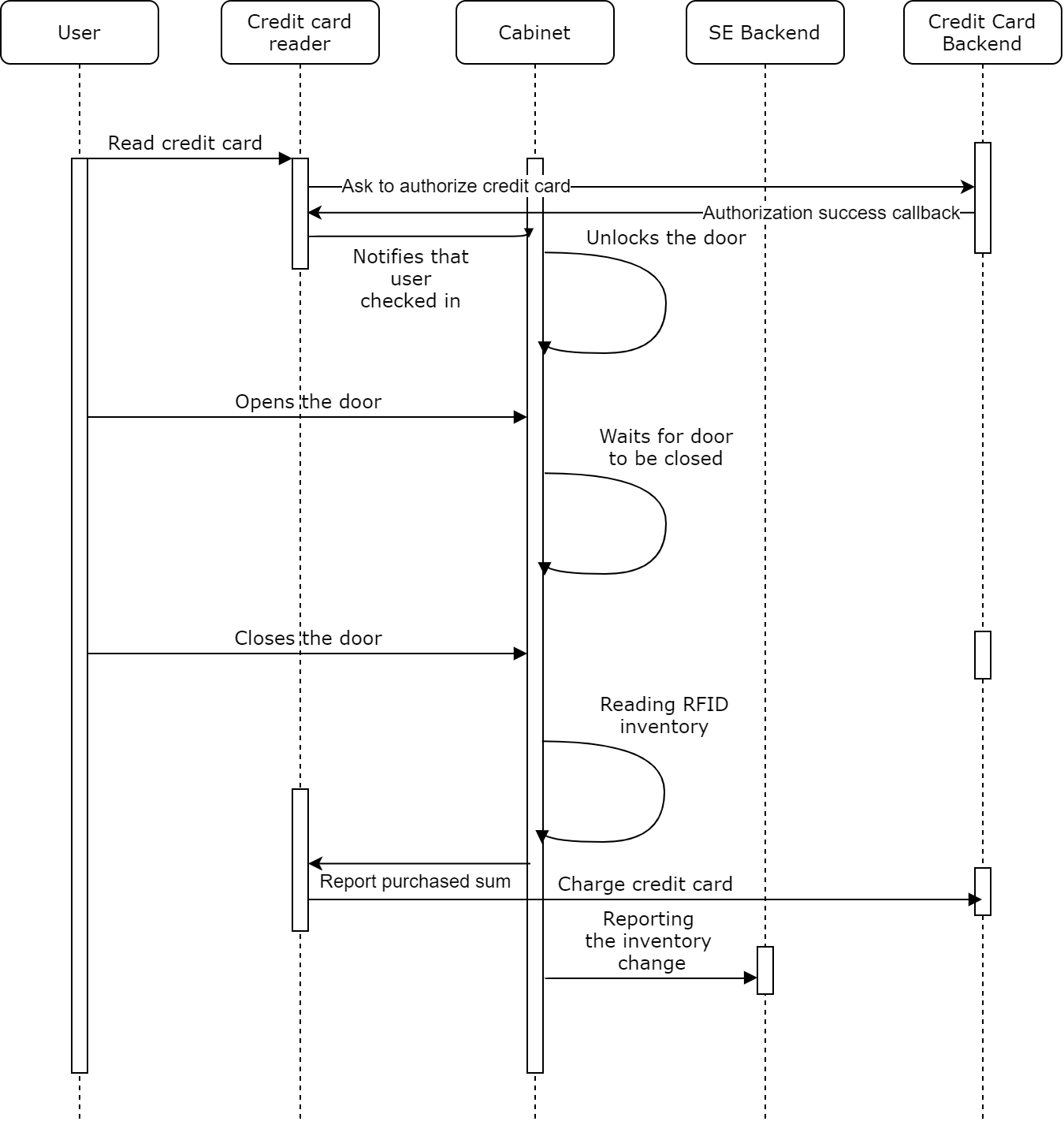
- User attaches the credit card to the card reader, either by chip reader or by NFC reader capability.
- Card terminal pre-authorizes the a fixed sum that is predefined on Selfly cloud portal
- After the preauthorisation is successful, the cabinet door is unlocked.
- User takes the goods he/she wants, then user closes the door.
- Cabinet calculates the total amount to be paid by checking the inventory difference between the inventory before the door opened and after it's closed.
- Cabinet sends the total sum to the card terminal to complete the transaction.
- If the total sum is equal or lower than the pre-authorised amount, payment is successfully completed.
- If purchase sum is greater than pre-authorised amount, cabinet asks the user to pay the remaining sum. If the user pays the remaining sum in time (timeout being 30 seconds for Nayax and 60 seconds for MyPos), then the payment is successful. If the user does not pay the remaining sum in time, then a transaction is created with a specific status called PARTIAL.
Note! Step 8 is not shown in the diagram for simplicity reasons.
Step 8 implementation depends on the Credit Card reader provider. For Nayax terminals, which allows only contactless payments, cabinet keeps asking for the remaining amount until the total amount is successfully paid. Every time users read the card, only the preauthorised amount is charged, whereas MyPos terminal allows users to enter their pin code so the remaining sum is withdrawn at once. For example, when the preauthorised amount is configured to 25€ and customers took the products that cost 80€, the Nayax terminal completes the payment in four steps (25€ + 25€ + 25€ + 5€). On the other hand, the Mypos terminal charges the remaining sum (55€ in this case) at the second try.
MySelfly
MySelfly is a service where consumers can see electronic receipts of their purchases and provide feedback to merchants. Feedback is given as satisfaction levels as well as wishes. E-receipts can be downloaded in PDF format.
MySelfly action flow:
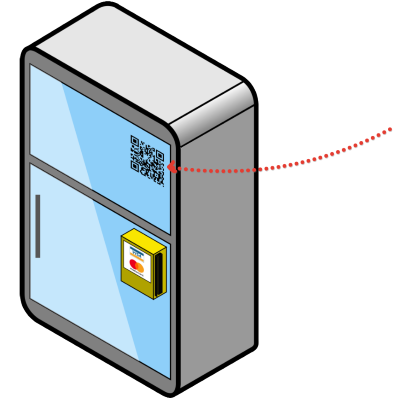
Consumer makes purchase -> (If settings are enabled properly) QR Code is shown on Cabinet screen -> Consumer scans the QR Code with a mobile phone -> Consumer arrives at MySelfly.
What consumer sees on MySelfly is based on the settings defined by merchants on Selfly Cloud Portal.
Possible scenarios:
-
If feedback and e-receipt are both enabled, consumer can give feedback, see and download e-receipt.
-
If feedback is disabled, and e-receipt is enabled, consumer can only see and download e-receipt.
-
If feedback is enabled, and e-receipt is disabled, consumer can only rate the purchasing experience and send wishes.
-
If feedback and e-receipt are both disabled, consumer doesn't get any QR code on screen to reach MySelfly.
Demo Videos
Tagging Products to Refill
Refilling Cabinets
Purchasing
Selfly Cloud Portal Overview
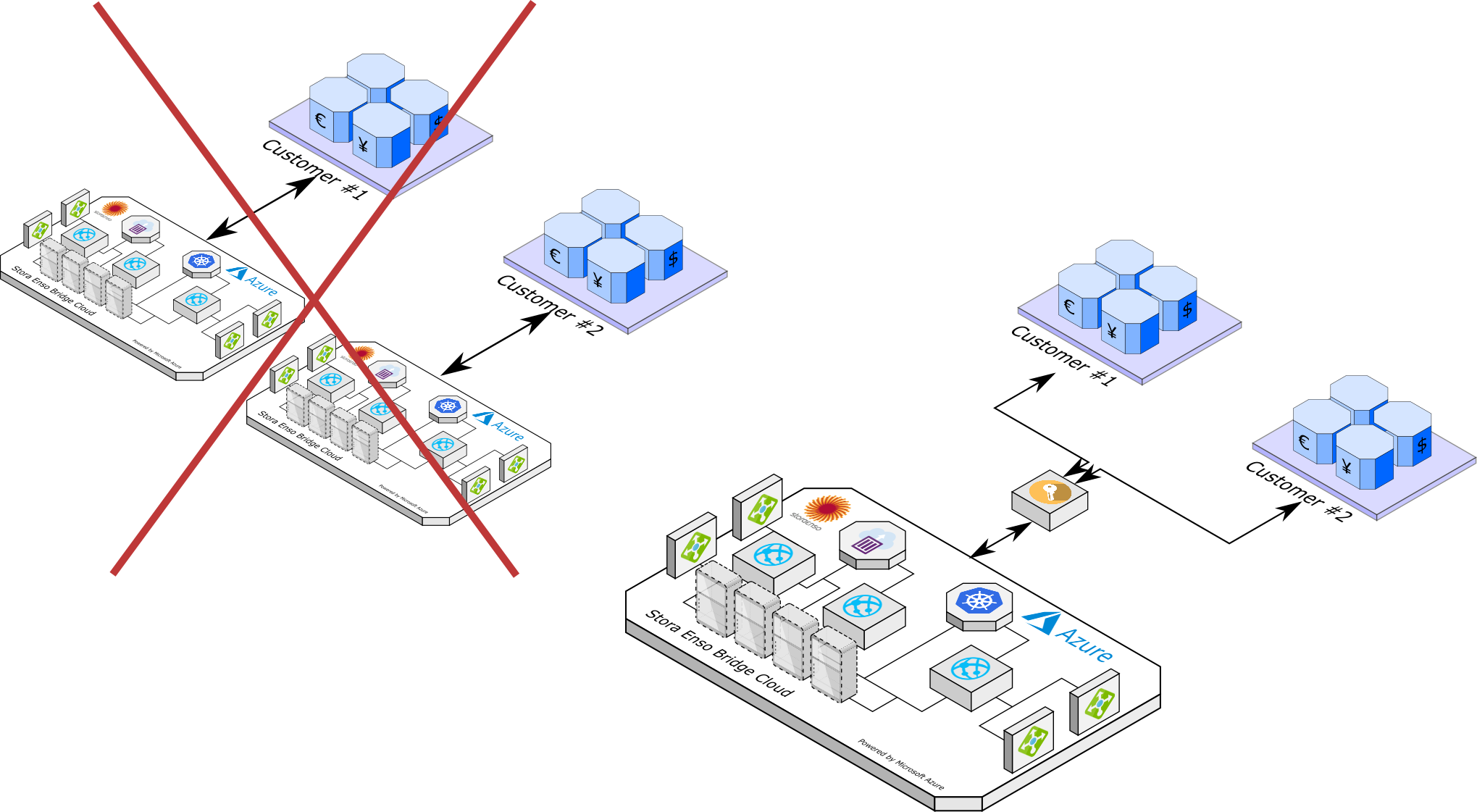
Is my company data stored in physically separate database?
The data layer is shared between all organizations which have access to Selfly Cloud. Reason for that is different parts of the data are stored in different ways. Files, SQL database, static Blobs, time-series databases, etc.
Hence the deployment is not replicated for each customer, but instead, the data storage layer is shared.
However, the data access is authorized only to the company scope, no other company can fetch other's data via API. We pay much of attention to the data security and we do not store business-essential data unprotected or non-encrypted.
Can I download my data from the cloud as a database?
We do not provide raw snapshot of the data as SQL database. Reports can be fetched via Analytics API as JSON objects for integration with third party systems.
See Analytics API chapter.
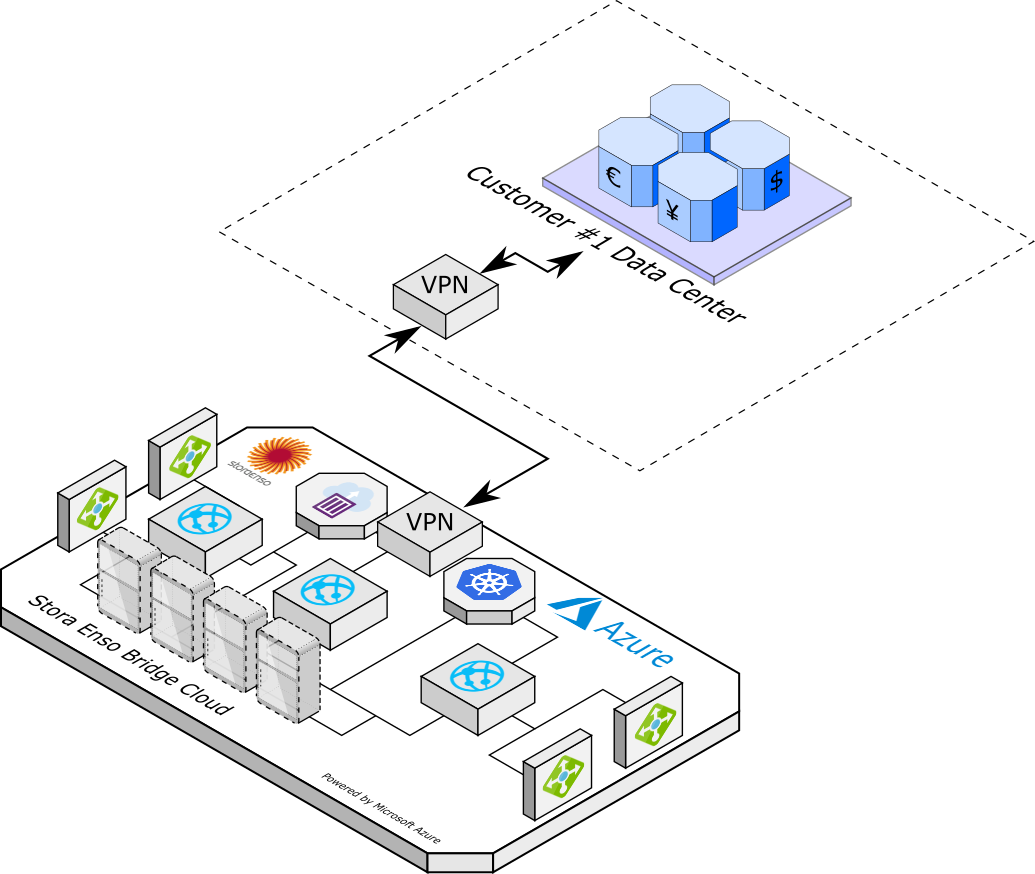
Can I use on-premise database instead of storing it in the Selfly Cloud
We do not support hybrid cloud approach by default, but can implement integration to on-premise data center on demand. All data is stored in the Microsoft Azure data-centers, geo-replicated in three places for disaster recovery. It is however possible to make a custom integration to pull necessary data periodically or event-based to the customer on-premise storage via VPN or other hybrid connections approach.
Each custom integration is a separate work that is implemented by our developers based on customer agreement and on demand.
How can you support if I have 1000 Intelligent Cabinets?
Each Intelligent Cabinet creates own resource in the cloud, so once provisioned, the computing resources are allocated, hence there is no bottleneck for individual cabinet-to-cloud data processing and guaranty that cabinet is having necessary response from the cloud.
API resources are scaled horizontally based on number of connected devices and based on customer geo-position.
Do I have similar response time from USA and Europe, or India?
We scale up our API horizontally on demand. If there is a need to deploy an API into new geographical region, we have tools to have it done. Also the traffic is then balanced via traffic manager that routes client to the nearest deployment.
Static content is always delivered from the CDN (content delivery network) and is copied all over the globe once created, this applies to advertisement images and videos and product photos.
How fast is the restoring time in case service goes down?
By default we always host minimum three (3) instances of the API just to make sure if one is down we still have another two to backup.
SLA is 99.5% for API. 99.95% for data storages.
In case all API instances go down they are restored within minutes. Intelligent Cabinets will display "Out of service" for that time.
How do you update software at the cabinets?
Each cabinet is keeping the connection with the software upgrade servers and is notified once new version of the software is ready. In order to update software the cabinet must be connected to the Internet.
Software is upgraded automatically "Over the Air" once we issue a new version. Usually upgrade takes about 5-10 minutes. But if update is small, it may take only 2-3 minutes to get cabinets back online.
Software upgrade mechanism supports pushing new software from 1 to 1 000 000 devices at the same time. If more than 1 000 000 devices are must be upgraded, they upgraded by 1 000 000 devices at a time.
Authentication Introduction
Each API call requires authentication. The call need to be authenticated ia the special bearer JWT token in the authorization header. Before making any API call the token need to be obtained.
Step 1. Obtain the access_token
Every user is granted with the user name and the password, this credentials are need to be stored in secret and are used to obtain the access token to make API calls. In order to fetch the access token user or system needs to make an HTTP POST request to the https://passport.selflystore.com/connect/token. See the example.
For instance:
- user name:
demo@example.com - password:
Pa$$w0rd!
Then user must compose the body as application/x-www-form-urlencoded. The body must contain the following fields:
| Field Name | Value | Explanation |
|---|---|---|
grant_type |
"password" |
Indicates that we use user name and password to get the access token |
username |
User name value, in this example "demo@example.com" |
User name value |
password |
User's password value, in this example Pa$$w0rd! |
Password value |
client_id |
"ipa.api.ro.client" |
The ID of the client to access the API, always use this value until further notice |
client_secret |
"xxxxx" |
Ask client_secret from the tech support |
scope |
"openid profile external_organizations offline_access" |
The list of APIs to get the access to. Always use this value until further notice |
Once executed, the result JSON object should contain the access token and other valuable information.
Example request
curl --location --request POST 'https://passport.selflystore.com/connect/token' \
--header 'Content-Type: application/x-www-form-urlencoded' \
--data-urlencode 'grant_type=password' \
--data-urlencode 'username=demo@example.com' \
--data-urlencode 'password=Pa$$w0rd!' \
--data-urlencode 'client_id=ipa.api.ro.client' \
--data-urlencode 'client_secret=xxxxx' \
--data-urlencode 'scope=openid profile external_organizations offline_access'
Step 2. Understand the access_token
The normal response (HTTP Status 200) is having the following fields:
| Field Name | Value | Explanation |
|---|---|---|
"id_token" |
The value of the JWT id token | This JWT token contains the user specific information. |
"access_token" |
The value of the JWT access token | Use this token in order to authenticate API call. Set the Authorization header with the value Bearer <access_token>. |
"expires_in" |
300 |
Time in seconds after what the token need to be refreshed. The token expires after this time, and each API call with this token will be invalid and the status code of 401 (Unauthorized) will be returned. See the next chapter on token refresh practices. |
"token_type" |
"Bearer" |
The type of the token to use in the Authorization header: Authorization: Bearer <access_token>. |
"refresh_token" |
The value of the refresh token | The special token that can be used to refresh the access_token value. See the information below on the access token refresh practices. |
"refresh_expires_in" |
604800 |
The time in seconds the refresh_token is valid for. |
"not-before-policy" |
0 |
The special policy to invalidate tokens. The tokens issued before this policy time become invalid. |
"session_state" |
The value of the session state | The unqiue identifier for the user session. |
"scope" |
The value of the scope | The granted scope list for the token. |
Example response
{
  "id_token": "eyJhbGciOiJSUzI1NiIsImtpZCI6IjVmNWQwZGU1NTEwM2RiOWNl...",
  "access_token": "eyJhbGciOiJSUzI1NiIsImtpZCI6IjVmNWQwZGU1NTEwM2RiOWNl...",
  "expires_in": 300,
  "token_type": "Bearer",
  "refresh_token": "4752c070bf6f0b34f5e52cf6e8a279842e98ab7fb008e79cebc649d42b3b...",
  "refresh_expires_in": 604800,
  "not-before-policy": 0,
  "session_state": "6b71f143-c90b-4ee0-82a8-0ff1e482b119",
  "scope": "openid email profile"
}
Step 3. Refresh the access_token
The granted access_token has limited lifetime (e.g. 5 minutes, 1 hour). To avoid interruptions in data delivery, it is recommended to refresh it before it expires.
There are two ways to obtain a new access token:
- Repeat the steps from "Step 1. Obtain the access_token". Use the user name and password again to request a new token.
- Using the granted
refresh_token. Therefresh_tokenprovided in the authentication response can be exchanged for a newaccess_tokenwithout re-entering credentials. This is the recommended approach.
Always make sure to check expires_in value in the authentication response to know when the current access_token will expire. Also, refresh the token shortly before it expires, not after.
Step 1 is an obvious candidate, as it can be called as many times as possible. However the recommendation is to refresh the token when 80-90% of the its lifetime has passed.
It is also not recommended to obtain new token before each API call as it can block the access to API due to too many unnecessary calls.
Good practice is to implement cache-aside pattern together with catch-retry pattern:
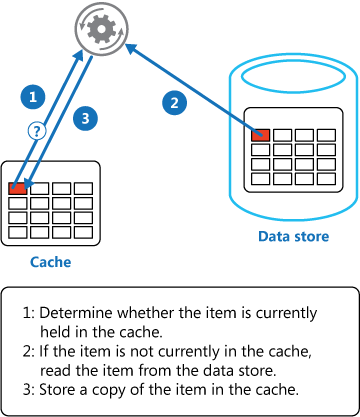
- Token is obtained and stored in the local memory cache with a reasonable TTL value;
- If API call is needed to be authenticated, the token is first checked from the cache;
- If in cache, use it, if not, fetch from the server and store in the cache;
- Authenticate the API call with the token;
Another good practice is catch-retry pattern, it is useful if for some reason the token is not yet expired but server returns status code of 401 (Unauthorized) if API is used with the token. It can happen in case of server sudden failure or some other interruptions.
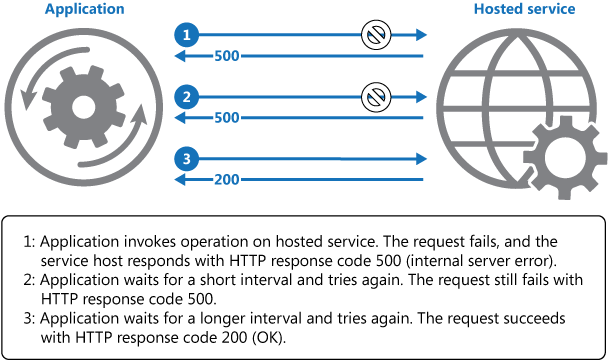
Applying this to the current case, the logic may be like this:
- System makes an HTTP API call with the valid token in the
Authorizationheader; - Server returns Status 401 (Unauthorized);
- System catches this and calls the API to refresh the access token;
- System stores new access token and retries the initial HTTP call;
- Remember to implement the finite number of retries, max 5, for example, after which the exception is thrown.
Step 3.2 Refresh token with refresh_token value. An alternative way.
More complex way is to refresh the token with the refresh_token value provided together with the access token response object. This refresh method need to be used when you don't want to ask for the user credentials or store the user name and password for token refresh purposes.
The POST request to refresh the token with the refresh_token is similar to do the same with the user name and password and it is described below.
Then user must compose the body as application/x-www-form-urlencoded. The body must contain the following fields:
| Field Name | Value | Explanation |
|---|---|---|
grant_type |
"refresh_token" |
Indicates that we use refresh token to fetch new access_token. |
refresh_token |
<refresh_token_value> |
Refresh token value form the initial access token response object. |
client_id |
"ipa.api.ro.client" |
The ID of the client to access the API, always use this value until further notice |
client_secret |
"xxxxx" |
Ask client_secret from the tech support |
scope |
"openid profile external_organizations offline_access" |
The list of APIs to get the access to. Always use this value until further notice |
The normal response (HTTP Status 200) is having the following fields:
| Field Name | Value | Explanation |
|---|---|---|
"id_token" |
The value of the JWT id token | This JWT token contains the user specific information. |
"access_token" |
The value of the JWT access token | Use this token in order to authenticate API call. Set the Authorization header with the value Bearer <access_token>. |
"expires_in" |
300 |
Time in seconds after what the token need to be refreshed. The token expires after this time, and each API call with this token will be invalid and the status code of 401 (Unauthorized) will be returned. See the next chapter on token refresh practices. |
"token_type" |
"Bearer" |
The type of the token to use in the Authorization header: Authorization: Bearer <access_token>. |
"refresh_token" |
The value of the refresh token | The special token that can be used to refresh the access_token value. |
"refresh_expires_in" |
604800 |
The time in seconds the refresh_token is valid for. |
"not-before-policy" |
0 |
The special policy to invalidate tokens. The tokens issued before this policy time become invalid. |
"session_state" |
The value of the session state | The unqiue identifier for the user session. |
"scope" |
The value of the scope | The granted scope list for the token. |
Notice! Once refresh_token is used, it becomes invalid and new value of the refresh_token need to be used. If you try to use invalid refresh_token the server will return the error Status: 400 (Bad Request).
Example request
curl --location --request POST 'https://passport.selflystore.com/connect/token' \
--header 'Content-Type: application/x-www-form-urlencoded' \
--data-urlencode 'grant_type=refresh_token' \
--data-urlencode 'client_id=ipa.api.ro.client' \
--data-urlencode 'client_secret=xxxxx' \
--data-urlencode 'scope=openid profile external_organizations offline_access' \
--data-urlencode 'refresh_token=2cdfdd4dd05356a5cfd5be0e1b228845b85fafcbd1c1aba972de4087d6f3ba20'
Example response
{
  "id_token": "eyJhbGciOiJSUzI1NiIsImtpZCI6IjVmNWQwZGU1NTEwM2RiOWNl...",
  "access_token": "eyJhbGciOiJSUzI1NiIsImtpZCI6IjVmNWQwZGU1NTEwM2RiOWNl...",
  "expires_in": 300,
  "token_type": "Bearer",
  "refresh_token": "4752c070bf6f0b34f5e52cf6e8a279842e98ab7fb008e79cebc649d42b3b...",
  "refresh_expires_in": 604800,
  "not-before-policy": 0,
  "session_state": "6b71f143-c90b-4ee0-82a8-0ff1e482b119",
  "scope": "openid email profile"
}
Usage of the access token

Assuming the valid token is fetched, each HTTP call to the API need to be authenticated with this access token.
The token need to be set to the Authorization header at the request headers.
As an example we will query the list of available cabinets. Notice the Authorization header value appended to the headers of the request.
| Header | Explanation |
|---|---|
Authorization |
Mandatory authorization header for each API call. Must be of a value Bearer <access_token>, where <access_token> is the actual value of the access token. |
Example request
curl --location --request GET 'https://api.selflystore.com/api/v1/cabinets?group=Selfly%20Store%20Demo' \
--header 'Authorization: Bearer eyJhbGciOiJSUzI1NiIsImtpZCI6IjVmNWQwZGU1NTEwM2RiOWNlY2Y4...'
Example response
[
  {
    "id": "00000001-94A8",
    "organizationId": "Selfly Store Demo",
    "deviceCode": "00000001-94A8",
    "name": "Demo Cabinet Helsinki",
    "deviceType": "smartCabinet",
    "lastSeenOnline": "2020-01-28T13:25:53.480Z",
    "lifeCycleStatus": "operational",
    "locationId": null
  }
]
How to Change Myselfly Settings
To change MySelfly's settings, operator can go to Selfly Cloud Portal, click settings button in the header and select MySelfly settings.

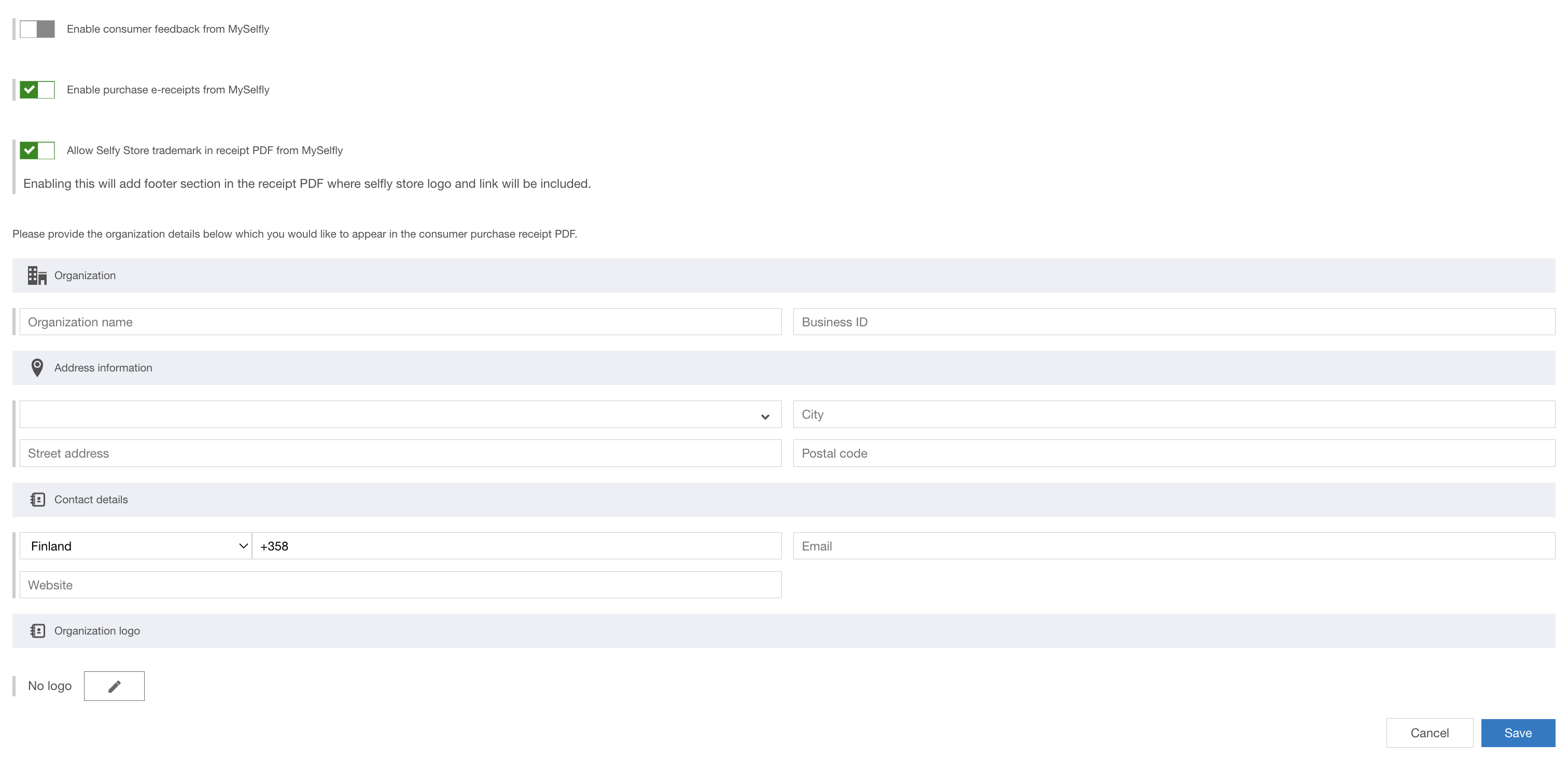
Here user can toggle settings for MySelfly
-
Enable feedback from MySelfly Avaibility of feedback after purchase
-
Enable purchase e-receipts from MySelfly Avaibility of e-receipt after purchase
-
Allow Selfy Store trademark in e-receipt PDF from MySelfly Visibility of Selfy Store footer at bottom of e-receipt. Disabled if e-receipt is not enabled.
How to Change Organization Settings
Operator can fill the form to update organization and e-receipt details:
-
Organization's name (Mandatory for e-receipt)
-
Business ID (Mandatory for e-receipt)
-
Country (Mandatory for e-receipt)
-
Street address (Mandatory for e-receipt)
-
Postal code
-
City
-
Contact person's phone number
-
Contact person's email address
-
Organization's website address
Operator can also upload organization's logo, which is included on the e-receipt PDF header.
Introduction
Cloud API allows user to fetch the data or set changes to the data. RESTful API requires HTTPS protocol, so the device that is calling the API must have GoDaddy root trust client certificate installed. All modern devices and browsers are having all necessary certificates preinstalled.
Each API call must me authorized via the access token, see the Authentication chapter for the information on how to fetch and update the access tokens.
Current User Profile
Each user who fetched the access token can request own user profile, to see the roles, groups and other essential information needed for the further API execution. The most essential part is to know the names or a name of the group user belongs to. group defines the scop of the data user can see and query from the API.
Normally each user belongs to one group that is equal to the organization name of the user. However, sometimes user may belong to multiple groups, in case if user is an administrator for multiple organizations or is the organization is split into sub-divisions and requires administrators and devices for separate divisions as separate context entities.
Query arguments
| Name | Type | Explanation |
|---|---|---|
username |
string | Required parameter for tax reporters. Originally developed for Italian collaborators. |
The normal response is having status code 200 with the following fields:
| Field | Type | Explanation |
|---|---|---|
email |
string | The current user email address. |
name |
string | The current user name, normalized upper case email address. |
roles |
string, an array of strings or null | The list of roles user belong to. Can be a single string value in case of a single role, an array, in case of multiple roles and null, in case of no roles are set to the user. |
firstName |
string | User's first name |
lastName |
string | User's last name |
middleName |
string | User's middle name |
fullName |
string | User's full name as a concatenation if the firstName + middleName + lastName |
gravatarImage |
URL | The URL for the user's avarat picture. It used the Gravatar resource to fetch the image by email, if no image is provided, it uses the random parent image generated by Gravatar to represent the user. |
groups |
string, an array of strings | Important field, the list of groups user belongs to. Can be an array of strings in case if user belongs to multiple groups, a string, if user belongs to one group. This field can't be null as user must belong to at least one group. |
You may need to store the list of groups, as most of the API calls require the argument ?group=<my group> in order to define the scope of the call.
Example request
curl --location --request GET 'https://core-api.selflystore.com/v3/me' \
--header 'Authorization: Bearer eyJhbGciOiJSUzI1NiIsImtpZCI6IjVmNWQwZGU1NTEwM2RiOWNlY2Y...'
Example response
{
  "email": "demo@example.com",
  "name": "DEMO@EXAMPLE.COM",
  "roles": ["Cabinet Operator", "DeviceManager"],
  "firstName": "John",
  "lastName": "Walker",
  "middleName": "Elioth",
  "fullName": "John Elioth Walker",
  "gravatarImage": "https://www.gravatar.com/avatar/3dd1dfd371e2bc41864fc965a39f8748?s=80&d=identicon",
  "groups": ["Selfly Store Oy", "Selfly Store Demo"]
}
VAT Categories
In order to include VAT information in products' data, VAT categories can be defined for each organization and then products can be associated with these VAT Categories. A VAT category object contains the following fields:
| Name | Type | Explanation |
|---|---|---|
id |
string | The Id of the VAT category. |
name |
string | The name of the VAT category. |
taxValue |
number | The percentage value of the VAT category. |
organization_id |
string | The organization which the VAT category belongs to. |
The CRUD API for VAT categories is described in the rest of this section.
Fetching VAT Categories
The end point to fetch all the VAT categories available for an organization. It returns an array of VAT category objects.
Query Arguments
| Name | Type | Explanation |
|---|---|---|
group |
string | Argument to specify what group to make query on behalf of. Group query param needs to be set when the user belongs to multiple groups. |
Response fields
| Name | Type | Explanation |
|---|---|---|
id |
string | The Id of the VAT category. |
name |
string | The name of the VAT category. |
taxValue |
number | The percentage value of the VAT category. |
organization_id |
string | The organization which the VAT category belongs to. |
Example request
curl --location --request GET 'https://api.selflystore.com/api/v1/vat?group=Selfly%20Store%20Demo' \
--header 'Authorization: Bearer eyJhbGciOiJSUzI1NiIsImtpZCI6IjVmNWQwZGU1NTEwM2RiOWNlY2Y4YTVmNjM1NTQ3...'
Example response
[
  {
    "id": "62c4b803-1aa9-43b0-8158-ac8cc4ecc84d",
    "name": "Finland Category 1",
    "taxValue": 24,
    "organization_Id": "Selfly Store Demo"
  },
  {
    "id": "91bdac4e-f1e5-46a7-a9ec-00468b29b5da",
    "name": "Finland Category 2",
    "taxValue": 14,
    "organization_Id": "Selfly Store Demo"
  }
]
Creating a VAT Category
The end point to create a new VAT category entry.
Query Arguments
| Name | Type | Explanation |
|---|---|---|
group |
string | Argument to specify what group to make query on behalf of. Group query param needs to be set when the user belongs to multiple groups. |
Body
| Name | Type | Explanation |
|---|---|---|
name |
string | The name of the VAT category to be created. |
taxValue |
number | The percentage value of the VAT category to be created. |
Response
Response fields are a complete VAT category object containing id and organization_id. In case of success, the status code of the query is 201 - Created.
| Name | Type | Explanation |
|---|---|---|
id |
string | The Id of the created VAT category. |
name |
string | The name of the created VAT category. |
taxValue |
number | The percentage value of the created VAT category. |
organization_id |
string | The organization which the VAT category belongs to. |
Example request
curl --location --request POST 'https://api.selflystore.com/api/v1/vat?group=Selfly%20Store%20Demo' \
--header 'Authorization: Bearer eyJhbGciOiJSUzI1NiIsImtpZCI6IjVmNWQwZGU1NTEwM2RiOWNlY2...' \
--header 'Content-Type: application/json' \
--data-raw '{
    "name": "Finland Category 1",
    "taxValue": 24,
    }'
Example body
{
  "name": "Finland Category 1",
  "taxValue": 24
}
Example response
{
  "id": "62c4b803-1aa9-43b0-8158-ac8cc4ecc84d",
  "name": "Finland Category 1",
  "taxValue": 24,
  "organization_Id": "Selfly Store Demo"
}
Updating a VAT Category
The end point to update a VAT category entry.
Path Arguments
| Name | Type | Explanation |
|---|---|---|
id |
string | The id of the VAT category to be updated |
Query Arguments
| Name | Type | Explanation |
|---|---|---|
group |
string | Argument to specify what group to make query on behalf of. Group query param needs to be set when the user belongs to multiple groups. |
Body
| Name | Type | Explanation |
|---|---|---|
name |
string | The name of the updated VAT category. |
taxValue |
number | The percentage value of the updated VAT category. |
Response
Response fields are a complete VAT category object including id and organization_id. In case of success, the status code of the query is 200 - Successful.
| Name | Type | Explanation |
|---|---|---|
id |
string | The Id of the associated VAT category. |
name |
string | The name of the associated VAT category. |
taxValue |
number | The percentage value of the associated VAT category. |
organization_id |
string | The organization which the VAT category belongs to. |
Example request
curl --location --request PUT 'https://api.selflystore.com/api/v1/vat/62c4b803-1aa9-43b0-8158-ac8cc4ecc84d?group=Selfly%20Store%20Demo' \
--header 'Authorization: Bearer eyJhbGciOiJSUzI1NiIsImtpZCI6IjVmNWQwZGU1NTEwM2RiOWNlY2...' \
--header 'Content-Type: application/json' \
--data-raw '{
    "name": "Finland Category 1",
    "taxValue": 24,
    }'
Example body
{
  "name": "Finland Category 1",
  "taxValue": 24
}
Example response
{
  "id": "62c4b803-1aa9-43b0-8158-ac8cc4ecc84d",
  "name": "Finland Category 1",
  "taxValue": 24,
  "organization_Id": "Selfly Store Demo"
}
Deleting a VAT Category
The end point to remove a VAT category entry. Note that if there is any products associated with the VAT category in request, the request to delete will be rejected by API.
Path Arguments
| Name | Type | Explanation |
|---|---|---|
id |
string | The id of the VAT category to be updated |
Query Arguments
| Name | Type | Explanation |
|---|---|---|
group |
string | Argument to specify what group to make query on behalf of. Group query param needs to be set when the user belongs to multiple groups. |
Response
Response field is the id of the deleted VAT category. In case of success, the status code of the query is 200 - Successful.
| Name | Type | Explanation |
|---|---|---|
id |
string | The Id of the deleted VAT category. |
Example request
curl --location --request DELETE 'https://api.selflystore.com/api/v1/vat/62c4b803-1aa9-43b0-8158-ac8cc4ecc84d?group=Selfly%20Store%20Demo' \
--header 'Authorization: Bearer eyJhbGciOiJSUzI1NiIsImtpZCI6IjVmNWQwZGU1NTEwM2RiOWNlY2...' \
--header 'Content-Type: application/json'
Example response
{
  "id": "62c4b803-1aa9-43b0-8158-ac8cc4ecc84d"
}
Fetch products
Based on authentication realm the API fetches the products either for the logged in user, by user’s tenant authorization, or for cabinet device based on device ID from the Device token.
The device ID is fetched from Authorization: Device xxxxx header for devices, or from groups property in Authorization: Bearer xxxx header for User tenants.
Query arguments
| Name | Type | Explanation |
|---|---|---|
group |
string | Argument to specify what group to make query on behalf of. Group query param needs to be set when belonging to multiple groups but it can be skipped if the user has only one group. |
Response fields
| Field Name | Value | Explanation |
|---|---|---|
id |
string | The unique ID of the product |
name |
string | The name of the product |
barcodeType |
string | The type of the barcode. |
barcode |
string | The barcode that is printed on the package of the product, or the custom made barcode. This value is encoded to the RFID tag. |
imageUrl |
string | The URL to the image of the product |
productType |
string | The product type tagging instruction, also known as the product package type. Plastic, metal, fresh food, etc. This defies the way how to apply the RFID tag as well as what tag to use. |
isPrebooked |
boolean | If the product can be pre-ordered. The pre-booked products do not appear in the cabinet interface. |
isFrozen |
boolean | Flag to determine if product is frozen product . |
status |
number | The new status of the product. Can be `1` as `Draft` as the product is created but is not in use, `2` as `Active` as it can be used by users,`3` as `Retired` as it is kept in the system, but cannot be used. |
prices |
List of objects | Defines the list of all available prices for the product for every location. id - the unique ID of the product price, price - the price value for the product. currency - the currency of the product price. locationId - location id that price is applied to. |
metadata |
object | The additional data about the product, that is not following standard schema. Normally an empty object. |
owners |
List of strings | The list of companies who can have an access to this product. |
price |
float | The default price of the product. |
currency |
string | The default currency of the product for what it is sold. |
supplierId |
string | The Id of the supplier object. |
supplier |
object | The supplier object, containing the id, name, description, organization_id, payloadJson and status. |
vatCategory |
object | The vatCategory object which contains the id, name, taxValue of the associated vatCategory. |
productCategoryId |
string | The Id of the product category |
productCategory |
object | The productCategory object. |
vatCategory object
| Name | Type | Explanation |
|---|---|---|
id |
string | The Id of the associated vat category. |
name |
string | The name of the associated vat category. |
taxValue |
number | the percentage value of the associated vat category. |
supplier object
| Name | Type | Explanation |
|---|---|---|
id |
string | The Id of the associated supplier. |
name |
string | The name of the associated supplier. |
description |
string | Optional detail description of the supplier. |
organization_id |
string | The organization to which the supplier belongs. |
payloadJson |
object | Payload metadata about the supplier. |
status |
int | Status of the supplier. |
productCategory object
| Name | Type | Explanation |
|---|---|---|
id |
string | The Id of the associated product category. |
name |
string | The name of the associated product category. |
description |
string | Optional detail description of the product category. |
organization_id |
string | The organization to which the product category belongs. |
status |
int | Status of the product category. |
Example request
curl --location --request GET 'https://api.selflystore.com/api/v1/products?group=Selfly%20Store%20Demo' \
--header 'Authorization: Bearer eyJhbGciOiJSUzI1NiIsImtpZCI6IjVmNWQwZGU1NTEwM2RiOWNlY2Y4YTVmNjM1NTQ3...'
Example response
[
  {
    "id": "0009800300235",
    "name": "Tic Tac Gum Watermelon",
    "imageUrl": "https://cdn.selflystore.com/cabinet-products-qa/Selfly%20Store%20Demo/032fa760-5c29-11e9-8074-99cf45ec5f3d.jpeg",
    "productType": "G11-MetallizedLiquidCartonPackage",
    "status": 2,
    "isPrebooked": false,
    "isFrozen": false,
    "prices": [
      {
        "id": "46f2f206-e0ee-4aa9-a5b8-f3c00c5205e8",
        "price": 1.9,
        "currency": "€",
        "locationId": "Airport"
      },
      {
        "id": "4b6bf0ca-beb3-4244-be04-2dcd961df3c5",
        "price": 1.5,
        "currency": "€",
        "locationId": null
      }
    ],
    "metadata": {},
    "owners": ["Selfly Store Demo"],
    "barcodeType": "EAN-13",
    "barcode": "10009800300235",
    "price": 1.5,
    "supplier": {
      "id": "143ea037-7067-4d64-876c-cb7af663d216",
      "name": "Japan suchi supplier",
      "description": "Yokohama city bento",
      "organization_Id": "Selfly Store",
      "payloadJson": null,
      "status": 1
    },
    "supplierId": "143ea037-7067-4d64-876c-cb7af663d216",
    "currency": "€",
    "vatCategory": {
      "id": "4e1b8e9a-f060-4a5e-88ca-5957e0d63a77",
      "name": "Finland Category 1",
      "taxValue": 24
    },
    "productCategoryId": "123456789",
    "productCategory": {
      "id": "123456789",
      "name": "Desserts",
      "status": 1,
      "description": "Dessert product category"
    }
  }
]
Create new product
Creates new product based on the given barcode.
For each organization, Barcode needs to be a database unique value. If a product with this barcode already exists, a BadRequest error (400) is returned. The body of the request message is also validated to match the following description. If the data is not valid, a BadRequest error (400) is returned containing the explanation of the error.
The price is set as default price for the product in the pricing with lcoationId as null.
Query arguments
| Name | Type | Explanation |
|---|---|---|
group |
string | Argument to specify what group to make query on behalf of. Group query param needs to be set when belonging to multiple groups. |
Body
| Name | Type | Explanation |
|---|---|---|
barcodeType |
string | The type of the barcode. |
barcode |
string | The barcode that is printed on the package of the product, or the custom made barcode. This value is encoded to the RFID tag. |
name |
string | The name of the product |
description |
string | The description of the product |
price |
float | The default price for the product |
isPrebooked |
boolean | If the product can be prebooked |
isFrozen |
boolean | If the product is frozen product |
currency |
string | The currency the product is sold at |
imageUrl |
string | The URL for the image that shows image photo or picture |
locationPricings |
array | The list of objects representing the price for each location, if applicable. |
supplierId |
string | The Id of the supplier associated with the product. |
vatCategoryId |
string | The Id of the associated VAT category. |
productCategoryId |
string | The Id of the associated product category. |
metadata |
object | The metadata of the product. |
Response
Response fields are the same as input fields in the body. In case of success, the status code of the query is 201 - Created.
| Name | Type | Explanation |
|---|---|---|
barcodeType |
string | The type of the barcode. |
barcode |
string | The barcode that is printed on the package of the product, or the custom made barcode. This value is encoded to the RFID tag. |
name |
string | The name of the product |
description |
string | The description of the product |
price |
float | The default price for the product |
isPrebooked |
boolean | If the product can be pre-booked |
isFrozen |
boolean | If the product is frozen product |
status |
number | The new status of the product. Can be `1` as `Draft` as the product is created but is not in use, `2` as `Active` as it can be used by users,`3` as `Retired` as it is kept in the system, but cannot be used. |
currency |
string | The currency the product is sold at |
imageUrl |
string | The URL for the image that shows image photo or picture |
prices |
array | The list of objects representing the price for each location, if applicable. |
supplierId |
string | The Id of the supplier associated with the product. |
supplier |
object | The supplier object, containing the id, name, description, organization_id, payloadJson and status. |
productCategoryId |
string | The Id of the product category associated with the product. |
productCategory |
object | The product category object. |
vatCategory |
object | The vatCategory object which contains the id, name, taxValue of the associated vatCategory. |
metadata |
object | The metadata of the product. |
vatCategory object
| Name | Type | Explanation |
|---|---|---|
id |
string | The Id of the associated vat category. |
name |
string | The name of the associated vat category. |
taxValue |
number | the percentage value of the associated vat category. |
supplier object
| Name | Type | Explanation |
|---|---|---|
id |
string | The Id of the associated supplier. |
name |
string | The name of the associated supplier. |
description |
string | Optional detail description of the supplier. |
organization_id |
string | The organization to which the supplier belongs. |
payloadJson |
object | Payload metadata about the supplier. |
status |
int | Status of the supplier. |
productCategory object
| Name | Type | Explanation |
|---|---|---|
id |
string | The Id of the associated product category. |
name |
string | The name of the associated product category. |
description |
string | Optional detail description of the product category. |
organization_id |
string | The organization to which the product category belongs. |
status |
int | Status of the product category. |
Example request
curl --location --request POST 'https://api.selflystore.com/api/v1/products?group=Selfly%20Store%20Demo' \
--header 'Authorization: Bearer eyJhbGciOiJSUzI1NiIsImtpZCI6IjVmNWQwZGU1NTEwM2RiOWNlY2...' \
--header 'Content-Type: application/json' \
--data-raw '{
  "barcodeType": "EAN-13",
  "barcode": "6800000005545",
  "name": "Chocolate Bar",
  "description": "Milk chocolate bar 250g.",
  "price": 3.25,
  "currency": "€",
  "isPrebooked":false,
  "imageUrl": "https://cdn.com/image1.jpeg",
  "locationPricings": [
    {
      "locationId": "Test",
      "price": 1,
      "currency": "€"
    }
  ],
  "supplierId": 143ea037-7067-4d64-876c-cb7af663d216 ,
  "vatCategoryId": "4e1b8e9a-f060-4a5e-88ca-5957e0d63a77",
  "productCategoryId": "123456789",
  "metadata":{},
}'
Example body
{
  "barcodeType": "EAN-13",
  "barcode": "6800000005545",
  "name": "Chocolate Bar",
  "description": "Milk chocolate bar 250g.",
  "price": 3.25,
  "isPrebooked": false,
  "isFrozen": false,
  "currency": "€",
  "imageUrl": "https://cdn.com/image1.jpeg",
  "locationPricings": [
    {
      "locationId": "Test",
      "price": 1,
      "currency": "€"
    }
  ],
  "supplierId": "143ea037-7067-4d64-876c-cb7af663d216",
  "vatCategoryId": "4e1b8e9a-f060-4a5e-88ca-5957e0d63a77",
  "productCategoryId": "123456789",
  "metadata": {}
}
Example response
[
  {
    "barcodeType": "EAN-13",
    "barcode": "6800000005545",
    "name": "Chocolate Bar",
    "description": "Milk chocolate bar 250g.",
    "price": 3.25,
    "isPrebooked": false,
    "isFrozen": false,
    "currency": "€",
    "imageUrl": "https://cdn.com/image1.jpeg",
    "status": 2,
    "prices": [
      {
        "locationId": "Test",
        "price": 1,
        "currency": "€"
      }
    ],
    "supplierId": "143ea037-7067-4d64-876c-cb7af663d216",
    "supplier": {
      "id": "143ea037-7067-4d64-876c-cb7af663d216",
      "name": "Japan sushi supplier",
      "description": "Yokohama city bento",
      "organization_Id": "Selfly Store Demo",
      "payloadJson": null,
      "status": 1
    },
    "vatCategory": {
      "id": "4e1b8e9a-f060-4a5e-88ca-5957e0d63a77",
      "name": "Finland Category 1",
      "taxValue": 24
    },
    "productCategoryId": "123456789",
    "productCategory": {
      "id": "123456789",
      "name": "Desserts",
      "status": 1,
      "description": "Dessert product category"
    },
    "metadata": {}
  }
]
Update product
Updates the product with the given barcode. Also updates it's default price. Expects to receive the full object about the product and updates each field of it.
Path arguments
| Name | Type | Explanation |
|---|---|---|
id |
string | Barcode of the product. Note! This is not the ID, this is barcode value. If multiple groups of your organization are having products with the same barcode, specify also the group query argument. |
Query arguments
| Name | Type | Explanation |
|---|---|---|
group |
string | Argument to specify what group to make query on behalf of. Group query param needs to be set when the user belongs to multiple groups. |
Body
| Name | Type | Explanation |
|---|---|---|
name |
string | The name of the product |
barcodeType |
string | The barcode type of the product |
barcode |
number | The barcode of the product |
description |
string | The description of the product |
price |
float | The default price for the product |
isPrebooked |
boolean | If the product can be prebooked |
isFrozen |
boolean | If the product is frozen |
status |
number | The new status of the product. Can be `1` as `Draft` as the product is created but is not in use, `2` as `Active` as it can be used by users,`3` as `Retired` as it is kept in the system, but cannot be used. If not provided, the default value will be Active. |
currency |
string | The currency the product is sold at |
imageUrl |
string | The URL for the image that shows image photo or picture |
locationPricings |
array | The list of objects representing the price for each location, if applicable. |
supplierId |
string | The Id of the supplier associated with the product. |
vatCategoryId |
string | The Id of the associated VAT category. |
productCategoryId |
string | The Id of the associated product category. |
metadata |
object | The metadata of the product. |
Response
Response is having the code 200 (Success), and the body of the response is the same object, that was provided with request.
| Name | Type | Explanation |
|---|---|---|
name |
string | The name of the product |
barcodeType |
string | The barcode type of the product |
barcode |
number | The new barcode of the product |
description |
string | The description of the product |
price |
float | The default price for the product |
isPrebooked |
boolean | If the product can be prebooked |
isFrozen |
boolean | If the product is frozen |
status |
number | The new status of the product. Can be `1` as `Draft` as the product is created but is not in use, `2` as `Active` as it can be used by users,`3` as `Retired` as it is kept in the system, but cannot be used. |
currency |
string | The currency the product is sold at |
imageUrl |
string | The URL for the image that shows image photo or picture |
prices |
array | The list of objects representing the price for each location, if applicable. |
supplierId |
string | The Id of the supplier associated with the product. |
supplier |
object | The supplier object, containing the id, name, description, organization_id, payloadJson and status. |
vatCategory |
object | The vatCategory object which contains the id, name, taxValue of the associated vatCategory. |
productCategoryId |
string | The Id of the product category associated with the product. |
productCategory |
object | The product category object. |
metadata |
object | The metadata of the product. |
vatCategory object
| Name | Type | Explanation |
|---|---|---|
id |
string | The Id of the associated vat category. |
name |
string | The name of the associated vat category. |
taxValue |
number | the percentage value of the associated vat category. |
supplier object
| Name | Type | Explanation |
|---|---|---|
id |
string | The Id of the associated supplier. |
name |
string | The name of the associated supplier. |
description |
string | Optional detail description of the supplier. |
organization_id |
string | The organization to which the supplier belongs. |
payloadJson |
object | Payload metadata about the supplier. |
status |
int | Status of the supplier. |
productCategory object
| Name | Type | Explanation |
|---|---|---|
id |
string | The Id of the associated product category. |
name |
string | The name of the associated product category. |
description |
string | Optional detail description of the product category. |
organization_id |
string | The organization to which the product category belongs. |
status |
int | Status of the product category. |
Example request
curl --location --request PUT 'https://api.selflystore.com/api/v1/products/6800000005545?group=Selfly%20Store%20Demo' \
--header 'Authorization: Bearer eyJhbGciOiJSUzI1NiIsImtpZCI6IjVmNWQwZGU1NTEwM2RiOWNlY2Y4YT...' \
--header 'Content-Type: application/json' \
--data-raw '{
  "name": "Chocolate Bar",
  "barcodeType": "EAN-13",
  "barcode": 6843513843511,
  "description": "Milk chocolate bar 250g.",
  "price": 3.25,
  "isPrebooked":false,
  "isFrozen": false,
  "status": 2,
  "currency": "€",
  "imageUrl": "https://cdn.com/image1.jpeg",
  "locationPricings": [
    {
      "locationId": "Test",
      "price": 1,
      "currency": "€"
    }
  ],
  "supplierId": "143ea037-7067-4d64-876c-cb7af663d216",
  "vatCategoryId": "4e1b8e9a-f060-4a5e-88ca-5957e0d63a77",
  "productCategoryId": "123456789",
  "metadata": {},
}'
Example body
{
  "name": "Chocolate Bar",
  "barcodeType": "EAN-13",
  "barcode": 6843513843511,
  "description": "Milk chocolate bar 250g.",
  "price": 3.25,
  "isPrebooked": false,
  "isFrozen": false,
  "status": 2,
  "currency": "€",
  "imageUrl": "https://cdn.com/image1.jpeg",
  "locationPricings": [
    {
      "locationId": "Test",
      "price": 1,
      "currency": "€"
    }
  ],
  "supplierId": "143ea037-7067-4d64-876c-cb7af663d216",
  "vatCategoryId": "4e1b8e9a-f060-4a5e-88ca-5957e0d63a77",
  "productCategoryId": "123456789",
  "metadata": {}
}
Example response
[
  {
    "name": "Chocolate Bar",
    "barcodeType": "EAN-13",
    "barcode": 6843513843511,
    "description": "Milk chocolate bar 250g.",
    "price": 3.25,
    "isPrebooked": false,
    "isFrozen": false,
    "currency": "€",
    "imageUrl": "https://cdn.com/image1.jpeg",
    "status": 2,
    "prices": [
      {
        "locationId": "Test",
        "price": 1,
        "currency": "€"
      }
    ],
    "supplierId": "143ea037-7067-4d64-876c-cb7af663d216",
    "supplier": {
      "id": "143ea037-7067-4d64-876c-cb7af663d216",
      "name": "Japan sushi supplier",
      "description": "Yokohama city bento",
      "organization_Id": "Selfly Store Demo",
      "payloadJson": null,
      "status": 1
    },
    "vatCategory": {
      "id": "4e1b8e9a-f060-4a5e-88ca-5957e0d63a77",
      "name": "Finland Category 1",
      "taxValue": 24
    },
    "productCategoryId": "123456789",
    "productCategory": {
      "id": "123456789",
      "name": "Desserts",
      "status": 1,
      "description": "Dessert product category"
    },
    "metadata": {}
  }
]
Patch product
Updates the status and metadata of a product with the given barcode. Status is a required field in the body of the request which indicates life cycle of the product as it is Active or Retired.
Path arguments
| Name | Type | Explanation |
|---|---|---|
id |
string | Barcode of the product. Note! This is not the ID, this is barcode value. If multiple groups of your organization are having products with the same barcode, specify also the group query argument. |
Query arguments
| Name | Type | Explanation |
|---|---|---|
group |
string | Argument to specify what group to make query on behalf of. Group query param needs to be set when the user belongs to multiple groups. |
Body
| Name | Type | Explanation |
|---|---|---|
status |
number | The new status of the product. Can be `1` as `Draft` which mean the product is created but is not in use, `2` as `Active` which means it can be used by users,`3` as `Retired` which means it is kept in the system, but cannot be used. Required. |
metadata |
object | The metadata of the product. Optional. |
Response
Response is having the code 200 (Success), and the body of the response is the complete product object that was patched with request.
| Name | Type | Explanation |
|---|---|---|
name |
string | The name of the product |
barcodeType |
string | The barcode type of the product |
barcode |
number | The new barcode of the product |
description |
string | The description of the product |
price |
float | The default price for the product |
isPrebooked |
boolean | If the product can be pre-booked |
isFrozen |
boolean | If the product is frozen |
status |
number | The new status of the product. Can be `1` as `Draft` as the product is created but is not in use, `2` as `Active` as it can be used by users,`3` as `Retired` as it is kept in the system, but cannot be used. |
currency |
string | The currency the product is sold at |
imageUrl |
string | The URL for the image that shows image photo or picture |
prices |
array | The list of objects representing the price for each location, if applicable. |
supplierId |
string | The Id of the supplier associated with the product. |
supplier |
object | The supplier object, containing the id, name, description, organization_id, payloadJson and status. |
vatCategory |
object | The vatCategory object which contains the id, name, taxValue of the associated vatCategory. |
productCategoryId |
string | The Id of the product category associated with the product. |
productCategory |
object | The product category object. |
metadata |
object | The metadata of the product. |
vatCategory object
| Name | Type | Explanation |
|---|---|---|
id |
string | The Id of the associated vat category. |
name |
string | The name of the associated vat category. |
taxValue |
number | the percentage value of the associated vat category. |
supplier object
| Name | Type | Explanation |
|---|---|---|
id |
string | The Id of the associated supplier. |
name |
string | The name of the associated supplier. |
description |
string | Optional detail description of the supplier. |
organization_id |
string | The organization to which the supplier belongs. |
payloadJson |
object | Payload metadata about the supplier. |
status |
int | Status of the supplier. |
productCategory object
| Name | Type | Explanation |
|---|---|---|
id |
string | The Id of the associated product category. |
name |
string | The name of the associated product category. |
description |
string | Optional detail description of the product category. |
organization_id |
string | The organization to which the product category belongs. |
status |
int | Status of the product category. |
Example request
curl --location --request PATCH 'https://api.selflystore.com/api/v1/products/6800000005545?group=Selfly%20Store%20Demo' \
--header 'Authorization: Bearer eyJhbGciOiJSUzI1NiIsImtpZCI6IjVmNWQwZGU1NTEwM2RiOWNlY2Y4YT...' \
--header 'Content-Type: application/json' \
--data-raw '{
  "status": 3,
  "metadata": {},
}'
Example body
{
  "status": 3,
  "metadata": {}
}
Example response
[
  {
    "name": "Chocolate Bar",
    "barcodeType": "EAN-13",
    "barcode": 6843513843511,
    "description": "Milk chocolate bar 250g.",
    "price": 3.25,
    "isPrebooked": false,
    "isFrozen": false,
    "status": 2,
    "currency": "€",
    "imageUrl": "https://cdn.com/image1.jpeg",
    "prices": [
      {
        "locationId": "Test",
        "price": 1,
        "currency": "€"
      }
    ],
    "supplierId": "143ea037-7067-4d64-876c-cb7af663d216",
    "supplier": {
      "id": "143ea037-7067-4d64-876c-cb7af663d216",
      "name": "Japan sushi supplier",
      "description": "Yokohama city bento",
      "organization_Id": "Selfly Store Demo",
      "payloadJson": null,
      "status": 1
    },
    "vatCategory": {
      "id": "4e1b8e9a-f060-4a5e-88ca-5957e0d63a77",
      "name": "Finland Category 1",
      "taxValue": 24
    },
    "productCategoryId": "123456789",
    "productCategory": {
      "id": "123456789",
      "name": "Desserts",
      "status": 1,
      "description": "Dessert product category"
    },
    "metadata": {}
  }
]
Delete product
Deleting a product is a PATCH request since we don't delete a product permanently from a database. It only updates the status of a product with the given barcode indicating the life cycle of the product to Deleted.
Only the products with status 3 i.e Retired and 1 i.e Draftcan be deleted. An attemto to delete an active product with status 2 throws as error.
Path arguments
| Name | Type | Explanation |
|---|---|---|
id |
string | Barcode of the product. Note! This is not the ID, this is barcode value. If multiple groups of your organization are having products with the same barcode, specify also the group query argument. |
Query arguments
| Name | Type | Explanation |
|---|---|---|
group |
string | Argument to specify what group to make query on behalf of. Group query param needs to be set when the user belongs to multiple groups. |
Body
| Name | Type | Explanation |
|---|---|---|
status |
number | The new status of the product should be `4` indicating the prodcut life cycle `Deleted`. Required. |
metadata |
object | The metadata of the product. Optional. |
Response
Response is having the code 200 (Success), and the body of the response is the complete product object that was deleted with request.
| Name | Type | Explanation |
|---|---|---|
name |
string | The name of the product |
barcodeType |
string | The barcode type of the product |
barcode |
number | The barcode of the product |
description |
string | The description of the product |
price |
float | The default price for the product |
isPrebooked |
boolean | If the product can be prebooked |
isFrozen |
boolean | If the product is frozen |
status |
number | The new status of the product should be `4` indicating the prodcut life cycle `Deleted`. |
currency |
string | The currency the product is sold at |
imageUrl |
string | The URL for the image that shows image photo or picture |
prices |
array | The list of objects representing the price for each location, if applicable. |
supplierId |
string | The Id of the supplier associated with the product. |
supplier |
object | The supplier object, containing the id, name, description, organization_id, payloadJson and status. |
vatCategory |
object | The vatCategory object which contains the id, name, taxValue of the associated vatCategory. |
productCategoryId |
string | The Id of the product category associated with the product. |
productCategory |
object | The product category object. |
metadata |
object | The metadata of the product. |
vatCategory object
| Name | Type | Explanation |
|---|---|---|
id |
string | The Id of the associated vat category. |
name |
string | The name of the associated vat category. |
taxValue |
number | the percentage value of the associated vat category. |
supplier object
| Name | Type | Explanation |
|---|---|---|
id |
string | The Id of the associated supplier. |
name |
string | The name of the associated supplier. |
description |
string | Optional detail description of the supplier. |
organization_id |
string | The organization to which the supplier belongs. |
payloadJson |
object | Payload metadata about the supplier. |
status |
int | Status of the supplier. |
productCategory object
| Name | Type | Explanation |
|---|---|---|
id |
string | The Id of the associated product category. |
name |
string | The name of the associated product category. |
description |
string | Optional detail description of the product category. |
organization_id |
string | The organization to which the product category belongs. |
status |
int | Status of the product category. |
Example request
curl --location --request PATCH 'https://api.selflystore.com/api/v1/products/6800000005545?group=Selfly%20Store%20Demo' \
--header 'Authorization: Bearer eyJhbGciOiJSUzI1NiIsImtpZCI6IjVmNWQwZGU1NTEwM2RiOWNlY2Y4YT...' \
--header 'Content-Type: application/json' \
--data-raw '{
  "status": 4,
  "metadata": {},
}'
Example body
{
  "status": 4,
  "metadata": {}
}
Example response
[
  {
    "name": "Chocolate Bar",
    "barcodeType": "EAN-13",
    "barcode": 6843513843511,
    "description": "Milk chocolate bar 250g.",
    "price": 3.25,
    "isPrebooked": false,
    "isFrozen": false,
    "status": 4,
    "currency": "€",
    "imageUrl": "https://cdn.com/image1.jpeg",
    "prices": [
      {
        "locationId": "Test",
        "price": 1,
        "currency": "€"
      }
    ],
    "supplierId": "143ea037-7067-4d64-876c-cb7af663d216",
    "supplier": {
      "id": "143ea037-7067-4d64-876c-cb7af663d216",
      "name": "Japan sushi supplier",
      "description": "Yokohama city bento",
      "organization_Id": "Selfly Store Demo",
      "payloadJson": null,
      "status": 1
    },
    "vatCategory": {
      "id": "4e1b8e9a-f060-4a5e-88ca-5957e0d63a77",
      "name": "Finland Category 1",
      "taxValue": 24
    },
    "productCategoryId": "123456789",
    "productCategory": {
      "id": "123456789",
      "name": "Desserts",
      "status": 1,
      "description": "Dessert product category"
    },
    "metadata": {}
  }
]
Product Categories
In order to include product category information in products' data, product categories can be defined for each organization and then products can be associated with these Product Categories. A product category object contains the following fields:
| Name | Type | Explanation |
|---|---|---|
id |
string | The Id of the product category. |
name |
string | The name of the product category. |
description |
string | The description of the product category. |
organization_id |
string | The organization which the product category belongs to. |
The CRUD API for Product categories is described in the rest of this section.
Fetching Product Categories
The end point to fetch all the product categories available for an organization. It returns an array of product category objects.
Query Arguments
| Name | Type | Explanation |
|---|---|---|
group |
string | Argument to specify what group to make query on behalf of. Group query param needs to be set when the user belongs to multiple groups. |
Response fields
| Name | Type | Explanation |
|---|---|---|
id |
string | The Id of the product category. |
name |
string | The name of the product category. |
description |
string | The description of the product category. |
organization_id |
string | The organization which the product category belongs to. |
Example request
curl --location --request GET 'https://api.selflystore.com/api/v2/product-category?group=Selfly%20Store%20Demo' \
--header 'Authorization: Bearer eyJhbGciOiJSUzI1NiIsImtpZCI6IjVmNWQwZGU1NTEwM2RiOWNlY2Y4YTVmNjM1NTQ3...'
Example response
[
  {
    "id": "62c4b803-1aa9-43b0-8158-ac8cc4ecc84d",
    "name": "Breads",
    "description": "Category for breads",
    "organization_Id": "Selfly Store Demo"
  },
  {
    "id": "91bdac4e-f1e5-46a7-a9ec-00468b29b5da",
    "name": "Smoothies",
    "description": "Category for smoothies",
    "organization_Id": "Selfly Store Demo"
  }
]
Creating a Product Category
The end point to create a new Product category entry.
Query Arguments
| Name | Type | Explanation |
|---|---|---|
group |
string | Argument to specify what group to make query on behalf of. Group query param needs to be set when the user belongs to multiple groups. |
Body
| Name | Type | Explanation |
|---|---|---|
name |
string | The name of the product category to be created. |
description |
string | The description of the product category. |
Response
Response fields are a complete product category object containing id and organization_id. In case of success, the status code of the query is 201 - Created.
| Name | Type | Explanation |
|---|---|---|
id |
string | The Id of the created product category. |
name |
string | The name of the created product category. |
description |
string | The description of the product category. |
organization_id |
string | The organization which the product category belongs to. |
Example request
curl --location --request POST 'https://api.selflystore.com/api/v2/product-category?group=Selfly%20Store%20Demo' \
--header 'Authorization: Bearer eyJhbGciOiJSUzI1NiIsImtpZCI6IjVmNWQwZGU1NTEwM2RiOWNlY2...' \
--header 'Content-Type: application/json' \
--data-raw '{
    "name": "Drinks",
    "description": "Category for drinks",
    }'
Example body
{
  "name": "Drinks",
  "description": "Category for drinks"
}
Example response
{
  "id": "62c4b803-1aa9-43b0-8158-ac8cc4ecc84d",
  "name": "Drinks",
  "description": "Category for drinks",
  "organization_Id": "Selfly Store Demo"
}
Updating a product category
The end point to update a product category entry.
Path Arguments
| Name | Type | Explanation |
|---|---|---|
id |
string | The id of the product category to be updated |
Query Arguments
| Name | Type | Explanation |
|---|---|---|
group |
string | Argument to specify what group to make query on behalf of. Group query param needs to be set when the user belongs to multiple groups. |
Body
| Name | Type | Explanation |
|---|---|---|
name |
string | The name of the updated product category. |
description |
number | The percentage value of the updated product category. |
Response
Response fields are a complete product category object including id and organization_id. In case of success, the status code of the query is 200 - Successful.
| Name | Type | Explanation |
|---|---|---|
id |
string | The Id of the associated product category. |
name |
string | The name of the associated product category. |
description |
string | The percentage value of the associated product category. |
organization_id |
string | The organization which the product category belongs to. |
Example request
curl --location --request PUT 'https://api.selflystore.com/api/v2/product-category/62c4b803-1aa9-43b0-8158-ac8cc4ecc84d?group=Selfly%20Store%20Demo' \
--header 'Authorization: Bearer eyJhbGciOiJSUzI1NiIsImtpZCI6IjVmNWQwZGU1NTEwM2RiOWNlY2...' \
--header 'Content-Type: application/json' \
--data-raw '{
    "name": "Smoothies",
    "description": "Category for Smoothies",
    }'
Example body
{
  "name": "Smoothies",
  "description": "Category for Smoothies"
}
Example response
{
  "id": "62c4b803-1aa9-43b0-8158-ac8cc4ecc84d",
  "name": "Smoothies",
  "description": "Category for Smoothies",
  "organization_Id": "Selfly Store Demo"
}
Deleting a Product Category
The end point to remove a product category entry. Note that if there is any products associated with the product category in request, the request to delete will be rejected by API.
Path Arguments
| Name | Type | Explanation |
|---|---|---|
id |
string | The id of the product category to be updated |
Query Arguments
| Name | Type | Explanation |
|---|---|---|
group |
string | Argument to specify what group to make query on behalf of. Group query param needs to be set when the user belongs to multiple groups. |
Response
Response field is the id of the deleted product category. In case of success, the status code of the query is 200 - Successful.
| Name | Type | Explanation |
|---|---|---|
markedInactive |
boolean | Confirmation that product category is deleted |
Example request
curl --location --request DELETE 'https://api.selflystore.com/api/v2/product-category/62c4b803-1aa9-43b0-8158-ac8cc4ecc84d?group=Selfly%20Store%20Demo' \
--header 'Authorization: Bearer eyJhbGciOiJSUzI1NiIsImtpZCI6IjVmNWQwZGU1NTEwM2RiOWNlY2...' \
--header 'Content-Type: application/json'
Example response
{
  "markedInactive": true
}
Fetch supplier
Based on authentication realm the API fetches the suppliers for the logged in user, by user’s tenant authorization.
The device ID is from groups property in Authorization: Bearer xxxx header for User tenants.
Query arguments
| Name | Type | Explanation |
|---|---|---|
group |
string | Argument to specify what group to make query on behalf of. Group query param needs to be set when belonging to multiple groups but it can be skipped if the user has only one group. |
Response fields
| Field Name | Value | Explanation |
|---|---|---|
id |
string | The unique ID of the supplier |
name |
string | The name of the supplier |
description |
string | The description about the supplier. |
organization_Id |
string | The organization to which the supplier belongs to. |
payloadJson |
object | Payload data about supplier. |
status |
number | The new status of the supplier. Can be `1` as `Active` the supplier is actively being used, `2` as `Retired` which means the supplier is kept in the system, but not used,`3` as `Deleted` which means the supplier has been deleted by the organization. |
Example request
curl --location --request GET 'https://api.selflystore.com/api/v1/supplier?group=Selfly%20Store%20Demo' \
--header 'Authorization: Bearer eyJhbGciOiJSUzI1NiIsImtpZCI6IjVmNWQwZGU1NTEwM2RiOWNlY2Y4YTVmNjM1NTQ3...'
Example response
[
  {
    "id": "143ea037-7067-4d64-876c-cb7af663d216",
    "name": "Japan sushi supplier",
    "description": "Yokohama city bento",
    "organization_Id": "Selfly Store Demo",
    "payloadJson": null,
    "status": 1
  }
]
Create new supplier
Creates a new supplier.
For each organization, suppliers can be added with names and descriptions, an initial status of 1 is given if not provided in the payloadJson, which is allowed to be sent but initially set to null.
Query arguments
| Name | Type | Explanation |
|---|---|---|
group |
string | Argument to specify what group to make query on behalf of. Group query param needs to be set when belonging to multiple groups. |
Body
| Name | Type | Explanation |
|---|---|---|
name |
string | The name of the supplier. |
description |
string | The description of the supplier. |
payloadJson |
object | Payload metadata containing supplier information to be created. |
status |
interger | The current status of the supplier. |
Response
Response fields are the same as input fields in the body. In case of success, the status code of the query is 201 - Created.
| Name | Type | Explanation |
|---|---|---|
id |
string | The unique ID of the supplier |
name |
string | The name of the supplier |
description |
string | The URL to the image of the product |
organization_Id |
string | The organization to which the supplier belongs to. |
payloadJson |
object | Payload data sent with the request. |
status |
number | The new status of the supplier. Can be `1` as `Active` the supplier is actively being used, `2` as `Retired` which means the supplier is kept in the system, but not used,`3` as `Deleted` which means the supplier has been deleted by organization. |
Example request
curl --location --request POST 'https://api.selflystore.com/api/v1/supplier?group=Selfly%20Store%20Demo' \
--header 'Authorization: Bearer eyJhbGciOiJSUzI1NiIsImtpZCI6IjVmNWQwZGU1NTEwM2RiOWNlY2...' \
--header 'Content-Type: application/json' \
--data-raw '{
  "name": "Chocolate Bar supplier",
  "description": "Milk chocolate bar 250g.",
  "payloadJson": null,
}'
Example body
{
  "name": "Japan sushi supplier",
  "description": "Yokohama city bento",
  "payloadJson": null,
  "status": 1
}
Example response
{
  "id": "143ea037-7067-4d64-876c-cb7af663d216",
  "name": "Japan sushi supplier",
  "description": "Yokohama city bento",
  "organization_Id": "Selfly Store Demo",
  "payloadJson": null,
  "status": 1
}
Update supplier
Updates the supplier with the given id. Expects to receive the full object about the supplier and updates each field of it.
Path arguments
| Name | Type | Explanation |
|---|---|---|
id |
string | id, identifier of the supplier. |
Query arguments
| Name | Type | Explanation |
|---|---|---|
group |
string | Argument to specify what group to make query on behalf of. Group query param needs to be set when the user belongs to multiple groups. |
Body
| Name | Type | Explanation |
|---|---|---|
name |
string | The name of the supplier. |
description |
string | The description of the supplier. |
payloadJson |
object | Payload metadata containing supplier information to be created. |
status |
interger | The current status of the supplier. |
Response
Response fields are the same as input fields in the body. In case of success, the status code of the query is 201 - Created.
| Name | Type | Explanation |
|---|---|---|
id |
string | The unique ID of the supplier |
name |
string | The name of the supplier |
description |
string | The URL to the image of the product |
organization_Id |
string | The organization to which the supplier belongs to. |
payloadJson |
object | Payload data sent with the request. |
status |
number | The new status of the supplier. Can be `1` as `Active` the supplier is actively being used, `2` as `Retired` which means the supplier is kept in the system, but not used,`3` as `Deleted` which means the supplier has been deleted by organization. |
Example request
curl --location --request PUT 'https://api.selflystore.com/api/v1/supplier/6800000005545?group=Selfly%20Store%20Demo' \
--header 'Authorization: Bearer eyJhbGciOiJSUzI1NiIsImtpZCI6IjVmNWQwZGU1NTEwM2RiOWNlY2Y4YT...' \
--header 'Content-Type: application/json' \
--data-raw '{
        "name": "Japan sushi supplier",
        "description": "Yokohama city bento",
        "payloadJson": null,
        "status": 1
}'
Example body
{
  "name": "Japan sushi supplier",
  "description": "Yokohama city bento",
  "payloadJson": null,
  "status": 1
}
Example response
{
  "id": "143ea037-7067-4d64-876c-cb7af663d216",
  "name": "Japan sushi supplier",
  "description": "Yokohama city bento",
  "organization_Id": "Selfly Store Demo",
  "payloadJson": null,
  "status": 1
}
Patch supplier
Updates the status of a supplier with the given status. Status is a required field in the body of the request which indicates life cycle of the supplier as it is Active, Retired or Deleted.
Path arguments
| Name | Type | Explanation |
|---|---|---|
id |
string | Id of the supplier. |
Query arguments
| Name | Type | Explanation |
|---|---|---|
group |
string | Argument to specify what group to make query on behalf of. Group query param needs to be set when the user belongs to multiple groups. |
Body
| Name | Type | Explanation |
|---|---|---|
status |
number | The new status of the supplier. Can be `1` as `Active` the supplier is actively being used, `2` as `Retired` which means the supplier is kept in the system, but not used,`3` as `Deleted` which means the supplier has been deleted by organization. |
Response
Response fields are the same as input fields in the body. In case of success, the status code of the query is 201 - Created.
| Name | Type | Explanation |
|---|---|---|
id |
string | The unique ID of the supplier |
name |
string | The name of the supplier |
description |
string | The URL to the image of the product |
organization_Id |
string | The organization to which the supplier belongs to. |
payloadJson |
object | Payload data sent with the request. |
status |
number | The new status of the supplier. Can be `1` as `Active` the supplier is actively being used, `2` as `Retired` which means the supplier is kept in the system, but not used,`3` as `Deleted` which means the supplier has been deleted by organization. |
Example request
curl --location --request PATCH 'https://api.selflystore.com/api/v1/supplier/6800000005545?group=Selfly%20Store%20Demo' \
--header 'Authorization: Bearer eyJhbGciOiJSUzI1NiIsImtpZCI6IjVmNWQwZGU1NTEwM2RiOWNlY2Y4YT...' \
--header 'Content-Type: application/json' \
--data-raw '{
  "status": 3
}'
Example body
{
  "status": 3
}
Example response
{
  "id": "143ea037-7067-4d64-876c-cb7af663d216",
  "name": "Japan sushi supplier",
  "description": "Yokohama city bento",
  "organization_Id": "Selfly Store Demo",
  "payloadJson": null,
  "status": 3
}
Fetch advertisements
The API to fetch an array of all the advertisements created for an organisation.
Query Arguments
| Name | Type | Explanation |
|---|---|---|
group |
string | Argument to specify what group to make query on behalf of. Group query param needs to be set when the user belongs to multiple groups. |
Response fields
| Name | Type | Explanation |
|---|---|---|
id |
string | Id of the advertisement media. |
activationDate |
dateTime | The exact date and time when the advertisement gets activated. |
cabinets |
array | Array of cabinets in which the advertisement should be activated. |
deactivationDate |
dateTime | The exact date and time when the advertisement gets deactivated. |
description |
string | A short description about the advertisement. |
individualCabinetsOnly |
boolean | If the advertisement should be displayed only on specific cabinets. |
isActive |
boolean | If the advertisement is currently active. |
locations |
array | An array of locations where the advertisement should be activated. |
title |
string | Title of the advertisement. |
url |
string | Url of the advertisement media. |
Example request
curl --location --request GET 'https://api.selflystore.com/api/v2/advertisements?group=Selfly%20Store%20Demo' \
--header 'Authorization: Bearer eyJhbGciOiJSUzI1NiIsImtpZCI6IjVmNWQwZGU1NTEwM2RiOWNlY2Y4YTVmNjM1NTQ3...'
Example response
[
  [
    {
      "id": "a6696e80-5190-11eb-889e-a11fb2044f6e.jpeg",
      "activationDate": "2021-01-07T22:00:00.000Z",
      "cabinets": [],
      "deactivationDate": "2021-01-13T22:00:00.000Z",
      "description": "A new healthy snack now in market.",
      "individualCabinetsOnly": false,
      "isActive": false,
      "locations": ["0ee1125e-e607-4a56-99ad-58560bc25232"],
      "title": "New Healty snack",
      "url": "https://cdn.selflystore.com/advertisements-prod/Selfly Store Demo/51aff450-25bb-11eb-be63-af61eb263c96.jpeg"
    },
    {
      "id": "d43171e0-1f5a-11eb-b8d4-bd141af0dfd5.jpeg",
      "activationDate": null,
      "cabinets": [],
      "deactivationDate": "2020-11-14T22:00:00.000Z",
      "description": null,
      "individualCabinetsOnly": false,
      "isActive": false,
      "locations": [],
      "title": "cat 3",
      "url": "https://cdn.selflystore.com/advertisements-prod/Selfly Store Demo/51aff450-25bb-11eb-be63-af61eb263c96.jpeg"
    }
  ]
]
Creating an advertisement
The API to create a new advertisement for an organisation.
Creating an advertisement is two step process. First step is to upload an image and acquire media id. Then the second step is to update the media with advertisement data.
Step 1. Uploading an image
The endpoint returns a media id and url when an image is uploaded. The body of the request has to be of type FormData of an image.
Currently, the API does not support a video upload.
Query Arguments
| Name | Type | Explanation |
|---|---|---|
group |
string | Argument to specify what group to make query on behalf of. Group query param needs to be set when the user belongs to multiple groups. |
Body
| Type | Explanation |
|---|---|
| FormData | Image data appended as FormData |
Response
The status code of the query is 201 - Created.
| Name | Type | Explanation |
|---|---|---|
id |
string | Id of the media file. |
url |
string | Url of the uploaded image |
Step 2. Creating an advertisement
The endpoint updates the advertisement data with the media id acquired when images was uploaded.
| Name | Type | Explanation |
|---|---|---|
id |
string | Id of the media file. |
Query Arguments
| Name | Type | Explanation |
|---|---|---|
group |
string | Argument to specify what group to make query on behalf of. Group query param needs to be set when the user belongs to multiple groups. |
Body
| Name | Type | Explanation |
|---|---|---|
activationDate |
dateTime | The exact date and time when the advertisement gets activated. |
cabinets |
array | Array of cabinets in which the advertisement should be activated. |
deactivationDate |
dateTime | The exact date and time when the advertisement gets deactivated. |
description |
string | A short description about the advertisement. |
individualCabinetsOnly |
boolean | If the advertisement should be displayed only on specific cabinets. |
locations |
array | An array of regions where the advertisement should be activated. |
title |
string | Title of the advertisement. |
Example response
{
  "id": "a3120320-6539-11eb-87f3-71d262e4be80.jpeg",
  "url": "https://cdn.selflystore.com/advertisements-prod/Selfly Store Demo/51aff450-25bb-11eb-be63-af61eb263c96.jpeg"
}
Example request
curl --location --request PUT 'https://api.selflystore.com/api/v2/advertisements/a3120320-6539-11eb-87f3-71d262e4be80.jpeg?group=Selfly%20Store%20Demo' \
--header 'Authorization: Bearer eyJhbGciOiJSUzI1NiIsImtpZCI6IjVmNWQwZGU1NTEwM2RiOWNlY2...' \
--header 'Content-Type: application/json' \
--data-raw '{
   "activationDate":"2021-02-03T22:00:00.000Z",
   "cabinets":[
      "04766083-4a07-4c0d-8183-9773109da3a8",
      "91e3be5e-7a50-43c4-8f89-c9a662e5665b",
      "…"
   ],
   "deactivationDate":"2021-02-08T22:00:00.000Z",
   "description":"A new Healthy snack now in market.",
   "individualCabinetsOnly":false,
   "locations":[
      "0ee1125e-e607-4a56-99ad-58560bc25232",
      "Airport"
   ],
   "title":"A new Healthy Snack."
}'
Example body
{
  "activationDate": "2021-02-03T22:00:00.000Z",
  "cabinets": [
    "04766083-4a07-4c0d-8183-9773109da3a8",
    "91e3be5e-7a50-43c4-8f89-c9a662e5665b",
    "…"
  ],
  "deactivationDate": "2021-02-08T22:00:00.000Z",
  "description": "A new Healthy snack now in market.",
  "individualCabinetsOnly": false,
  "locations": ["0ee1125e-e607-4a56-99ad-58560bc25232", "Airport"],
  "title": "A new Healthy Snack."
}
Updating an advertisement
The endpoint updates the advertisement for the given id.
Path Arguments
| Name | Type | Explanation |
|---|---|---|
id |
string | Id of the media file to be updated |
Query Arguments
| Name | Type | Explanation |
|---|---|---|
group |
string | Argument to specify what group to make query on behalf of. Group query param needs to be set when the user belongs to multiple groups. |
Body
| Name | Type | Explanation |
|---|---|---|
activationDate |
dateTime | The exact date and time when the advertisement gets activated. |
cabinets |
array | Array of cabinets in which the advertisement should be activated. |
deactivationDate |
dateTime | The exact date and time when the advertisement gets deactivated. |
description |
string | A short description about the advertisement. |
individualCabinetsOnly |
boolean | If the advertisement should be displayed only on specific cabinets. |
locations |
array | An array of locations where the advertisement should be activated. |
title |
string | Title of the advertisement. |
Example request
curl --location --request PUT 'https://api.selflystore.com/api/v2/advertisements/51aff450-25bb-11eb-be63-af61eb263c96.jpeg?group=Selfly%20Store%20Demo' \
--header 'Authorization: Bearer eyJhbGciOiJSUzI1NiIsImtpZCI6IjVmNWQwZGU1NTEwM2RiOWNlY2...' \
--header 'Content-Type: application/json' \
--data-raw '{
   "activationDate":"2021-02-03T22:00:00.000Z",
   "cabinets":[
      "04766083-4a07-4c0d-8183-9773109da3a8",
      "91e3be5e-7a50-43c4-8f89-c9a662e5665b",
      "…"
   ],
   "deactivationDate":"2021-02-08T22:00:00.000Z",
   "description":"A new Healthy snack now in market.",
   "individualCabinetsOnly":false,
   "locations":[
      "0ee1125e-e607-4a56-99ad-58560bc25232",
      "Airport"
   ],
   "title":"A new Healthy Snack."
}'
Example body
{
  "activationDate": "2021-02-03T22:00:00.000Z",
  "cabinets": ["04766083-4a07-4c0d-8183-9773109da3a8"],
  "deactivationDate": "2021-02-08T22:00:00.000Z",
  "description": "A new Healthy snack now in market.",
  "individualCabinetsOnly": false,
  "locations": ["0ee1125e-e607-4a56-99ad-58560bc25232", "Airport"],
  "title": "Discount on Healthy Snack."
}
Delete an advertisement
The end point to remove an advertisement for a given id.
Path Arguments
| Name | Type | Explanation |
|---|---|---|
id |
string | Id of the media file to delete. |
Query Arguments
| Name | Type | Explanation |
|---|---|---|
group |
string | Argument to specify what group to make query on behalf of. Group query param needs to be set when the user belongs to multiple groups. |
Example request
curl --location --request DELETE 'https://api.selflystore.com/api/v2/advertisements/51aff450-25bb-11eb-be63-af61eb263c96.jpeg?group=Selfly%20Store%20Demo' \
--header 'Authorization: Bearer eyJhbGciOiJSUzI1NiIsImtpZCI6IjVmNWQwZGU1NTEwM2RiOWNlY2...' \
--header 'Content-Type: application/json'
Discounting Engine (v2)
NOTE! New discount engine (v2) requires latest version of the cabinet SW updated to apply the v2 discount rules. V2 discount engine, Selfly Cloud portal and Cabinet will support the discount rules created earlier using older discount engine (v1), however all new rules and modifications on older rules will be in v2 discount rule format. Older discount engine APIs (v1) are still functional for managing V1 discount rules, however they will be removed during 2023.
In order to apply discounts to products regardless of whether they are expiring or not, you need to first create a discount rule via discount rules endpoint. While creating the discount rule, you can decide where and to which products the discount rule will be visible. This operation is called filtering and done through the parameters in the payload.
- If locations filter is set to a certain location or locations, the discount will ONLY be visible to a certain location or locations but if set to null, the discount rule is visible to all locations.
- If devices filter is set to a certain device or devices, the discount will ONLY be visible to a certain device or devices but if set to null, the discount rule is visible to all devices.
- If products filter is set to a certain product or products, the discount will ONLY be visible to a certain product or products but if set to null, the discount rule is visible to all products.
- If product category filter is set to a certain product category or product categories,the discount will ONLY be visible to a certain product or products which are part of the category but if set to null, the discount rule is visible to all products.
The use of multiple filters at the same time
You can also create combination of the filters with care. In order to use multiple filters at the same time, you need to keep in mind that you can set either locations or devices filter along with products / product categories filter. You cannot use location and device filters, or product and product category filters at the same time. After setting either locations or devices filter, you can set either productIds or product category. For example, if you want a discount rule to be active only for Tampere and for a few products, you can set the locations and products filters. On the other hand, if you want a discount to be active for certain cabinets for certain product categories, you should set devices and product category filters.
| Name | Type | Explanation |
|---|---|---|
Id |
string | The Id of the discount rule. |
Name |
string | The name of the discount rule. |
OrganisationId |
string | The organization to which the discount rule belongs |
ProductIds |
array | This field allows users to select specific products to apply the discount. It represents Ids of the products to which the discount rule be applied. If the ProductIds is set to null, the discount is applied to all products. |
ProductCategoryIds |
array | This field allows users to select specific product categories to apply the discount. It represents Ids of the product categories to which the discount rule be applied. If the ProductCategoryIds is set to null, the discount |
| is applied to all product categories. | ||
LocationIds |
array | This field allows users to select specific locations to apply the discount. It represents ids of locations to which the discount rule be applied. If the LocationIds is set to null, the discount is applied to all locations. |
DeviceCodes |
array | Codes of the devices to which the discount rule be applied. If the DeviceCodes is set to null, the discount is applied to all devices. |
DiscountData |
object | Data of the discount which is used to calculate discounts |
Type |
string | Type of discount (expiry/scheduled/bundle) |
Status |
number | Status of discount. 1 = active, 2 = deactivated, 3 = removed |
Each discount rule must have a DiscountData object which includes data to calculate discounts. discount rule stop object which indicates when and how the discount is going to be active. In case of expiry discounts, a typical discountRuleStops contains the discount rule stop objects, which includes discount amount and minutes before expiry (how many minutes before product is expired the discount is applied). Discount type is determined based on minsBeforeExpiry parameter, if minsBeforeExpiry is set to null, then it is a promotional/fixed discount. One discount rule can have multiple stops with different discount amounts. For example, users can define 30% discount 5 hours before expiry, 40% discount 3 hours before expiry and 50% discount 1 hour before expiry. In addition to that, if minutes before expiry is set to null then the discount is considered promotional/fixed which applies to products without expiry date as well. discountTypeOrder property is hardcoded to 1, so expiry discounts are most high priority discounts.
In case of scheduled discounts, DiscountData includes startdate, enddate, recurrenceDays, and discountTypeOrder properties. startDate and endDate defines valid active date for discount. For example, startDate "2022-07-22T11:00:00" and endDate "2022-07-30T20:00:00" means that discount is valid from 22th day of June in 2022 to 30th day of June in 2022. By this, discount is active every weekday, but if recurrenceDays are set, for example, ["Tue", "Thu"], discount is only valid at Tuesdays and Thursdays during that timerange. startTime and endTime defines valid active time in hour:minutes format. For example, StartTime 10:00 and EndTime 16:30 means that discount is active only from 10 AM to 4.30 PM. discountTypeOrder property is hardcoded to 2, so if no expiry discounts are existing, scheduled ones are most high priority.
In case of bundle discounts, DiscountData includes bundlePricing, bundleDiscountData, itemPricing, Scheduling and discountTypeOrder. With itemPricing, bundle discount logic is defined to either item level so single item discounts/fixed prices can be are applied, or bundle level where fixed price or discount amount is applied to all bundle items. BundlePricing is object which includes Type and Value properties which defines which kind of bundle discount is applied. Type = "percentage" means that example value of 33 will be 33% of all items and type = "fixed" means that example value of 33 is 33 euros/dollars/whatever cabinet's current currency is. bundleDiscountData is array of objects which includes information about discountable items. It requires amount of items, id of product / product category and itemType which is "product" or "productCategory". If item level itempricing is used, one of objects also requires to have value, which is percentage/fixed price discount amount and bundleDiscountType which tells what kind of discount. Valid values are "percentage"/"fixed"/"free". Scheduling includes same properties and mechanisms as scheduled discount stated above. discountTypeOrder property is hardcoded to 3, which means that bundle discounts are lowest of priority when multiple discounts are racing.
Frequently asked questions
Q: Can I update a discount rule?
A:Yes you can, by sending same modified discount object to discounts/id-of-discount address
Q: What happens if I create two discount rules with the same discount stops?
A: By design, the higher discount is active in case of two identical sets of discount stops.
Q: What happens if I create two bundle discounts which are both active same time?
A: Then last edited discount will be valid one.
Q: What happens if expiry and bundle discount are valid same time?
A: Discounts have inner run-order, so expiry discounts comes first, then scheduled and lastly bundle ones.
Q: When does a discount rule takes effect after its creation?
A: Cabinets checks new discount rules frequently, discounts will be applied in a few minutes after their creation.
Q: What is a promotional/fixed discount rule? A: Promotional discounts are the ones that have a fixed discount amount regardless of products' expiry dates. For the same discount rule, you cannot create a fixed and expiry related discounts at the same time.
The CRUD endpoints for discount rule api are described below.
Fetching discount rules
Fetches all discount rules
Query Arguments
| Name | Type | Explanation |
|---|---|---|
group |
string | Argument to specify what group to make query on behalf of. Group query param needs to be set when the user belongs to multiple groups. |
cabinetId |
string | Optional argument to specify which cabinet's discount rules are fetched. When set to null, cabinet filters are ignored. |
locationId |
string | Optional argument to specify which location's discount rules are fetched. When set to null, location filters are ignored. |
Response fields
| Name | Type | Explanation |
|---|---|---|
Id |
string | The Id of the discount rule. |
Name |
string | The name of the discount rule. |
ProductIds |
array | Array of product ids to which the discount rule be applied (not available in bundle discount) |
ProductCategoryIds |
array | Array of product category ids to which the discount rule be applied (not available in bundle discount) |
OrganisationId |
string | The organization to which the discount rule belongs |
LocationIds |
array | Array of location ids to which the discount rule be applied |
DeviceCodes |
array | Array of devices codes to which the discount rule be applied |
DiscountData |
array | Data of the discount which is used to calculate discounts |
Type |
string | Type of discount (expiry/scheduled/bundle) |
Status |
number | Discount's status (1 active, 2 deactivated, 3 deleted) |
DiscountData consists different properties depending type of discount.
Expiry discount
| Name | Type | Explanation |
|---|---|---|
Id |
string | The Id of the discount rule. |
minsBeforeExpiry |
number | Defines how many minutes before product expiry, the discount is applied |
discountAmount |
number | The discount percentage amount |
DiscountTypeOrder |
number | Discount's priority. Expiry is hardcoded to 1, as biggest priority |
Scheduled discount
| Name | Type | Explanation |
|---|---|---|
DiscountTypeOrder |
number | Discount's priority. Scheduled is hardcoded to 2 |
discountAmount |
number | The discount percentage amount |
startDate |
date | Timestamp of discount's first active day |
endDate |
date | Timestamp of discount's last active day |
startTime |
string | Hours and minutes of discount's start time (in format, e.g "10:00") |
endTime |
string | Hours and minutes of discount's start time (in format, e.g "16:00") |
recurrenceDays |
array | Array of dates when discount reoccur (e.g. ["Mon", "Tue"]) |
lastEdited |
date | Timestamp of discount's last edited date (automatically generated) |
Bundle discount
| Name | Type | Explanation |
|---|---|---|
DiscountTypeOrder |
number | Discount's priority. Scheduled is hardcoded to 4, as lowest priority |
bundlePricing |
object | Object with two properties (type, value), which is used when pricingType is 'bundle. |
| It implies type of bundlePricing (percentage / fixed ) and what value it has (fixed as e.g. 30 euros, or percentage 30 off) | ||
bundleDiscountData |
array | Objects of items that are involved into bundle. |
pricingType |
string | Value of bundle's pricing type (item/bundle) |
Scheduling |
object | Schedule values for scheduling bundle. Same properties as in Scheduled discount |
lastEdited |
date | Timestamp of discount's last edited date |
Bundle discount's bundleDiscountData
| Name | Type | Explanation |
|---|---|---|
id |
string | Id of item |
value |
object | Value of fixed price or percetange discount Can only be assigned to one item. |
bundleDiscountType |
string | Type of discount (percentage, fixed, free). Can only be assigned to one item. |
amount |
number | Amount of item in the bundle |
itemType |
string | Value of item's type (product / productCategory) |
Example request
curl --location --request GET 'https://api.selflystore.com/api/v2/discounts?group=Selfly%20Store%20Demo' \
--header 'Authorization: Bearer eyJhbGciOiJSUzI1NiIsImtpZCI6IjVmNWQwZGU1NTEwM2RiOWNlY2Y4YTVmNjM1NTQ3...'
Example response
[
  {
    "ProductIds": null,
    "ProductCategoryIds": null,
    "OrganisationId": "Selfly Store Demo",
    "LocationIds": null,
    "DeviceCodes": ["483ba12f-5663-4a30-a958-fb2388a3cf2b"],
    "Id": "083ba12f-5643-4a30-a958-fb2388a3cf2b",
    "Name": "Test",
    "DiscountData": {
      "DiscountTypeOrder": 1,
      "lastEdited": "2022-07-11T13:43:02.573Z",
      "discountRuleStops": [
        {
          "Id": "26cbe9b3-bfa9-42b5-9569-61f9cc52a198",
          "minsBeforeExpiry": 240,
          "discountAmount": 25
        }
      ]
    }
  },
  {
    "ProductIds": ["2020230120024"],
    "ProductCategoryIds": ["48845b2f-973f-4ee6-8be8-9d8d0f5bd65f"],
    "OrganisationId": "Selfly Store Oy",
    "LocationIds": null,
    "DeviceCodes": ["e7b5f86c-a7b8-405a-8fde-ffdc5fa72f8a"],
    "DiscountData": {
      "DiscountTypeOrder": 2,
      "lastEdited": 1658755683262,
      "discountAmount": 66,
      "startDate": "2022-07-31T21:00:00.000Z",
      "startTime": "12:00",
      "endTime": "18:00",
      "endDate": "2022-08-05T20:59:59.999Z",
      "recurrenceDays": ["Wed", "Thu", "Mon", "Tue"]
    },
    "Status": 1,
    "Type": "scheduled",
    "Id": "  05b471f7-6793-4b18-be3e-168692520301",
    "Name": "Sched Discount Example 2"
  },
  {
    "OrganisationId": "Selfly Store Oy",
    "LocationIds": null,
    "DeviceCodes": null,
    "DiscountData": {
      "pricingType": "item",
      "bundleDiscountData": [
        {
          "id": "6416453014923",
          "itemType": "product",
          "amount": 1
        },
        {
          "id": "6416453061361",
          "itemType": "product",
          "amount": 1
        },
        {
          "id": "48845b2f-973f-4ee6-8be8-9d8d0f5bd65f",
          "bundleDiscountType": "free",
          "value": 100,
          "itemType": "productCategory",
          "amount": 1
        }
      ],
      "Scheduling": {
        "startTime": "00:00",
        "endTime": "23:59",
        "startDate": "2022-07-10T21:00:00.000Z",
        "endDate": "2022-07-28T20:59:59.999Z",
        "recurrenceDays": ["Mon", "Tue", "Wed", "Fri"]
      },
      "DiscountTypeOrder": 3,
      "lastEdited": "2022-07-11T13:43:02.573Z"
    },
    "Status": 2,
    "Type": "bundle",
    "Id": "297e2385-fb42-419d-8b8a-527b3b5bce32",
    "Name": "Bundle example 1"
  }
]
Fetching a single discount rule
The endpoint to fetch a discount rule.
Path Arguments
| Name | Type | Explanation |
|---|---|---|
id |
string | The id of the discount rule to be fetched |
Query Arguments
| Name | Type | Explanation |
|---|---|---|
group |
string | Argument to specify what group to make query on behalf of. Group query param needs to be set when the user belongs to multiple groups. |
Example request
curl --location --request GET 'https://api.selflystore.com/api/v2/discounts/62c4b803-1aa9-43b0-8158-ac8cc4ecc84d?group=Selfly%20Store%20Demo' \
--header 'Authorization: Bearer eyJhbGciOiJSUzI1NiIsImtpZCI6IjVmNWQwZGU1NTEwM2RiOWNlY2...' \
--header 'Content-Type: application/json'
Example response
{
  "ProductIds": null,
  "ProductCategoryIds": null,
  "OrganisationId": "Selfly Store Demo",
  "LocationIds": null,
  "DeviceCodes": null,
  "Id": "62c4b803-1aa9-43b0-8158-ac8cc4ecc84d",
  "Name": "Test 1",
  "DiscountData": {
    "DiscountTypeOrder": 1,
    "discountStops": [
      {
        "Id": "c5c9bd55-cf96-4bb8-aa86-19679dda78fc",
        "minsBeforeExpiry": 60,
        "discountAmount": 50
      }
    ]
  }
}
Creating a discount rule
The end point to create a new discount rule.
Query Arguments
| Name | Type | Explanation |
|---|---|---|
group |
string | Argument to specify what group to make query on behalf of. Group query param needs to be set when the user belongs to multiple groups. |
Example request
curl --location --request POST 'https://api.selflystore.com/api/v2/discounts?group=Selfly%20Store%20Demo' \
--header 'Authorization: Bearer eyJhbGciOiJSUzI1NiIsImtpZCI6IjVmNWQwZGU1NTEwM2RiOWNlY2...' \
--header 'Content-Type: application/json' \
--data-raw '{
    "Name":"Test",
    "ProductCategoryIds": null,
    "ProductIds": ["6d97eb51-387b-45fe-8e2f-9305c799821d","6d92eb51-387b-45fe-8e2f-9105c799821d"],
    "LocationIds": ["1d97eb51-387b-45fe-8e2f-9305c799821d","6222eb51-387b-45fe-8e2f-9105c799821d"],
    "DeviceCodes": null,
    "Type": "expiry",
    "Status": 1,
    "DiscountData": {
      "DiscountTypeOrder": 1,
      "discountStops":[
      {
        "Id": "g2g9bd55-h196-4bb8-aa86-19679dda78fc",
        "minsBeforeExpiry": 60,
        "discountAmount": 40,
      }
    ]
  },
  }'
Example body
{
  "ProductIds": ["2020230120024", "6416453014923"],
  "ProductCategoryIds": ["48845b2f-973f-4ee6-8be8-9d8d0f5bd65f"],
  "OrganisationId": "Selfly Store Oy",
  "LocationIds": null,
  "DeviceCodes": ["e7b5f86c-a7b8-405a-8fde-ffdc5fa72f8a"],
  "DiscountData": {
    "DiscountTypeOrder": 2,
    "lastEdited": 1658755683262,
    "discountAmount": 66,
    "startTime": "19:00",
    "startDate": "2022-07-31T21:00:00.000Z",
    "endDate": "2022-08-05T20:59:59.999Z",
    "endTime": "21:00",
    "recurrenceDays": ["Wed", "Thu", "Mon", "Tue"]
  },
  "Status": 2,
  "Type": "scheduled",
  "Id": "  05b471f7-6793-4b18-be3e-168692520301",
  "Name": "Sched Discount Example 2"
}
Example response
{
  "ProductIds": ["2020230120024", "6416453014923"],
  "ProductCategoryIds": ["48845b2f-973f-4ee6-8be8-9d8d0f5bd65f"],
  "OrganisationId": "Selfly Store Oy",
  "LocationIds": null,
  "DeviceCodes": ["e7b5f86c-a7b8-405a-8fde-ffdc5fa72f8a"],
  "DiscountData": {
    "DiscountTypeOrder": 2,
    "lastEdited": 1658755683262,
    "discountAmount": 66,
    "startTime": "19:00",
    "startDate": "2022-07-31T21:00:00.000Z",
    "endDate": "2022-08-05T20:59:59.999Z",
    "endTime": "21:00",
    "recurrenceDays": ["Wed", "Thu", "Mon", "Tue"]
  },
  "Status": 2,
  "Type": "scheduled",
  "Id": "  05b471f7-6793-4b18-be3e-168692520301",
  "Name": "Sched Discount Example 2"
}
Updating and deleting a discount rule
The end point to update a new discount rule and deleting it.
Delete works same way as updating discount rule, but then you change Status property to 3. This is not undoable action.
Query Arguments
| Name | Type | Explanation |
|---|---|---|
group |
string | Argument to specify what group to make query on behalf of. Group query param needs to be set when the user belongs to multiple groups. |
Example update request
curl --location --request PUT 'https://api.selflystore.com/api/v2/discounts?group=Selfly%20Store%20Demo' \
--header 'Authorization: Bearer eyJhbGciOiJSUzI1NiIsImtpZCI6IjVmNWQwZGU1NTEwM2RiOWNlY2...' \
--header 'Content-Type: application/json' \
--data-raw '{
    "OrganisationId": "Selfly Store Oy",
    "LocationIds": null,
    "DeviceCodes": null,
    "DiscountData": {
        "pricingType": "bundle",
        "bundlePricing": {
            "type": "fixed",
            "value": 3
        },
        "bundleDiscountData": [
            {
                "id": "6416453061361",
                "itemType": "product",
                "amount": 1
            },
            {
                "id": "6416453014923",
                "itemType": "product",
                "amount": 2
            }
        ],
        "Scheduling": {
            "startDate": "2022-08-29T21:00:00.000Z",
            "endDate": "2022-09-30T20:59:59.999Z",
            "endTime": "23:59",
            "startTime": "12:00",
            "recurrenceDays": [
                "Mon",
                "Tue",
                "Thu",
                "Wed",
                "Fri"
            ]
        },
        "DiscountTypeOrder": 3,
        "lastEdited": 1661863042948
    },
    "Status": 1,
    "Type": "bundle",
    "Id": "fc96201d-291f-4b04-a6cf-1ea0107620e2",
    "Name": "Test bundle"
  }'
Example body
{
  "OrganisationId": "Selfly Store Oy",
  "LocationIds": null,
  "DeviceCodes": null,
  "DiscountData": {
    "pricingType": "bundle",
    "bundlePricing": {
      "type": "fixed",
      "value": 3
    },
    "bundleDiscountData": [
      {
        "id": "6416453061361",
        "itemType": "product",
        "amount": 1
      },
      {
        "id": "6416453014923",
        "itemType": "product",
        "amount": 2
      }
    ],
    "Scheduling": {
      "startDate": "2022-08-29T21:00:00.000Z",
      "endDate": "2022-09-30T20:59:59.999Z",
      "endTime": "23:59",
      "startTime": "16:00",
      "recurrenceDays": ["Mon", "Tue", "Thu", "Wed", "Fri"]
    },
    "DiscountTypeOrder": 3,
    "lastEdited": 1661863042948
  },
  "Status": 1,
  "Type": "bundle",
  "Id": "fc96201d-291f-4b04-a6cf-1ea0107620e2",
  "Name": "Test bundle"
}
Example response
{
  "OrganisationId": "Selfly Store Oy",
  "LocationIds": null,
  "DeviceCodes": null,
  "DiscountData": {
    "pricingType": "bundle",
    "bundlePricing": {
      "type": "fixed",
      "value": 3
    },
    "bundleDiscountData": [
      {
        "id": "6416453061361",
        "itemType": "product",
        "amount": 1
      },
      {
        "id": "6416453014923",
        "itemType": "product",
        "amount": 2
      }
    ],
    "Scheduling": {
      "startDate": "2022-08-29T21:00:00.000Z",
      "endDate": "2022-09-30T20:59:59.999Z",
      "endTime": "23:59",
      "startTime": "16:00",
      "recurrenceDays": ["Mon", "Tue", "Thu", "Wed", "Fri"]
    },
    "DiscountTypeOrder": 3,
    "lastEdited": 1661863042948
  },
  "Status": 1,
  "Type": "bundle",
  "Id": "fc96201d-291f-4b04-a6cf-1ea0107620e2",
  "Name": "Test bundle"
}
Fetch all cabinets
Fetches cabinets belonging to group.
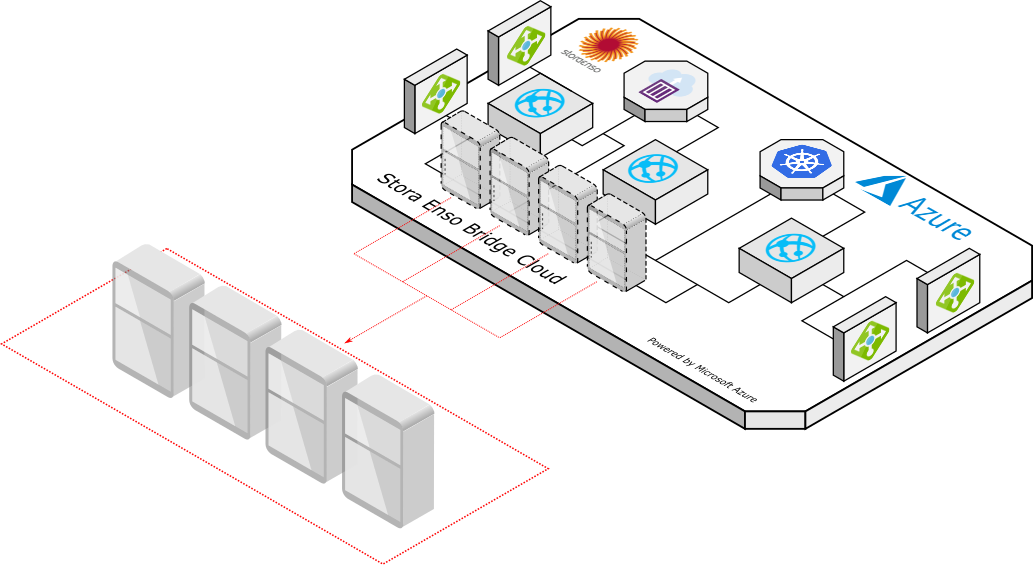
Query arguments
| Name | Type | Explanation |
|---|---|---|
group |
string | Argument to specify what group to make query on behalf of. Group query param needs to be set when belonging to multiple groups. |
Response
| Name | Type | Explanation |
|---|---|---|
id |
string | The unique hardware identifier of the cabinet. |
organizationId |
string | The organization the cabinet belongs to. Normally is the same as group argument provided. |
deviceCode |
string | The so called logical device identifier or serial number. Remains the same in case of hardware replacement. Use this code for any other cabinet related queries, not the id. |
name |
string | Human readable name of the device. |
lastSeenOnline |
dateTime | The time in UTC when this cabinet was last time reported it's health status to the cloud. Normally it happens once per every 10 minutes. |
lifeCycleStatus |
string | The status of the device. Normal status is operational, but can be also retired, created. |
locationId |
string | The location cabinet belongs to. null by default. |
Example request
curl --location --request GET 'https://api.selflystore.com/api/v1/cabinets?group=Selfly%20Store%20Demo' \
--header 'Authorization: Bearer eyJhbGciOiJSUzI1NiIsImtpZCI6IjVmNWQwZGU1NTEwM2RiOWNlY...' \
--header 'Content-Type: application/json'
Example response
[
  {
    "id": "00000001-94A8",
    "organizationId": "Selfly Store Demo",
    "deviceCode": "00000001-94A8",
    "name": "Demo Cabinet Les Mosquetairen",
    "deviceType": "smartCabinet",
    "lastSeenOnline": "2020-02-04T07:22:59.847Z",
    "lifeCycleStatus": "operational",
    "locationId": null,
    "isOnline": false,
    "isDigiTwinOnline": false,
    "region": null,
    "locationId": "test",
    "rfidStatus": "NO_INFO"
  }
]
Fetch one cabinet by Code
Fetches a cabinet details by cabinet code.
Path arguments
| Name | Type | Explanation |
|---|---|---|
id |
string | The cabinet code. Note, this is not an ID, this is device code |
Response
| Name | Type | Explanation |
|---|---|---|
id |
string | The unique hardware identifier of the cabinet. |
organizationId |
string | The organization the cabinet belongs to. Normally is the same as group argument provided. |
deviceCode |
string | The so called logical device identifier or serial number. Remains the same in case of hardware replacement. Use this code for any other cabinet related queries, not the id. |
name |
string | Human readable name of the device. |
lastSeenOnline |
dateTime | The time in UTC when this cabinet was last time reported it's health status to the cloud. Normally it happens once per every 10 minutes. |
lifeCycleStatus |
string | The status of the device. Normal status is operational, but can be also retired, created. |
locationId |
string | The location cabinet belongs to. null by default. |
Example request
curl --location --request GET 'https://api.selflystore.com/api/v1/cabinets/00000001-94A8' \
--header 'Authorization: Bearer eyJhbGciOiJSUzI1NiIsImtpZCI6IjVmNWQwZGU1NTEwM2Ri...'
Example response
{
  "id": "00000001-94A8",
  "organizationId": "Selfly Store Demo",
  "deviceCode": "00000001-94A8",
  "name": "Demo Cabinet Les Mosquetairen",
  "deviceType": "smartCabinet",
  "lastSeenOnline": "2020-02-04T08:33:16.267Z",
  "lifeCycleStatus": "operational",
  "locationId": null
}
Disclaimer
The following API calls are made to a different endpoints, as they affect raw device settings, not the specific cabinet settings. Make sure you inderstand and notice this difference.*
To explain more, there are two API engines deployed - new retail cabinet specific API and device health and life cycle generic API.
| URL | Purpose |
|---|---|
| https://api.selflystore.com | New Retail Specific API with real time notifications. Used for new retail devices only and encapsulates only the features related to the new retail projects. |
| https://core-api.selflystore.com | The generic device health and life cycle API. Used for all types of devices in Selfly Cloud Platform. |
Update cabinet location
Updates the cabinet location. After that update, the cabinet will use prices from the given location.
Path arguments
| Name | Type | Explanation |
|---|---|---|
id |
string | The cabinet code. Note, this is not an ID, this is device code |
Body
| Name | Type | Explanation |
|---|---|---|
locationId |
string | The id of the location. |
Response
Response is having the code 200 (Success).
Example request
curl --location --request PUT 'https://api.selflystore.com/api/v1/cabinets/c87da35a-0f70-4b6f-aafd-1ba3a142b8f6' \
--header 'Authorization: Bearer eyJhbGciOiJSUzI1NiIsImtpZCI6ImFlOWRkNzQzNjdi...' \
--header 'Content-Type: application/json' \
--data-raw '{
	"locationId": "XXX"
}'
Example body
{
  "locationId": "XXX"
}
Fetch locations
Locations can be retrieved from the GraphQL end point.
Only organization needs to be changed in GraphQl query below to fetch locations for your organization.
Arguments
| Name | Type | Explanation |
|---|---|---|
organization |
string | Organization to fetch locations for. You need to belong to organization to be able to fetch, otherwise will return empty array. |
includeChildren |
enum | FLAT or NONE. Should be FLAT in most cases to get all locations. NONE will filter so only locations with no parent location is returned. |
Fields
| Name | Type | Explanation |
|---|---|---|
id |
string | Location id |
name |
string | Location name |
status |
string | Is "Active" if location is in use. "Retired" if location is retired. |
parentLocationCode |
string | Location id of parent location |
Response
The response contains a data object which includes a key attribute locations whose value is an array of location objects.
| Name | Type | Explanation |
|---|---|---|
data |
object | Contains the data requested from the backend |
Example body
{
  "query": "{locations(organization:\"Selfly Store Demo\", includeChildren: FLAT){id name status parentLocationCode}}"
}
Example request
curl "https://core-api.selflystore.com/v4/graphql" \
--header "Authorization: Bearer eyJhbGciOiJSUzI1NiIsImtpZCI6IjVmNWQwZGU1NTEwM2RiOWNlY...' \
--header "Content-Type: application/json" \
--data-binary '{"query":"{locations(organization:\"Selfly Store Demo\"){id severity source device_Id}}","variables":null,"operationName":null}'
Example response
{
  "data": {
    "locations": [
      {
        "id": "0ee1125e-e607-4a56-99ad-58560bc25232",
        "name": "Tampere",
        "status": "Active",
        "parentLocationCode": ""
      },
      {
        "id": "e529d6c6-5c5a-4816-9d40-7e3f80547ede",
        "name": "City Mall",
        "status": "Active",
        "parentLocationCode": "0ee1125e-e607-4a56-99ad-58560bc25232"
      }
    ]
  }
}
Create location
Creates new location based on the given id/code (must be unique).
Body
| Name | Type | Explanation |
|---|---|---|
code |
string | Id that location will be created with. Must be unique |
name |
string | Location name |
parentLocationCode |
string | Location id of parent location. Empty string if location has no parent location |
type |
string | The type of a location. Can beBuilding, section, site, Floor, Room etc. Optional. |
owners |
array | This is an array but it should only contain one string, which is the organization that this location belongs to. |
Response
Response fields are the same as input fields in the body. In case of success, the status code of the query is 200.
| Name | Type | Explanation |
|---|---|---|
message |
string | Human readable result message |
location |
object | Created location object |
location object
| Name | Type | Explanation |
|---|---|---|
code |
string | Location id |
name |
string | Location name |
status |
string | Is "Active" if location is in use. "Retired" if location is retired. |
parentLocationCode |
string | Location id of parent location. Empty string if location has no parent location |
type |
string | The type of a location. |
owners |
array | Array that should contain only a single string that is organization that location belongs to |
Example request
curl --location --request POST 'https://core-api.selflystore.com/v4/locations' \
--header 'Authorization: Bearer eyJhbGciOiJSUzI1NiIsImtpZCI6IjVmNWQwZGU1NTEwM2RiOWNlY2...' \
--header 'Content-Type: application/json' \
--data-raw '{
  "code": "xxx",
  "name": "Test Location",
  "parentLocationCode": "yyy",
  "owners":["Selfly Store Demo"]
}'
Example body
{
  "code": "xxx",
  "name": "Test Location",
  "parentLocationCode": "yyy",
  "owners": ["Selfly Store Demo"]
}
Example response
{
  "message": "The requested location is created",
  "location": {
    "code": "xxx",
    "name": "Test Location",
    "status": "Active",
    "parentLocationCode": "yyy",
    "owners": ["Selfly Store Demo"]
  }
}
Update location
Update a location with given id as request parameter.
Locations' parent location can be set with update.
Location can also be retired (removed) with update.
If status of a location is changed to Retired and there exists a device with this location code assigned to it and force flag is not in the parameters of the request,
this API will not retire that location. If force flag is true the Location_Id of that device will be set to null.
If status of a location is changed to Retired and the location has a child location and force flag is not in the parameters of the request,
this API will not retire that location. If force flag is true, the location will be retired and all of its child locations will be retired too.
This API will also clean up the product price items which is associated with this location.
Setting optional parameter force to True when changing locations status to Retired will cause retiring the location with all its child locations,removing location_Id of all devices with that location code and that locations children code and all product prices with that code and that locations children codes
Query arguments
| Name | Type | Explanation |
|---|---|---|
code |
String | Location code to update. |
force |
Boolean | When changing locations status to Retired will cause retiring the location with all its child locations,removing location_Id of all devices with that location code and that locations children code and all product prices with that code and that locations children codes. Optional. |
Body
| Name | Type | Explanation |
|---|---|---|
name |
string | Location name |
parentLocationCode |
string | Parent location id |
status |
string | Set to "Retired" to remove/retire location |
type |
string | The type of a location. Can beBuilding, section, site, Floor, Room etc. Optional. |
Response
Response fields are the same as input fields in the body. In case of success, the status code of the query is 200.
| Name | Type | Explanation |
|---|---|---|
message |
string | Human readable result message |
location |
object | Created location object |
location object
| Name | Type | Explanation |
|---|---|---|
name |
string | Location name |
status |
string | Is "Active" if location is in use (not retired) |
parentLocationCode |
string | Location id of parent location. Empty string if location has no parent location |
owners |
array | Array that should contain only a single string that is organization that location belongs to |
Example request
curl --location --request PUT 'https://core-api.selflystore.com/v4/locations/xxx' \
--header 'Authorization: Bearer eyJhbGciOiJSUzI1NiIsImtpZCI6IjVmNWQwZGU1NTEwM2RiOWNlY2...' \
--header 'Content-Type: application/json' \
--data-raw '{
  "name": "New Location Name",
  "parentLocationCode": "example-location-id"
}'
Example body
{
  "name": "New Location Name",
  "parentLocationCode": "example-location-id"
}
Example response
{
  "message": "The following fields of the location with location code 'example-location-id' is updated:",
  "location": {
    "name": "New Location Name",
    "status": "Active",
    "parentLocationCode": "example-location-id",
    "owners": ["Selfly Store Demo"]
  }
}
Fetch Cabinet Transactions
Each transaction, if payment was sent, is saved to the storage. This method fetches the list of transactions per cabinet for given date range.
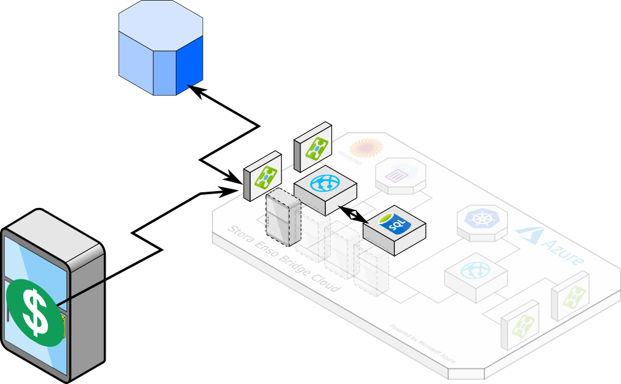
Path arguments
| Name | Type | Explanation |
|---|---|---|
id |
string | The cabinet code. Note, this is not an ID, this is device code |
Query arguments
| Name | Type | Explanation |
|---|---|---|
from |
date in ISO format | From what date and time to query the transactions. This should be UTC time. If not given, queries for all time. |
to |
date in ISO format | To what date and time to query the transactions. This should be UTC time. If not given, queries up to current date and time. |
status |
string | If given, will filter transaction only with this status. Allowed values are: DONE, IN_PROGRESS, CANCELED, PARTIAL, TIMEOUT, NO_PURCHASE, FAIL, NEW. If not set, deliver all transactions. |
Response
Response is having the code 200 (Success).
| Name | Type | Explanation |
|---|---|---|
customerId |
string | Unique customer identifier. This value is defined by the cabinet payment system. Each payment system will return the customer identifier. |
deviceCode |
string | Cabinet device code, the identifier of the cabinet. |
orderId |
string | The unique ID of the order. |
paymentMethod |
string | The payment method used to perform the transaction. |
purchasedTags |
Array of strings | The list of sold EPC codes for the tags, that user took out during transaction. |
unchargedTags |
Array of object | The list of uncharged items |
purchases |
Array of object | The list of purchases, that are made during the transaction. See below the separate table with purchase explanation. |
transactionData |
object | Payment system specific transaction result response. Varies based on the cabinet payment system. |
status |
string | The status of the transaction. Can be DONE, IN_PROGRESS, CANCELED, PARTIAL, TIMEOUT, NO_PURCHASE, FAIL, NEW. |
timestamp |
date time as ISO string | Timestamp of the transaction in UTC. |
Purchases data
| Name | Type | Explanation |
|---|---|---|
purchase |
Array of objects | List of the items user has purchased. |
purchase.barcode |
number | Purchased products barcode, that is printed on the package. A unique SKU number. |
purchase.count |
number | Number of purchased products. |
purchase.price |
float | The unit price of Purchased product. |
purchase.image |
string | URL to product's image. |
purchase.currency |
number | The currency of product's price. |
purchase.skuId |
string | The SKU ID of the product. |
purchase.name |
string | The name of the product. |
purchase.isDiscounted |
boolean | If the product was discounted or not. |
purchase.discountAmount |
number | The percentage of discount. |
purchase.discountName |
string | The name under which the discount is set. |
totalSum |
number | The total transaction sum. |
Example request
curl --location --request GET 'https://api.selflystore.com/api/v1/transactions/00000001-94A8?from=2020-02-01T00:00:00Z&to=2020-02-06T23:59:59Z&status=DONE' \
--header 'Authorization: Bearer eyJhbGciOiJSUzI1NiIsImtpZCI6ImFlOWRkNzQzNjdiZ...'
Example response
[
  {
    "customerId": "0E-C6-4E-4D",
    "deviceCode": "623bb422-198c-4818-813b-971906c6522c",
    "orderId": "Order-1604308531391",
    "paymentMethod": "nayax",
    "purchasedTags": [
      "303614229C507E80FB263A1B",
      "303614229C507E80FB263E1C",
      "303614229C507E80FB26BA1B"
    ],
    "unchargedTags": [
      {
        "epc": "303614229C507E80FB263A1B",
        "barcode": "6416453014923",
        "price": 1.5,
        "reason": "sold"
      }
    ],
    "purchases": {
      "purchase": [
        {
          "barcode": 6416453014923,
          "count": 2,
          "price": 1.5,
          "image": "https://cabinetdemo.blob.core.windows.net/demofiles/kismet.png",
          "currency": "€",
          "skuId": "6416453014923",
          "name": "Kismet chocolate bar, 55g",
          "epc": ["303614229C507E80FB263A1B", "303614229C507E80FB263E1C"],
          "imageUrl": "https://cabinetdemo.blob.core.windows.net/demofiles/kismet.png",
          "isDiscounted": true,
          "discountAmount": 20,
          "discountName": "Christmas"
        },
        {
          "barcode": 6416453554665,
          "count": 1,
          "price": 1,
          "image": "https://cabinetdemo.blob.core.windows.net/demofiles/jaffa.png",
          "currency": "€",
          "skuId": 6416453554665,
          "name": "Jaffa cookies, 300g",
          "epc": ["303614229C507E80FB26BA1B"],
          "imageUrl": "https://cabinetdemo.blob.core.windows.net/demofiles/jaffa.png",
          "isDiscounted": false,
          "discountAmount": 0,
          "discountName": null
        }
      ],
      "totalSum": 4
    },
    "status": "DONE",
    "timestamp": "2019-02-20T12:33:30.709Z"
  }
]
Fetch Cabinet Inventory
Cabinet sends regularly inventory snapshots of cabinet inventory. This endpoint is for retrieving those. Can delivery the current inventory or the history of inventories.
Path arguments
| Name | Type | Explanation |
|---|---|---|
id |
string | The cabinet code. Note, this is not an ID, this is device code |
Query arguments
| Name | Type | Explanation |
|---|---|---|
latest |
boolean | Will fetch all snapshots if set to false else only latest. If not set, returns latest inventory only. |
tagsOnly |
boolean | Option to exclude tag product information |
from |
date time as ISO string | Select inventories after timestamp if latest is false |
to |
date time as ISO string | Select inventories before timestamp if latest is false |
excludeGhostTags |
boolean | Option to exclude ghost tags(tags that have antenna value missing) from the inventory data. |
excludeBadQualityTags |
boolean | Option to exclude tags that are marked bad quality from inventory data. |
includeDiscounts |
boolean | Option to include discounted (Scheduled and Expiry) products to the response. |
timezone |
string | Option to send timezone information, example Europe/Helsinki. This information is used in the discount calculations if includeDiscounts field present as true. If not present, the timeZone value is used in the cabinet settings. |
Response
Response is having the code 200 (Success).
| Name | Type | Explanation |
|---|---|---|
deviceCode |
string | The code of the cabinet. |
readTime |
date time string in ISO format | The date and time when the inventory was fetched. |
tags |
Array of objects | The list of RFID tags that were fetched inside the cabinet during this inventory. See details in the table below. |
payload |
Object | Additional data about the inventory, usually this field is null as it is not in use at the moment. |
discountedProducts |
Array of objects | The list of discountd products inside the cabinet. See details in the table below. |
Tags
| Name | Type | Explanation |
|---|---|---|
epc |
string | The unique RFID tag EPC code, that was attached to the item. |
rssi |
number | The quality of the tag visibility, raw data from the reader. |
barcode |
number | The product barcode, encoded to the RFID tag. |
antenna |
number | The antenna index that was reading the RFID tag. |
quality |
string | Overall quality of reading. Can be -, good or bad. Bad tag is the tag that is not visible at every cabinet inventory. |
product |
Object | The associated product data. See below the detailed table. |
userMemory |
string | The value recorded in user memory of the tag. Used for saving the expiry date of a tag. the same value parsed as DateTime is available in expiryDate field. |
expiryDate |
Object | The expiry date of the product if available in tags user memory. |
Product
Product data is the same data as returned from Products endpoint.
| Field Name | Value | Explanation |
|---|---|---|
id |
string | The unique ID of the product |
name |
string | The name of the product |
imageUrl |
string | The URL to the image of the product |
productType |
string | The product type tagging instruction, also known as the product package type. Plastic, metal, fresh food, etc. This defies the way how to apply the RFID tag as well as what tag to use. |
prices |
List of objects | Defines the list of all available prices for the product for every location. id - the unique ID of the product price, price - the price value for the product. currency - the currency of the product price. locationId - location id of location price. |
metadata |
object | The additional data about the product, that is not following standard schema. Normally an empty object. |
owners |
List of strings | The list of companies who can have an access to this product. |
barcode |
string | The barcode that is printed on the package of the product, or the custom made barcode. This value is encoded to the RFID tag. |
price |
float | The default price of the product. |
currency |
string | The default currency of the product for what it is sold. |
Discounted Products
List of discounted product information.
| Name | Type | Explanation |
|---|---|---|
productId |
string | The id of the product. |
epc |
string | The unique RFID tag EPC code, that was attached to the item. |
barcode |
string | The product barcode, encoded to the RFID tag. |
expiryDate |
Date | The expiry date of the product if available in tags user memory. |
discountId |
string | The id of the discount. |
isExpired |
boolean | The value that indicates if the product has expired or not. |
isExpiring |
boolean | The value that indicates if the product will be expired or not. |
minutesToExpiry |
number | The value that indicates the minutes to expiry for a product. |
Example request
curl --location --request GET 'https://api.selflystore.com/api/v1/inventory/00000001-94A8' \
--header 'Authorization: Bearer eyJhbGciOiJSUzI1NiIsImtpZCI6ImFlOWRkNzQzNjdiZmIzN2NhMzcxYzg4ZjVkMjk...'
Example response
{
  "deviceCode": "00000001-94A8",
  "readTime": "2020-02-06T11:06:26.167Z",
  "tags": [
    {
      "epc": "30393AB2411A86C03E41A571",
      "rssi": 203,
      "barcode": "3222492893077",
      "expiryDate": "2020-09-03T23:59:59.000Z",
      "antenna": 1,
      "quality": "good",
      "userMemory": "03092020",
      "product": {
        "id": "ce3f48f0-77f3-45bd-b7db-0e46778871e9",
        "name": "Bouton d'Or chips saveur barbecue",
        "imageUrl": "https://cdn.selflystore.com/cabinet-products-prod/selfly%20store%20oy/6603f720-384b-11ea-9d2a-b7361ec5f6d9.jpeg",
        "productType": "G11-MetallizedLiquidCartonPackage",
        "prices": [
          {
            "id": "7a26497c-8694-43ec-b29a-a1d68ad41f3a",
            "price": 0.79,
            "currency": "€",
            "locationId": "Main Central Train Station",
            "metadata": {},
            "region": "Main Central Train Station"
          }
        ],
        "metadata": {},
        "owners": ["Selfly Store Demo"],
        "barcode": "3222492893077",
        "price": 0.79,
        "currency": "€",
        "status": 2,
        "timeToLiveDays": null
      }
    }
  ],
  "payload": null,
  "discountedProducts": [
    {
      "productId": "7a26497c-8694-43ec-b29a-a1d68ad41f3a",
      "epc": "30393AB2411A86C03E41A571",
      "barcode": "3222492893077",
      "expiryDate": "2020-09-03T23:59:59.000Z",
      "discountId": "26a0d4a1-el25-6234-c537-t783949c6odc",
      "isExpired": false,
      "isExpiring": false,
      "minutesToExpiry": null
    }
  ]
}
Refill records
version 1 (v1)
Returns array of refill records with audit data as well as before and after inventory snapshots.
Path arguments
| Name | Type | Explanation |
|---|---|---|
id |
string | The cabinet code. Note, this is not an ID, this is device code |
Query arguments
| Name | Type | Explanation |
|---|---|---|
from |
date time as ISO string | Select refill records after timestamp. |
to |
date time as ISO string | Select refill records before timestamp. |
Example request
curl --location --request GET 'https://api.selflystore.com/api/v1/refill/00000001-94A8?from=2020-01-01' \
--header 'Authorization: Bearer eyJhbGciOiJSUzI1NiIsImtpZCI6ImFlOWRkNzQzN...'
Example response
[
  {
    "audit": {
      "id": "4f126e81-3f7c-4a45-b97c-09fd44eecf35",
      "command": 0,
      "deviceId": "00000001-94A8",
      "commandParams": "{}",
      "timestamp": "2020-01-27T15:21:23.197Z",
      "userName": "none@selflystore.com"
    },
    "start": {
      "deviceCode": "00000001-94A8",
      "readTime": "2020-01-27T15:21:27.043Z",
      "tags": [
        {
          "antenna": 9,
          "barcode": "0040000001607",
          "epc": "30340271000028002A110000",
          "expiryDate": null,
          "quality": "good",
          "rssi": 203,
          "userMemory": null
        }
      ],
      "payload": {
        "type": "replenishment-start",
        "record": "4f126e81-3f7c-4a45-b97c-09fd44eecf35"
      }
    },
    "end": {
      "deviceCode": "00000001-94A8",
      "readTime": "2020-01-27T15:21:35.960Z",
      "tags": [
        {
          "antenna": 9,
          "barcode": "0040000001607",
          "epc": "30340271000028002A110000",
          "expiryDate": null,
          "quality": "good",
          "rssi": 203,
          "userMemory": null
        },
        {
          "antenna": 1,
          "barcode": "3222492893077",
          "epc": "30393AB2411A86C03E41A971",
          "expiryDate": null,
          "quality": "good",
          "rssi": 207,
          "userMemory": null
        }
      ],
      "payload": {
        "type": "replenishment-end",
        "record": "4f126e81-3f7c-4a45-b97c-09fd44eecf35"
      }
    }
  }
]
version 2 (v2)
Returns array of refill records with audit data and products that are added and removed in each refill.
Path arguments
| Name | Type | Explanation |
|---|---|---|
id |
string | The cabinet code. Note, this is not an ID, this is device code |
Query arguments
| Name | Type | Explanation |
|---|---|---|
from |
date time as ISO string | Select refill records after timestamp. |
to |
date time as ISO string | Select refill records before timestamp. |
Example request
curl --location --request GET 'https://api.selflystore.com/api/v2/refill/00000001-94A8?from=2020-01-01' \
--header 'Authorization: Bearer eyJhbGciOiJSUzI1NiIsImtpZCI6ImFlOWRkNzQzN...'
Example response
[
  {
    "audit": {
      "id": "05447113-fefe-46b8-9abb-83782b3b8359",
      "command": 0,
      "deviceId": "623bb422-198c-4818-813b-971906c6522c",
      "commandParams": "{}",
      "timestamp": "2020-11-16T09:07:05.717Z",
      "userName": "none@selflystore.com"
    },
    "refill": [
      {
        "id": "11137e3d-9e86-4aaa-9853-fce7d6ecee84",
        "barcode": "1221111111112",
        "name": "Test_PlasticCan_Liquid_Stacked",
        "imageUrl": "https://cdn.selflystore.com/image.jpeg",
        "price": 2.5,
        "currency": "€",
        "removedItems": {
          "total": 0,
          "tags": []
        },
        "addedItems": {
          "total": 1,
          "tags": [
            {
              "epc": "30344A87DC0AD9C0B113BB4A",
              "rssi": 195,
              "antenna": 2,
              "userMemory": "10112020",
              "expiryDate": "2020-11-10T23:59:59.000Z",
              "quality": "good"
            }
          ]
        }
      },
      {
        "id": "0f28edaa-86b6-4c99-b957-9badb66101b7",
        "barcode": "7176773389178",
        "name": "Tony's Chocolonely",
        "imageUrl": "https://cdn.selflystore.com/image.jpeg",
        "price": 2,
        "currency": "€",
        "removedItems": {
          "total": 0,
          "tags": []
        },
        "addedItems": {
          "total": 1,
          "tags": [
            {
              "epc": "3035B6091426014000000003",
              "rssi": 212,
              "antenna": 1,
              "userMemory": null,
              "expiryDate": null,
              "quality": "good"
            }
          ]
        }
      }
    ]
  }
]
Reporting webhooks
Cabinet can send the reports when refill is finished or when purchase transaction is executed.
By registering webhooks url for the mentioned events in any cabinet settings, the user can receive the refill payload or transaction payload.
Refill report webhook
Apply the following setting to receive a refill payload to your web URL after each refill process is done for each cabinet. For details about how to apply settings, please go to user settings section.
| Setting | Type | Description |
|---|---|---|
webhook_refillUrl |
URL string | A URl to which the POST request will be made containing the refill payload. Payload contains items that were added, items that were removed and cabinet code that was reporting the refill end event |
webhook_refillUrl_header_key |
string | The custom header key which the POST request will be made containing the refill payload. |
webhook_refillUrl_header_value |
string | The custom header value which the POST request will be made containing the refill payload. |

Refill payload
Payload example to expect to the webhook:
| Property | Type | Description |
|---|---|---|
cabinetCode |
string | Unique cabinet code where refill had happened |
itemsAdded |
array | Items that were added to the cabinet, each item is a unique tag EPC code with appended product information. |
itemsRemoved |
array | Items that were removed from the cabinet during refill, each item is a unique tag EPC code with appended product information. |
audit |
object | Audit information related to refill operation like operator email address, deviceId and timestamp. |
Example payload
{
  "cabinetCode": "xxxxxxx-xxxxx-xxxxxx",
  "itemsAdded": [
    {
      "epc": "30358723B8011C807482B088",
      "rssi": 198,
      "barcode": "6408430011384",
      "antenna": 4,
      "userMemory": null,
      "expiryDate": null,
      "quality": "bad",
      "product": {
        "id": "6408430011384",
        "name": "Profeel Protein Drink White Coffee",
        "imageUrl": "https://cdn.selflystore.com/cabinet-products-qa/selfly%20store%20oy/116f4e50-44d9-11e9-8815-db9fe02b3c9c.jpeg",
        "status": 2,
        "productType": "G9-LiquidCartonPackageWithMetalFoilLayer",
        "timeToLiveDays": null,
        "prices": [
          {
            "id": "12",
            "price": 2.2,
            "currency": "€",
            "locationId": null
          }
        ],
        "metadata": {},
        "owners": ["Selfly Store Demo"],
        "barcode": "6408430011384",
        "price": 2.2,
        "currency": "€"
      }
    }
  ],
  "itemsRemoved": [],
  "audit": {
    "id": "4f126e81-3f7c-4a45-b97c-09fd44eecf35",
    "command": 0,
    "deviceId": "00000001-94A8",
    "commandParams": "{}",
    "timestamp": "2020-01-27T15:21:23.197Z",
    "userName": "none@selflystore.com"
  }
}
Transaction report webhook
Apply the following setting to receive a transaction payload to your web URL after each transaction is made in a cabinet. For details about how to apply settings, please go to user settings section.
Note that this transaction payload will not contain the user information and only includes the purchased product information
| Setting | Type | Description |
|---|---|---|
webhook_transactionUrl |
URL string | A URl to which the POST request will be made containing the transaction payload. Payload contains deviceCode where purchase happened, timestamp of purchase, purchased items' tags, total sum of purchased items and items that were purchased. |
webhook_transactionUrl_header_key |
string | The custom header key which the POST request will be made containing the transaction payload. |
webhook_transactionUrl_header_value |
string | The custom header value which the POST request will be made containing the transaction payload. |

Transaction payload
Payload example to expect to the webhook:
| Property | Type | Description |
|---|---|---|
deviceCode |
string | Unique cabinet code where purchase had happened. |
timestamp |
string | The time stamp when the purchase happened. |
purchasedTags |
array | The EPC codes of the purchased items. |
totalSum |
number | The total sum of purchased items. |
purchases |
array | The information of each purchased item. If more than one item of the same type (same barcode) is purchased, they are grouped based on EPC codes |
Purchases data
| Name | Type | Explanation |
|---|---|---|
purchase |
Array of objects | List of the items user has purchased. |
purchase.barcode |
number | Purchased products barcode, that is printed on the package. A unique SKU number. |
purchase.count |
number | Number of purchased products. |
purchase.price |
float | The unit price of Purchased product. |
purchase.image |
string | URL to product's image. |
purchase.currency |
number | The currency of product's price. |
purchase.skuId |
string | The SKU ID of the product. |
purchase.name |
string | The name of the product. |
purchase.isDiscounted |
boolean | If the product was discounted or not. |
purchase.discountAmount |
number | The percentage of discount. |
purchase.discountName |
string | The name under which the discount is set. |
totalSum |
number | The total transaction sum. |
Example payload
{
  "deviceCode": "Demo-Device-1",
  "timestamp": "2019-02-20T12:33:30.709Z",
  "purchasedTags": [
    "303614229C507E80FB263A1B",
    "303614229C507E80FB263E1C",
    "303614229C507E80FB26BA1B"
  ],
  "orderId": "OrderId-121211121",
  "totalSum": 4,
  "purchases": [
    {
      "barcode": 6416453014923,
      "count": 2,
      "price": 1.5,
      "image": "https://cabinetdemo.blob.core.windows.net/demofiles/kismet.png",
      "currency": "€",
      "skuId": "6416453014923",
      "name": "Kismet chocolate bar, 55g",
      "epc": ["303614229C507E80FB263A1B", "303614229C507E80FB263E1C"],
      "imageUrl": "https://cabinetdemo.blob.core.windows.net/demofiles/kismet.png",
      "isDiscounted": true,
      "discountAmount": 20,
      "discountName": "Christmas"
    },
    {
      "barcode": 6416453554665,
      "count": 1,
      "price": 1,
      "image": "https://cabinetdemo.blob.core.windows.net/demofiles/jaffa.png",
      "currency": "€",
      "skuId": 6416453554665,
      "name": "Jaffa cookies, 300g",
      "epc": ["303614229C507E80FB26BA1B"],
      "imageUrl": "https://cabinetdemo.blob.core.windows.net/demofiles/jaffa.png",
      "isDiscounted": false,
      "discountAmount": 0,
      "discountName": null
    }
  ]
}
Reporting cabinet revenue (Only for Italian market)
The endpoint fetches the revenue of the given cabinet for a total and certain period of time.
Path arguments
| Name | Type | Explanation |
|---|---|---|
deviceCode |
string | The cabinet code. Note, this is not an ID, this is device code |
Query arguments
| Name | Type | Explanation |
|---|---|---|
group |
string | Required organisation Id parameter to perform the action. |
Query arguments
| Name | Type | Explanation |
|---|---|---|
counterIndex |
number | Optional parameter to get the revenues in the past by the counter index. If set, the revenue that belongs to the counter index will be returned. |
Example request
curl --location --request GET 'https://api.selflystore.com/api/v2/revenue-italian-market/a3d2b72c-83e9-411b-8420-5324b7108f99?group=xxx' \
--header 'Authorization: Bearer eyJhbGciOiJSUzI1NiIsImtpZCI6ImFlOWRkNzQzN...'
Example response
{
  "ActualDataCollectionDate": "2021-09-22T06:07:18.533Z",
  "ActualDataCollectionIdx": 5,
  "PreviousDataCollectionDate": "2021-09-19T06:07:02.287Z",
  "PreviousDataCollectionIdx": 4,
  "MasterSN": "a3d2b72c-83e9-411b-8420-5324b7108f99",
  "ValoriCumulati": {
    "venduto": 2369119,
    "vendutoContante": 0,
    "vendutoNoContante": 2369119,
    "incassato": 0,
    "incassatoRicarica": 0,
    "incassatoVendita": 0,
    "totaleResoTubiResto": 0,
    "totaleCaricatoTubiResto": 0,
    "totaleResoManualeTubiResto": 0,
    "totaleCaricatoManualeTubiResto": 0
  },
  "ValoriPeriodo": {
    "venduto": 0,
    "vendutoContante": 0,
    "vendutoNoContante": 0,
    "incassato": 0,
    "incassatoRicarica": 0,
    "incassatoVendita": 0,
    "totaleResoTubiResto": 0,
    "totaleCaricatoTubiResto": 0,
    "totaleResoManualeTubiResto": 0,
    "totaleCaricatoManualeTubiResto": 0
  }
}
Refill template
A refill template is a set of rules that define the target quantity of products during cabinet refilling. The refill plan is generated based on the refill template configuration.
Target amount: It specifies the quantity of a product that should be in a cabinet after refilling.
Minimum threshold: It specifies the minimum quantity of a product that must be in the cabinet at the time of sales. If any product falls below this threshold, an alarm will be triggered to indicate that the limit has been reached.
Refill note: A short note, typically intended for a refill operator during refill process.
Planogram image: A custom image can also be uploaded with the planogram to include any additional information.
Fetching refill templates
The endpoint retrieves all refill templates for the specified group.
Query Arguments
| Name | Type | Explanation |
|---|---|---|
group |
string | Argument to specify what group to make query on behalf of. Group query param needs to be set when the user belongs to multiple groups. |
Response fields
| Name | Type | Explanation |
|---|---|---|
id |
string | The id of the refill template. |
refillRule |
object | Object of refill template |
deviceCode |
string | Device code of refill template |
planogramImageUrl |
string | Image url of planogram |
refillRule
| Name | Type | Explanation |
|---|---|---|
id |
string | The id of refill template |
productData |
object | Objects of products and their refill data |
productData
| Name | Type | Explanation |
|---|---|---|
barcode |
string | barcode of product |
targetInvAmount |
number | Target amount for product to be refilled |
refillNote |
string | A short instruction for refill operator |
minimumInvAmount |
number | Minimum inventory threshold to trigger alarm |
Example request
curl --location --request GET 'https://api.selflystore.com/api/v3/refill-rules?group=Selfly%20Store%20Demo' \
--header 'Authorization: Bearer eyJhbGciOiJSUzI1NiIsImtpZCI6IjVmNWQwZGU1NTEwM2RiOWNlY2Y4YTVmNjM1NTQ3...'
Example response
[
  {
    "deviceCode": "cca42688-770d-4884-925f-d2ffe7b0f54e",
    "refillRule": {
      "id": "58387dc9-18a9-4a7f-a314-ffd87be5d6c3",
      "productData": [
        {
          "barcode": "1111111111192",
          "targetInvAmount": 15,
          "refillNote": "Place the product on top shelf",
          "minimumInvAmount": 31
        },
        {
          "barcode": "2343454365768",
          "targetInvAmount": 4,
          "refillNote": "",
          "minimumInvAmount": 0
        },
        {
          "barcode": "0000039229922",
          "targetInvAmount": 3,
          "refillNote": "max 5 items in a slot",
          "minimumInvAmount": 5
        }
      ],
      "planogramImageUrl": "https://cdn.selflystore.com/refill-planogram-images-dev/Selfly%20Store%20Demo/8b4650e0-94fe-11ef-8fcd-fb4f4a8dfa35.jpeg"
    }
  },
  {
    "deviceCode": "2407721b-9368-4b50-b266-fdc52c195e1b",
    "refillRule": {
      "id": "58387dc9-18a9-4a7f-a314-ffd87be5d6c3",
      "productData": [
        {
          "barcode": "1111111111192",
          "targetInvAmount": 0,
          "refillNote": "Remove all the item",
          "minimumInvAmount": 0
        },
        {
          "barcode": "2343454365768",
          "targetInvAmount": 4,
          "refillNote": "Bottom most shelf",
          "minimumInvAmount": 0
        },
        {
          "barcode": "0000039229922",
          "targetInvAmount": 3,
          "refillNote": "",
          "minimumInvAmount": 2
        }
      ]
    }
  }
]
Fetching a single refill template
The endpoint to fetch a refill template.
Arguments
| Name | Type | Explanation |
|---|---|---|
code |
string | Device code |
Fields
| Name | Type | Explanation |
|---|---|---|
id |
string | Rule id |
productData |
array | Rule's product data |
planogramImageUrl |
string | Image url of planogram |
productData
| Name | Type | Explanation |
|---|---|---|
barcode |
string | barcode of product |
targetInvAmount |
number | Target amount for product to be refilled |
refillNote |
string | A short instruction for refill operator |
minimumInvAmount |
number | Minimum inventory threshold to trigger alarm |
Example body
{
  "query": "{device(code: '{deviceCode}') { refillRule { id, productData { barcode, targetInvAmount, refillNote, minInvAmount }}}}"
}
Example request
curl --location --request POST 'https://core-api.selflystore.com/v4/graphql' \
--header 'Authorization: Bearer eyJhbGciOiJSUzI1NiIsImtpZCI6IjVmNWQwZGU1NTEwM2RiOWNlY2...' \
--header 'Content-Type: application/json'
--data-binary "'query':{device(code: '{deviceCode}') { refillRule { id, productData { barcode, targetInvAmount }}}}"
Example response
{
  "id": "8f077c99-a89c-43d3-afc9-5de3643700b1",
  "productData": [
    {
      "barcode": "5449000214911",
      "targetInvAmount": 3,
      "refillNote": "Bottom most shelf",
      "minimumInvAmount": 0
    },
    {
      "barcode": "6416453061361",
      "targetInvAmount": 3,
      "refillNote": "",
      "minimumInvAmount": 0
    },
    {
      "barcode": "2222225555655",
      "targetInvAmount": 3,
      "refillNote": "Bottom most shelf",
      "minimumInvAmount": 0
    },
    {
      "barcode": "6416453554665",
      "targetInvAmount": 2,
      "refillNote": "Bottom most shelf",
      "minimumInvAmount": 5
    },
    {
      "barcode": "4018077764011",
      "targetInvAmount": 5,
      "refillNote": "Put only 5 items i a slot",
      "minimumInvAmount": 15
    },
    {
      "barcode": "3222492893077",
      "targetInvAmount": 15,
      "refillNote": "",
      "minimumInvAmount": 4
    },
    {
      "barcode": "6408430021673",
      "targetInvAmount": 6,
      "refillNote": "",
      "minimumInvAmount": 5
    },
    {
      "barcode": "5706779057478",
      "targetInvAmount": 5,
      "refillNote": "",
      "minimumInvAmount": 2
    }
  ],
  "planogramImageUrl": "https://cdn.selflystore.com/refill-planogram-images-dev/Selfly%20Store%20Demo/8b4650e0-94fe-11ef-8fcd-fb4f4a8dfa35.jpeg"
}
Creating a refill template
The end point to create a refill template
Query Arguments
| Name | Type | Explanation |
|---|---|---|
group |
string | Argument to specify what group to make query on behalf of. Group query param needs to be set when the user belongs to multiple groups. |
Example request
curl --location --request POST 'https://api.selflystore.com/api/v3/refill-rules?group=Selfly%20Store%20Demo' \
--header 'Authorization: Bearer eyJhbGciOiJSUzI1NiIsImtpZCI6IjVmNWQwZGU1NTEwM2RiOWNlY2...' \
--header 'Content-Type: application/json' \
--data-raw '{
    "deviceCodes": ["if-23-3-2022-beef38"],
     "productData":[
        {
            "barcode" : "6345632453348",
            "targetInvAmount": 2,
            "refillNote":"",
            "minimumInvAmount":2
        },
        {
            "barcode" : "2000000000008",
           "targetInvAmount": 5
           "refillNote":"",
           "minimumInvAmount":2
        },
     ]
    }'
Example body
{
  "deviceCodes": ["if-23-3-2022-beef38"],
  "productData": [
    {
      "barcode": "6345632453348",
      "targetInvAmount": 2,
      "refillNote": "",
      "minimumInvAmount": 2
    },
    {
      "barcode": "2000000000008",
      "targetInvAmount": 5,
      "refillNote": "",
      "minimumInvAmount": 2
    }
  ]
}
Example response
{
  "msg": "Device(s) refill template(s) created successfully",
  "data": {
    "id": "342423423423411-1412-2gg2-22",
    "productData": [
      {
        "barcode": "6345632453348",
        "targetInvAmount": 2,
        "refillNote": "",
        "minimumInvAmount": 2
      },
      {
        "barcode": "2000000000008",
        "targetInvAmount": 5,
        "refillNote": "",
        "minimumInvAmount": 2
      }
    ]
  }
}
Updating refill template
The end point to update a refill template
Query Arguments
| Name | Type | Explanation |
|---|---|---|
group |
string | Argument to specify what group to make query on behalf of. Group query param needs to be set when the user belongs to multiple groups. |
deviceCode |
string | Argument to specify what device's refill rule is updated |
Example request
curl --location --request PUT 'https://api.selflystore.com/api/v3/refill-rules?group=Selfly%20Store%20Demo&deviceCode=if-23-3-2022-beef38' \
--header 'Authorization: Bearer eyJhbGciOiJSUzI1NiIsImtpZCI6IjVmNWQwZGU1NTEwM2RiOWNlY2...' \
--header 'Content-Type: application/json' \
--data-raw '{
    "productData": [
        {
           "barcode" : "6345632453348",
          "targetInvAmount": 6,
          "refillNote":"5 items max is a slot",
          "minimumInvAmount":5

        },
        {
            "barcode" : "2000000000008",
           "targetInvAmount": 2,
           "refillNote":"On top shelf",
          "minimumInvAmount":5
        },
     ],
     planogramImageUrl:"https://cdn.selflystore.com/refill-planogram-images-dev/Selfly%20Store%20Demo/8b4650e0-94fe-11ef-8fcd-fb4f4a8dfa35.jpeg"
  }'
Example body
{
  "productData": [
    {
      "barcode": "6345632453348",
      "targetInvAmount": 6,
      "refillNote": "On top shelf",
      "minimumInvAmount": 5
    },
    {
      "barcode": "2000000000008",
      "targetInvAmount": 2,
      "refillNote": "On top shelf",
      "minimumInvAmount": 5
    }
  ],
  "planogramImageUrl": "https://cdn.selflystore.com/refill-planogram-images-dev/Selfly%20Store%20Demo/8b4650e0-94fe-11ef-8fcd-fb4f4a8dfa35.jpeg"
}
Deleting refill template
The end point to delete refill template
Path Arguments
| Name | Type | Explanation |
|---|---|---|
id |
string | Device code |
Query Arguments
| Name | Type | Explanation |
|---|---|---|
group |
string | Argument to specify what group to make query on behalf of. Group query param needs to be set when the user belongs to multiple groups. |
Example delete request
curl --location --request DELETE  'https://api.selflystore.com/api/v3/refill-rules/342423423423411-1412-2gg2-22?group=Selfly%20Store%20Demo'  \
--header 'Authorization: Bearer eyJhbGciOiJSUzI1NiIsImtpZCI6IjVmNWQwZGU1NTEwM2RiOWNlY2...' \
--header 'Content-Type: application/json'
Example response
{
  "msg": "refill rule deleted successfully",
  "id": "342423423423411-1412-2gg2-22"
}
Refill plan suggestions
If refill amounts are wanted to be calculated, instead of doing manually, refill plan suggestions API can be used to calculate every cabinet refill amounts for every product in cabinet's refill rule. Refill rule is required to use this API.
Query Arguments
| Name | Type | Explanation |
|---|---|---|
group |
string | Argument to specify what group to make query on behalf of. Group query param needs to be set when the user belongs to multiple groups. |
Example request
curl --location --request POST 'https://api.selflystore.com/api/v3/refill-plan-suggestions?group=Selfly%20Store%20Demo' \
--header 'Authorization: Bearer eyJhbGciOiJSUzI1NiIsImtpZCI6IjVmNWQwZGU1NTEwM2RiOWNlY2...' \
--header 'Content-Type: application/json' \
--data-raw '{
   "selectedCabinets": ["2407721b-9368-4b50-b266-fdc52c195e1b", 2407721b-9368-4b50-b266-fdc52c195e1b"]
  }'
Example body
{
  "selectedCabinets": [
    "2407721b-9368-4b50-b266-fdc52c195e1b",
    "2407721b-9368-4b50-b266-fdc52c195e1b"
  ]
}
Example response
[
  {
    "refillRuleId": "24adb417-00a2-4bfb-904f-c1c31a7ed9e5",
    "deviceCode": "2407721b-9368-4b50-b266-fdc52c195e1b",
    "productData": {
      "barcode": "3456436754753",
      "imageUrl": null,
      "name": "TEST oreo 2",
      "amountToRefill": 2
    }
  },
  {
    "refillRuleId": "24adb417-00a2-4bfb-904f-c1c31a7ed9e5",
    "deviceCode": "2407721b-9368-4b50-b266-fdc52c195e1b",
    "productData": {
      "barcode": "1221111111112",
      "imageUrl": "https://cdn.intelligentpackaging.online/cabinet-products-qa/selfly%20store%20international/8de38650-2262-11eb-af2b-ddae62416360.jpeg",
      "name": "Test_PlasticCan_LiquidStacked",
      "amountToRefill": 7
    }
  }
]
Planogram
A planogram is a visual representation or schematic diagram of a cabinet that defines the placement of products on shelves, displays, or other retail spaces to optimize sales and improve the shopping experience. It helps to determine where, how, and in what quantity products should be displayed to maximize visibility and sales.
Number of shelves and slots in a cabinet can be configured in a planogram. Drag and drop a product to the slot into the planogram. For RFID cabinet, a slot can be assigned with multiple products. Only one product can be assinged per slot for a scale based cabinet.
Fetching planogram
The endpoint retrieves a planogram of a cabinet.
Query Arguments
| Name | Type | Explanation |
|---|---|---|
devicCode |
string | Device code used to retrieve the corresponding planogram. |
group |
string | Argument to specify what group to make query on behalf of. Group query param needs to be set when the user belongs to multiple groups. |
Response fields
| Name | Type | Explanation |
|---|---|---|
shelves |
array | Array of shelf configuration. |
shelvesCount |
numnber | Object of refill rule |
shelves
| Name | Type | Explanation |
|---|---|---|
shelf |
string | The shelf number(from top of cabinet) |
type |
string | type of cabinet shelf- 'rfid' or 'scale' |
slots |
array | array of slots data with product informatiom |
slots
| Name | Type | Explanation |
|---|---|---|
slot |
number | Slot number in the |
products |
array | array of product id in a slot |
Example request
curl --location --request GET 'https://api.selflystore.com/api/v3/planogram/64804a9c5938a89a09eb972b?group=Selfly%20Store%20Demo' \
--header 'Authorization: Bearer eyJhbGciOiJSUzI1NiIsImtpZCI6IjVmNWQwZGU1NTEwM2RiOWNlY2Y4YTVmNjM1NTQ3...'
Example response
{
  "shelves": [
    {
      "shelf": 1,
      "type": "rfid",
      "slots": [
        {
          "slot": 1,
          "products": []
        },
        {
          "slot": 2,
          "products": [
            "057f2643-1e7b-450b-822b-1806588af4ac",
            "057f2643-1e7b-450b-822b-1806588af4ac"
          ]
        },
        {
          "slot": 3,
          "products": ["0def81a0-3a2b-42f7-b26b-cf234266fb42"]
        },
        {
          "slot": 4,
          "products": [
            "0def81a0-3a2b-42f7-b26b-cf234266fb42",
            "13ffd14c-be67-4645-bd5c-476111918f70",
            "157a82a8-4739-419c-8312-99e375cbd1f1"
          ]
        },
        {
          "slot": 5,
          "products": ["157a82a8-4739-419c-8312-99e375cbd1f1"]
        }
      ]
    },
    {
      "shelf": 2,
      "type": "rfid",
      "slots": [
        {
          "slot": 1,
          "products": []
        },
        {
          "slot": 2,
          "products": []
        },
        {
          "slot": 3,
          "products": [
            "13ffd14c-be67-4645-bd5c-476111918f70",
            "13ffd14c-be67-4645-bd5c-476111918f70",
            "13ffd14c-be67-4645-bd5c-476111918f70",
            "13ffd14c-be67-4645-bd5c-476111918f70",
            "13ffd14c-be67-4645-bd5c-476111918f70",
            "3503780007780",
            "3503780007780",
            "3503780007780"
          ]
        },
        {
          "slot": 4,
          "products": []
        },
        {
          "slot": 5,
          "products": []
        }
      ]
    },
    {
      "shelf": 3,
      "type": "rfid",
      "slots": [
        {
          "slot": 1,
          "products": []
        },
        {
          "slot": 2,
          "products": []
        },
        {
          "slot": 3,
          "products": []
        },
        {
          "slot": 4,
          "products": [
            "2a16fe5c-d444-467a-8124-8c69955ed8d5",
            "157a82a8-4739-419c-8312-99e375cbd1f1"
          ]
        },
        {
          "slot": 5,
          "products": []
        },
        {
          "slot": 6,
          "products": []
        },
        {
          "slot": 7,
          "products": []
        }
      ]
    },
    {
      "shelf": 4,
      "type": "rfid",
      "slots": [
        {
          "slot": 1,
          "products": []
        },
        {
          "slot": 2,
          "products": []
        },
        {
          "slot": 3,
          "products": ["157a82a8-4739-419c-8312-99e375cbd1f1"]
        },
        {
          "slot": 4,
          "products": ["1396e39e-e907-470f-b542-8af69a56efd3"]
        },
        {
          "slot": 5,
          "products": []
        }
      ]
    },
    {
      "shelf": 5,
      "type": "rfid",
      "slots": [
        {
          "slot": 1,
          "products": []
        },
        {
          "slot": 2,
          "products": []
        },
        {
          "slot": 3,
          "products": ["2432a70d-6a6c-4ac8-bbf0-0a5d4721c92a"]
        },
        {
          "slot": 4,
          "products": ["152cad1b-8112-4f7d-9acc-e6beeac3d77a"]
        },
        {
          "slot": 5,
          "products": []
        }
      ]
    }
  ],
  "shelvesCount": 5
}
Creating a planogram
The end point to planogram
Query Arguments
| Name | Type | Explanation |
|---|---|---|
devicCode |
string | Device code used to retrieve the corresponding planogram. |
group |
string | Argument to specify what group to make query on behalf of. Group query param needs to be set when the user belongs to multiple groups. |
Example request
curl --location --request PUT 'https://api.selflystore.com/api/v3/planogram/64804a9c5938a89a09eb972b?group=Selfly%20Store%20Demo' \
--header 'Authorization: Bearer eyJhbGciOiJSUzI1NiIsImtpZCI6IjVmNWQwZGU1NTEwM2RiOWNlY2...' \
--header 'Content-Type: application/json' \
--data-raw '{"shelvesCount":5,"shelves":[{"shelf":1,"type":"rfid","slots":[{"slot":1,"products":[]},{"slot":2,"products":[]},{"slot":3,"products":[]},{"slot":4,"products":[]},{"slot":5,"products":[]}]},{"shelf":2,"type":"rfid","slots":[{"slot":1,"products":[]},{"slot":2,"products":[]},{"slot":3,"products":["057f2643-1e7b-450b-822b-1806588af4ac"]},{"slot":4,"products":[]},{"slot":5,"products":[]}]},{"shelf":3,"type":"rfid","slots":[{"slot":1,"products":[]},{"slot":2,"products":[]},{"slot":3,"products":[]},{"slot":4,"products":["13ffd14c-be67-4645-bd5c-476111918f70"]},{"slot":5,"products":[]}]},{"shelf":4,"type":"rfid","slots":[{"slot":1,"products":["5449000014535"]},{"slot":2,"products":[]},{"slot":3,"products":[]},{"slot":4,"products":["5449000214911"]},{"slot":5,"products":[]}]},{"shelf":5,"type":"rfid","slots":[{"slot":1,"products":[]},{"slot":2,"products":[]},{"slot":3,"products":["488d9c66-1197-4694-92fe-8a6b3b3b84c2"]},{"slot":4,"products":[]},{"slot":5,"products":[]}]}]
}'
Example body
{
  "shelvesCount": 5,
  "shelves": [
    {
      "shelf": 1,
      "type": "rfid",
      "slots": [
        { "slot": 1, "products": [] },
        { "slot": 2, "products": [] },
        { "slot": 3, "products": [] },
        { "slot": 4, "products": [] },
        { "slot": 5, "products": [] }
      ]
    },
    {
      "shelf": 2,
      "type": "rfid",
      "slots": [
        { "slot": 1, "products": [] },
        { "slot": 2, "products": [] },
        { "slot": 3, "products": ["057f2643-1e7b-450b-822b-1806588af4ac"] },
        { "slot": 4, "products": [] },
        { "slot": 5, "products": [] }
      ]
    },
    {
      "shelf": 3,
      "type": "rfid",
      "slots": [
        { "slot": 1, "products": [] },
        { "slot": 2, "products": [] },
        { "slot": 3, "products": [] },
        { "slot": 4, "products": ["13ffd14c-be67-4645-bd5c-476111918f70"] },
        { "slot": 5, "products": [] }
      ]
    },
    {
      "shelf": 4,
      "type": "rfid",
      "slots": [
        { "slot": 1, "products": ["5449000014535"] },
        { "slot": 2, "products": [] },
        { "slot": 3, "products": [] },
        { "slot": 4, "products": ["5449000214911"] },
        { "slot": 5, "products": [] }
      ]
    },
    {
      "shelf": 5,
      "type": "rfid",
      "slots": [
        { "slot": 1, "products": [] },
        { "slot": 2, "products": [] },
        { "slot": 3, "products": ["488d9c66-1197-4694-92fe-8a6b3b3b84c2"] },
        { "slot": 4, "products": [] },
        { "slot": 5, "products": [] }
      ]
    }
  ]
}
Deleting planogram
The end point to delete planogram
Path Arguments
| Name | Type | Explanation |
|---|---|---|
deviceCode |
string | Device code to delete the planogram |
Example delete request
curl --location --request DELETE  'https://api.selflystore.com/api/v3/planogram/64804a9c5938a89a09eb972b  \
--header 'Authorization: Bearer eyJhbGciOiJSUzI1NiIsImtpZCI6IjVmNWQwZGU1NTEwM2RiOWNlY2...' \
--header 'Content-Type: application/json'
Refill plans
Refill Plans
Refill plans help refill operators determine which products need to be refilled and in what quantity. An organization can have only one refill plan, which includes an entry for every cabinet.
Each refill entry contains a refill rule, which specifies details about the refill products. The refill rule includes the product's image, name, barcode, and target inventory amount—the desired quantity of the product in stock. For example, if the target amount is 5 and the current inventory is 2, the plan indicates that the operator needs to refill 3 pieces.
A refill plan can have three states: Active, Completed, and Deleted.
- A plan is Active when it is created.
- It becomes Completed when the refill operator finalizes it in the refill app.
- It is marked as Deleted when removed in cloud portal.
- Additionally, each plan entry can be exported from cloud portal as an Excel sheet or PDF. If needed, the export can be filtered to include only selected cabinets.
Refill plan and planogram
A planogram created for a refill template can be updated and saved as a part of refill plans. The updated refill plan is saved and fetched as a part of refill plan.
If no planogram is defined for the refill plan, refill template's planogram is used for the specific cabinet.
Refill plan and planogramImageUrl
Fetching refill plans
The endpoint retrieves all refill plans for the specified group. If a device code is included in the URL, it fetches the active refill plan for that device.
Query Arguments
| Name | Type | Explanation |
|---|---|---|
group |
string | Argument to specify what group to make query on behalf of. Group query param needs to be set when the user belongs to multiple groups. |
deviceCode |
string | Optional argument to specify which cabinet's refill plans are fetched. When set to null, cabinet filters are ignored. |
Response fields
| Name | Type | Explanation |
|---|---|---|
id |
string | The id of the discount rule. |
productData |
array | Objects of products and their refill data |
deviceCode |
string | Device code of refill plan |
organizationId |
string | The id of the organization |
refillRuleId |
string | Id of refill rule |
lastUpdated |
timestamp | Timestamp of plan's latest update |
planogram |
object | Refill planogram object. |
planogramImageUrl |
string | Additional image upload to default planogram |
status |
string | Refill plan's status (Active, Completed, Deleted) |
productData
| Name | Type | Explanation |
|---|---|---|
barcode |
string | Barcode of product |
name |
string | Name of product |
amountToRefill |
number | Refill amount of the product |
imageUrl |
string | Image url of the product |
refillNote |
string | short text for refill opeatore |
barcodeType |
string | Type of barcode of the product |
Planogram
| Name | Type | Explanation |
|---|---|---|
shelves |
array | Array of shelf configuration. |
shelvesCount |
numnber | Object of refill rule |
shelves
| Name | Type | Explanation |
|---|---|---|
shelf |
string | The shelf number(from top of cabinet) |
type |
string | type of cabinet shelf- 'rfid' or 'scale' |
slots |
array | array of slots data with product informatiom |
slots
| Name | Type | Explanation |
|---|---|---|
slot |
number | Slot number in the |
products |
array | array of product id in a slot |
Example request
curl --location --request GET 'https://api.selflystore.com/api/v3/refill-plan?group=Selfly%20Store%20Demo' \
--header 'Authorization: Bearer eyJhbGciOiJSUzI1NiIsImtpZCI6IjVmNWQwZGU1NTEwM2RiOWNlY2Y4YTVmNjM1NTQ3...'
Example response
[
  {
    "id": "64e36073a660e71afe045b84",
    "deviceCode": "c194cd90-4578-48d3-b096-c533d6814715",
    "organizationId": "Selfly Store Oy",
    "productData": [
      {
        "barcode": "6416453074514",
        "imageUrl": "https://cdn.intelligentpackaging.online/cabinet-products-qa/selfly%20store%20oy/39445690-44da-11e9-8815-db9fe02b3c9c.jpeg",
        "name": "Domino cookies, 26g",
        "amountToRefill": 5
      },
      {
        "barcode": "6416453014923",
        "imageUrl": "https://cdn.intelligentpackaging.online/cabinet-products-qa/selfly%20store%20oy/c558b2e0-44d8-11e9-8815-db9fe02b3c9c.jpeg",
        "name": "Kismet chocolate bar, 55g",
        "amountToRefill": 4
      }
    ],
    "lastUpdated": "2023-08-21T16:03:02+03:00",
    "refillGroupId": "91a7980b-3a9c-4218-8aeb-41e451e14ed1",
    "status": "Active"
  },
  {
    "id": "64e3609fa660e71afe045b85",
    "deviceCode": "if-23-3-2022-beef38",
    "organizationId": "Selfly Store Demo",
    "productData": [
      {
        "barcode": "6345632453348",
        "imageUrl": "https://cdn.selflystore.com/cabinet-products-qa/fazer/83344a00-3f02-11ed-a7e4-1fc0e86fe5be.jpeg",
        "name": "Marble",
        "amountToRefill": 4
      },
      {
        "barcode": "2000000000008",
        "imageUrl": "https://cdn.intelligentpackaging.online/cabinet-products-qa/Selfly%20Store%20Demo/a92f8bf0-82d2-11ea-a98e-7dc2659a19a9.jpeg",
        "name": "Funny Ball Toy",
        "amountToRefill": 4
      },
      {
        "barcode": "0050000000555",
        "imageUrl": "https://cdn.selflystore.com/cabinet-products-qa/Selfly%20Store%20Demo/aeb6f700-ce08-11ed-9577-ab8c2775ae2d.jpeg",
        "name": "Hand made chocolate",
        "amountToRefill": 5
      },
      {
        "barcode": "6435438421389",
        "imageUrl": "https://cdn.selflystore.com/cabinet-products-qa/fazer/8f11d720-55eb-11ed-96da-99a494ecc524.jpeg",
        "name": "Fazer Chocolate bar",
        "amountToRefill": 4
      }
    ],
    "lastUpdated": "2023-08-22T20:21:37+03:00",
    "refillGroupId": "13cd5163-33a3-44db-960e-3dc56f90c261",
    "status": "Active",
    "planogram": {
      "shelvesCount": 5,
      "shelves": [
        {
          "shelf": 1,
          "type": "rfid",
          "slots": [
            { "slot": 1, "products": [] },
            { "slot": 2, "products": [] },
            { "slot": 3, "products": [] },
            { "slot": 4, "products": [] },
            { "slot": 5, "products": [] }
          ]
        },
        {
          "shelf": 2,
          "type": "rfid",
          "slots": [
            { "slot": 1, "products": [] },
            { "slot": 2, "products": [] },
            { "slot": 3, "products": ["057f2643-1e7b-450b-822b-1806588af4ac"] },
            { "slot": 4, "products": [] },
            { "slot": 5, "products": [] }
          ]
        },
        {
          "shelf": 3,
          "type": "rfid",
          "slots": [
            { "slot": 1, "products": [] },
            { "slot": 2, "products": [] },
            { "slot": 3, "products": [] },
            { "slot": 4, "products": ["13ffd14c-be67-4645-bd5c-476111918f70"] },
            { "slot": 5, "products": [] }
          ]
        },
        {
          "shelf": 4,
          "type": "rfid",
          "slots": [
            { "slot": 1, "products": ["5449000014535"] },
            { "slot": 2, "products": [] },
            { "slot": 3, "products": [] },
            { "slot": 4, "products": ["5449000214911"] },
            { "slot": 5, "products": [] }
          ]
        },
        {
          "shelf": 5,
          "type": "rfid",
          "slots": [
            { "slot": 1, "products": [] },
            { "slot": 2, "products": [] },
            { "slot": 3, "products": ["488d9c66-1197-4694-92fe-8a6b3b3b84c2"] },
            { "slot": 4, "products": [] },
            { "slot": 5, "products": [] }
          ]
        }
      ]
    },
    "planogramImageUrl": "https://cdn.selflystore.com/refill-planogram-images-dev/Selfly%20Store%20Demo/d9eb1910-74c4-11ef-8ce8-214b3b2d45c8.jpeg"
  }
]
Fetching a single refill plan
The endpoint to fetch a refill plan.
Path Arguments
| Name | Type | Explanation |
|---|---|---|
deviceCode |
string | Since device can have only one entry, deviceCode is used to get device's active plan |
Query Arguments
| Name | Type | Explanation |
|---|---|---|
group |
string | Argument to specify what group to make query on behalf of. Group query param needs to be set when the user belongs to multiple groups. |
Example request
curl --location --request GET 'https://api.selflystore.com/api/v3/refill-plan/if-23-3-2022-beef38?group=Selfly%20Store%20Demo' \
--header 'Authorization: Bearer eyJhbGciOiJSUzI1NiIsImtpZCI6IjVmNWQwZGU1NTEwM2RiOWNlY2...' \
--header 'Content-Type: application/json'
Example response
{
  "id": "64e3609fa660e71afe045b85",
  "deviceCode": "if-23-3-2022-beef38",
  "organizationId": "Selfly Store Demo",
  "productData": [
    {
      "barcode": "6345632453348",
      "imageUrl": "https://cdn.selflystore.com/cabinet-products-qa/fazer/83344a00-3f02-11ed-a7e4-1fc0e86fe5be.jpeg",
      "name": "Marble",
      "amountToRefill": 4
    },
    {
      "barcode": "2000000000008",
      "imageUrl": "https://cdn.intelligentpackaging.online/cabinet-products-qa/Selfly%20Store%20Demo/a92f8bf0-82d2-11ea-a98e-7dc2659a19a9.jpeg",
      "name": "Funny Ball Toy",
      "amountToRefill": 4
    },
    {
      "barcode": "0050000000555",
      "imageUrl": "https://cdn.selflystore.com/cabinet-products-qa/Selfly%20Store%20Demo/aeb6f700-ce08-11ed-9577-ab8c2775ae2d.jpeg",
      "name": "Hand made chocolate",
      "amountToRefill": 5
    },
    {
      "barcode": "6435438421389",
      "imageUrl": "https://cdn.selflystore.com/cabinet-products-qa/fazer/8f11d720-55eb-11ed-96da-99a494ecc524.jpeg",
      "name": "Fazer Chocolate bar",
      "amountToRefill": 4
    }
  ],
  "planogram":{
  "shelves": [
    {
      "shelf": 1,
      "type": "rfid",
      "slots": [
        {
          "slot": 1,
          "products": []
        },
        {
          "slot": 2,
          "products": [
            "057f2643-1e7b-450b-822b-1806588af4ac",
            "057f2643-1e7b-450b-822b-1806588af4ac"
          ]
        },
        {
          "slot": 3,
          "products": ["0def81a0-3a2b-42f7-b26b-cf234266fb42"]
        },
        {
          "slot": 4,
          "products": [
            "0def81a0-3a2b-42f7-b26b-cf234266fb42",
            "13ffd14c-be67-4645-bd5c-476111918f70",
            "157a82a8-4739-419c-8312-99e375cbd1f1"
          ]
        },
        {
          "slot": 5,
          "products": ["157a82a8-4739-419c-8312-99e375cbd1f1"]
        }
      ]
    },
    {
      "shelf": 2,
      "type": "rfid",
      "slots": [
        {
          "slot": 1,
          "products": []
        },
        {
          "slot": 2,
          "products": []
        },
        {
          "slot": 3,
          "products": [
            "13ffd14c-be67-4645-bd5c-476111918f70",
            "13ffd14c-be67-4645-bd5c-476111918f70",
            "13ffd14c-be67-4645-bd5c-476111918f70",
            "13ffd14c-be67-4645-bd5c-476111918f70",
            "13ffd14c-be67-4645-bd5c-476111918f70",
            "3503780007780",
            "3503780007780",
            "3503780007780"
          ]
        },
        {
          "slot": 4,
          "products": []
        },
        {
          "slot": 5,
          "products": []
        }
      ]
    },
    {
      "shelf": 3,
      "type": "rfid",
      "slots": [
        {
          "slot": 1,
          "products": []
        },
        {
          "slot": 2,
          "products": []
        },
        {
          "slot": 3,
          "products": []
        },
        {
          "slot": 4,
          "products": [
            "2a16fe5c-d444-467a-8124-8c69955ed8d5",
            "157a82a8-4739-419c-8312-99e375cbd1f1"
          ]
        },
        {
          "slot": 5,
          "products": []
        },
        {
          "slot": 6,
          "products": []
        },
        {
          "slot": 7,
          "products": []
        }
      ]
    },
    {
      "shelf": 4,
      "type": "rfid",
      "slots": [
        {
          "slot": 1,
          "products": []
        },
        {
          "slot": 2,
          "products": []
        },
        {
          "slot": 3,
          "products": ["157a82a8-4739-419c-8312-99e375cbd1f1"]
        },
        {
          "slot": 4,
          "products": ["1396e39e-e907-470f-b542-8af69a56efd3"]
        },
        {
          "slot": 5,
          "products": []
        }
      ]
    },
    {
      "shelf": 5,
      "type": "rfid",
      "slots": [
        {
          "slot": 1,
          "products": []
        },
        {
          "slot": 2,
          "products": []
        },
        {
          "slot": 3,
          "products": ["2432a70d-6a6c-4ac8-bbf0-0a5d4721c92a"]
        },
        {
          "slot": 4,
          "products": ["152cad1b-8112-4f7d-9acc-e6beeac3d77a"]
        },
        {
          "slot": 5,
          "products": []
        }
      ]
    }
  ],
  "shelvesCount": 5
}
  "planogramImageUrl":"https://cdn.selflystore.com/refill-planogram-images-dev/Selfly%20Store%20Demo/d9eb1910-74c4-11ef-8ce8-214b3b2d45c8.jpeg",
  "lastUpdated": "2023-08-22T20:21:37+03:00",
  "refillGroupId": "13cd5163-33a3-44db-960e-3dc56f90c261",
  "status": "Active"
}
Creating a refill plan
The end point to create a refill plan
Query Arguments
| Name | Type | Explanation |
|---|---|---|
group |
string | Argument to specify what group to make query on behalf of. Group query param needs to be set when the user belongs to multiple groups. |
Example request
curl --location --request POST 'https://api.selflystore.com/api/v3/refill-plan?group=Selfly%20Store%20Demo' \
--header 'Authorization: Bearer eyJhbGciOiJSUzI1NiIsImtpZCI6IjVmNWQwZGU1NTEwM2RiOWNlY2...' \
--header 'Content-Type: application/json' \
--data-raw '{
    "if-23-3-2022-beef38": {
     "refillRuleId": "80a808ce-9499-4027-8f93-49v79e46752b",
     "productData":[
        {
            "barcode" : "6345632453348",
            "imageUrl" : "https://cdn.selflystore.com/cabinet-products-qa/fazer/83344a00-3f02-11ed-a7e4-1fc0e86fe5be.jpeg",
            "name" : "Marble",
            "amountToRefill" : 4
        },
        {
            "barcode" : "2000000000008",
            "imageUrl" : "https://cdn.intelligentpackaging.online/cabinet-products-qa/Selfly%20Store%20Demo/a92f8bf0-82d2-11ea-a98e-7dc2659a19a9.jpeg",
            "name" : "Funny Ball Toy",
            "amountToRefill" : 4
        },
     ],
       "planogram":{"shelvesCount":5,"shelves":[{"shelf":1,"type":"rfid","slots":[{"slot":1,"products":[]},{"slot":2,"products":[]},{"slot":3,"products":[]},{"slot":4,"products":[]},{"slot":5,"products":[]}]},{"shelf":2,"type":"rfid","slots":[{"slot":1,"products":[]},{"slot":2,"products":[]},{"slot":3,"products":["057f2643-1e7b-450b-822b-1806588af4ac"]},{"slot":4,"products":[]},{"slot":5,"products":[]}]},{"shelf":3,"type":"rfid","slots":[{"slot":1,"products":[]},{"slot":2,"products":[]},{"slot":3,"products":[]},{"slot":4,"products":["13ffd14c-be67-4645-bd5c-476111918f70"]},{"slot":5,"products":[]}]},{"shelf":4,"type":"rfid","slots":[{"slot":1,"products":["5449000014535"]},{"slot":2,"products":[]},{"slot":3,"products":[]},{"slot":4,"products":["5449000214911"]},{"slot":5,"products":[]}]},{"shelf":5,"type":"rfid","slots":[{"slot":1,"products":[]},{"slot":2,"products":[]},{"slot":3,"products":["488d9c66-1197-4694-92fe-8a6b3b3b84c2"]},{"slot":4,"products":[]},{"slot":5,"products":[]}]}]},
     "planogramImageUrl":"https://cdn.selflystore.com/refill-planogram-images-dev/Selfly%20Store%20Demo/d9eb1910-74c4-11ef-8ce8-214b3b2d45c8.jpeg",
  }'
Example body
{
  "if-23-3-2022-beef38": {
    "refillRuleId": "80a808ce-9499-4027-8f93-49v79e46752b",
    "productData": [
      {
        "barcode": "6345632453348",
        "imageUrl": "https://cdn.selflystore.com/cabinet-products-qa/fazer/83344a00-3f02-11ed-a7e4-1fc0e86fe5be.jpeg",
        "name": "Marble",
        "amountToRefill": 4
      },
      {
        "barcode": "2000000000008",
        "imageUrl": "https://cdn.intelligentpackaging.online/cabinet-products-qa/Selfly%20Store%20Demo/a92f8bf0-82d2-11ea-a98e-7dc2659a19a9.jpeg",
        "name": "Funny Ball Toy",
        "amountToRefill": 4
      }
    ],
    "planogram": {
      "shelvesCount": 5,
      "shelves": [
        {
          "shelf": 1,
          "type": "rfid",
          "slots": [
            { "slot": 1, "products": [] },
            { "slot": 2, "products": [] },
            { "slot": 3, "products": [] },
            { "slot": 4, "products": [] },
            { "slot": 5, "products": [] }
          ]
        },
        {
          "shelf": 2,
          "type": "rfid",
          "slots": [
            { "slot": 1, "products": [] },
            { "slot": 2, "products": [] },
            { "slot": 3, "products": ["057f2643-1e7b-450b-822b-1806588af4ac"] },
            { "slot": 4, "products": [] },
            { "slot": 5, "products": [] }
          ]
        },
        {
          "shelf": 3,
          "type": "rfid",
          "slots": [
            { "slot": 1, "products": [] },
            { "slot": 2, "products": [] },
            { "slot": 3, "products": [] },
            { "slot": 4, "products": ["13ffd14c-be67-4645-bd5c-476111918f70"] },
            { "slot": 5, "products": [] }
          ]
        },
        {
          "shelf": 4,
          "type": "rfid",
          "slots": [
            { "slot": 1, "products": ["5449000014535"] },
            { "slot": 2, "products": [] },
            { "slot": 3, "products": [] },
            { "slot": 4, "products": ["5449000214911"] },
            { "slot": 5, "products": [] }
          ]
        },
        {
          "shelf": 5,
          "type": "rfid",
          "slots": [
            { "slot": 1, "products": [] },
            { "slot": 2, "products": [] },
            { "slot": 3, "products": ["488d9c66-1197-4694-92fe-8a6b3b3b84c2"] },
            { "slot": 4, "products": [] },
            { "slot": 5, "products": [] }
          ]
        }
      ]
    },
    "planogramImageUrl": "https://cdn.selflystore.com/refill-planogram-images-dev/Selfly%20Store%20Demo/d9eb1910-74c4-11ef-8ce8-214b3b2d45c8.jpeg"
  }
}
Example response
{
  "msg": "2 refill plans successfully created"
}
Updating refill plan
The end point to update a refill plan
Query Arguments
| Name | Type | Explanation |
|---|---|---|
group |
string | Argument to specify what group to make query on behalf of. Group query param needs to be set when the user belongs to multiple groups. |
id |
string | Refill plan id which is used to update the plan. |
Example request
curl --location --request PUT 'https://api.selflystore.com/api/v3/refill-plan?group=Selfly%20Store%20Demo' \
--header 'Authorization: Bearer eyJhbGciOiJSUzI1NiIsImtpZCI6IjVmNWQwZGU1NTEwM2RiOWNlY2...' \
--header 'Content-Type: application/json' \
--data-raw '{
  "deviceCode": "e7b5f86c-a7b8-405a-8fde-ffdc5fa72f8a",
  "status": "Active",
  "productData": [
    {
      "barcode": "4532761390435",
      "amountToRefill": 6,
      "name": "Avocado",
      "imageUrl": "https://cdn.selflystore.com/cabinet-products-qa/Selfly%20Store%20Demo/5e21e0d0-fad5-11ed-bb97-2bafa5561432.jpeg"
    },
    {
      "barcode": "3250390831464",
      "amountToRefill": 7,
      "name": "d'Or Tuiles salées",
      "imageUrl": "https://cdn.intelligentpackaging.online/cabinet-products-prod/selfly%20store%20oy/40e1bd60-384b-11ea-9d2a-b7361ec5f6d9.jpeg"
    }
  ],
   "planogram":{"shelvesCount":5,"shelves":[{"shelf":1,"type":"rfid","slots":[{"slot":1,"products":[]},{"slot":2,"products":[]},{"slot":3,"products":[]},{"slot":4,"products":[]},{"slot":5,"products":[]}]},{"shelf":2,"type":"rfid","slots":[{"slot":1,"products":[]},{"slot":2,"products":[]},{"slot":3,"products":["057f2643-1e7b-450b-822b-1806588af4ac"]},{"slot":4,"products":[]},{"slot":5,"products":[]}]},{"shelf":3,"type":"rfid","slots":[{"slot":1,"products":[]},{"slot":2,"products":[]},{"slot":3,"products":[]},{"slot":4,"products":["13ffd14c-be67-4645-bd5c-476111918f70"]},{"slot":5,"products":[]}]},{"shelf":4,"type":"rfid","slots":[{"slot":1,"products":["5449000014535"]},{"slot":2,"products":[]},{"slot":3,"products":[]},{"slot":4,"products":["5449000214911"]},{"slot":5,"products":[]}]},{"shelf":5,"type":"rfid","slots":[{"slot":1,"products":[]},{"slot":2,"products":[]},{"slot":3,"products":["488d9c66-1197-4694-92fe-8a6b3b3b84c2"]},{"slot":4,"products":[]},{"slot":5,"products":[]}]}]},
    "planogramImageUrl":"https://cdn.selflystore.com/refill-planogram-images-dev/Selfly%20Store%20Demo/d9eb1910-74c4-11ef-8ce8-214b3b2d45c8.jpeg",
  }'
Example body
{
  "deviceCode": "e7b5f86c-a7b8-405a-8fde-ffdc5fa72f8a",
  "status": "Active",
  "productData": [
    {
      "barcode": "4532761390435",
      "amountToRefill": 6,
      "name": "Avocado",
      "imageUrl": "https://cdn.selflystore.com/cabinet-products-qa/Selfly%20Store%20Demo/5e21e0d0-fad5-11ed-bb97-2bafa5561432.jpeg"
    },
    {
      "barcode": "3250390831464",
      "amountToRefill": 7,
      "name": "d'Or Tuiles salées",
      "imageUrl": "https://cdn.intelligentpackaging.online/cabinet-products-prod/selfly%20store%20oy/40e1bd60-384b-11ea-9d2a-b7361ec5f6d9.jpeg"
    }
  ],
  "planogram": {
    "shelvesCount": 5,
    "shelves": [
      {
        "shelf": 1,
        "type": "rfid",
        "slots": [
          { "slot": 1, "products": [] },
          { "slot": 2, "products": [] },
          { "slot": 3, "products": [] },
          { "slot": 4, "products": [] },
          { "slot": 5, "products": [] }
        ]
      },
      {
        "shelf": 2,
        "type": "rfid",
        "slots": [
          { "slot": 1, "products": [] },
          { "slot": 2, "products": [] },
          { "slot": 3, "products": ["057f2643-1e7b-450b-822b-1806588af4ac"] },
          { "slot": 4, "products": [] },
          { "slot": 5, "products": [] }
        ]
      },
      {
        "shelf": 3,
        "type": "rfid",
        "slots": [
          { "slot": 1, "products": [] },
          { "slot": 2, "products": [] },
          { "slot": 3, "products": [] },
          { "slot": 4, "products": ["13ffd14c-be67-4645-bd5c-476111918f70"] },
          { "slot": 5, "products": [] }
        ]
      },
      {
        "shelf": 4,
        "type": "rfid",
        "slots": [
          { "slot": 1, "products": ["5449000014535"] },
          { "slot": 2, "products": [] },
          { "slot": 3, "products": [] },
          { "slot": 4, "products": ["5449000214911"] },
          { "slot": 5, "products": [] }
        ]
      },
      {
        "shelf": 5,
        "type": "rfid",
        "slots": [
          { "slot": 1, "products": [] },
          { "slot": 2, "products": [] },
          { "slot": 3, "products": ["488d9c66-1197-4694-92fe-8a6b3b3b84c2"] },
          { "slot": 4, "products": [] },
          { "slot": 5, "products": [] }
        ]
      }
    ]
  },
  "planogramImageUrl": "https://cdn.selflystore.com/refill-planogram-images-dev/Selfly%20Store%20Demo/d9eb1910-74c4-11ef-8ce8-214b3b2d45c8.jpeg"
}
Deleting refill plan
The end point to delete refill plan
Path Arguments
| Name | Type | Explanation |
|---|---|---|
deviceCode |
string | Since device can have only one entry, deviceCode is used to get device's active plan |
Query Arguments
| Name | Type | Explanation |
|---|---|---|
group |
string | Argument to specify what group to make query on behalf of. Group query param needs to be set when the user belongs to multiple groups. |
Example delete request
curl --location --request DELETE 'https://api.selflystore.com/api/v3/refill-plan/if-22-2022-11?group=Selfly%20Store%20Demo' \
--header 'Authorization: Bearer eyJhbGciOiJSUzI1NiIsImtpZCI6IjVmNWQwZGU1NTEwM2RiOWNlY2...' \
--header 'Content-Type: application/json'
Example response
{
  "msg": "Refill plan deleted successfully",
  "deviceCode": "fc96201d-291f-4b04-a6cf-1ea0107620e2"
}
Completing refill plan
The end point to complete refill plan
Path Arguments
| Name | Type | Explanation |
|---|---|---|
deviceCode |
string | Since device can have only one entry, deviceCode is used to complete device's plan |
Query Arguments
| Name | Type | Explanation |
|---|---|---|
group |
string | Argument to specify what group to make query on behalf of. Group query param needs to be set when the user belongs to multiple groups. |
status |
string | Argument to specify which status is going to be set. Supports all of them but mostly used with "Completed" |
refillOperator |
string | Argument to specify refill operator's name who completed the plan |
Example completion request
curl --location --request PATCH 'https://api.selflystore.com/api/v3/refill-plan/64804a9c5938a89a09eb972b?group=Selfly%20Store%20Demo&status=Completed&refillOperator=Selfly McSelflyson' \
--header 'Authorization: Bearer eyJhbGciOiJSUzI1NiIsImtpZCI6IjVmNWQwZGU1NTEwM2RiOWNlY2...' \
--header 'Content-Type: application/json'
Example response
{
  "msg": "Refill plan's status succesfully updated"
}
Analytics API engine
Selfly Cloud utilizes a CubeJS engine to provide analytics data through creating complex queries to the database. The analytics engine uses a schema to combine and transform data and do the necessary calculations under hood.
In this context, the qualitative data such as numbers is presented as Measures, quantitative data such as types are presented as Dimensions. Filters can be applied to Dimensional variables. There is also an entity, called Segments, which is used for frequently used Dimensions or Measures which need complicated filtering and calculations. Time domain Dimensions are presented as TimeDimension variables. Also, the data for a specific entity is aggregated under a cube, for example Devices cube. For more details of CubeJs entities please consult here.
To reach the analytics engine, two endpoint have been implemented in cabinet API, namely Cube Meta and Cube Data.
Meta Data API
Analytics API provides the metadata about the schema implemented. The metadata contain all the Measures, Dimensions, Segments and available in the schema.
Response
| Name | Type | Explanation |
|---|---|---|
name |
string | Codename of the cube there can be several cubes in a schema |
title |
string | Human-readable cube name |
connectedComponent |
string | Number of connected components |
measure |
string | Array of measures defined within this cube see below for details |
dimensions |
string | Array of dimensions defined within this cube see below for details |
segments |
string | Array of segments defined within this cube see below for details |
Measures
| Name | Type | Explanation |
|---|---|---|
name |
string | Codename of the cube |
title |
string | Human readable title from data schema. |
shortTitle |
string | Short title for visualization usage |
cumulativeTotal |
boolean | If the measure is a cumulative sum of not |
cumulative |
boolean | If the value is calculated in a rolling window |
type |
string | Data type. |
Dimensions
| Name | Type | Explanation |
|---|---|---|
name |
string | Codename of the cube |
title |
string | Human readable title from data schema. |
type |
string | Data type. |
shortTitle |
string | Short title for visualization usage |
suggestFilterValues |
boolean | If the Dimension should be included in filters list |
Segments
| Name | Type | Explanation |
|---|---|---|
name |
string | Codename of the cube |
title |
string | Human readable title from data schema. |
shortTitle |
string | Short title for visualization usage |
Example request
curl --location --request GET 'https://api.selflystore.com/api/v1/cube-meta' \
--header 'Authorization: Bearer eyJhbGciOiJSUzI1NiIsImtpZCI6IjVmNWQwZGU1NTEwM2RiOWNlY...' \
--header 'Content-Type: application/json'
Example response
{
  "cubes": [
    {
      "name": "Device",
      "title": "Device",
      "connectedComponent": 1,
      "measures": [
        {
          "name": "Device.deviceTypeCount",
          "title": "Device Device Type Count",
          "shortTitle": "Device Type Count",
          "cumulativeTotal": false,
          "cumulative": false,
          "type": "number"
        }
      ],
      "dimensions": [
        {
          "name": "Device.id",
          "title": "Device Id",
          "type": "string",
          "shortTitle": "Id",
          "suggestFilterValues": true
        }
      ],
      "segments": [
        {
          "name": "Device.Registered",
          "title": "Device Registered",
          "shortTitle": "Registered"
        }
      ]
    }
  ]
}
Analytics Data API
Cabinet API's end point for receiving analytics data. In this end point, other that normal authentication, the data is only provided for a specific organization. the organization should be in the organizations list of the requestor.
Query arguments
| Name | Type | Explanation |
|---|---|---|
group |
string | The organization the data is requested for. If user only belongs to 1 group, not needed. |
query |
string | CubeJS query Required, See bellow for details about CubeJS query |
CubeJS Query
| Name | Type | Explanation |
|---|---|---|
dimensions |
string | An array of dimensions. |
timeDimensions |
string | A convenient way to specify a time dimension with a filter. |
measures |
string | An array of measures. |
filters |
string | An array of objects, describing filters. |
timezone |
string | All time based calculations performed within Cube.js are timezone-aware. Using this property you can set your desired timezone in TZ Database Name format, e.g.: America/Los_Angeles. The default value is UTC. |
segments |
string | An array of segments. Segment is a named filter, created in the Data Schema. |
limit |
string | A row limit for your query. The default value is 10000. The maximum allowed limit is 50000. |
offset |
string | Number of first rows to be skipped for your query. The default value is 0. |
order |
string | An object, where keys are measures or dimensions to order by and their corresponding values are either asc or desc. The order of the fields to order is based on the order of the keys in the object. |
renewQuery |
boolean | If renewQuery is set to true, Cube.js will renew all refreshKey for query and query result itself in foreground. However if refreshKeyor refreshKeyRenewalThreshold don't indicate that there's a need for update this setting has no effect. The default value is false. |
ungrouped |
boolean | If ungrouped is set to true no GROUP BY statement will be added to the query and raw results after filtering and joining will be returned without grouping. By default ungrouped query requires to pass primary key as a dimension of every cube involved in query for security purpose. |
For more detailed information please consult official CubeJS documentation.
Response
| Name | Type | Explanation |
|---|---|---|
query |
string | The query passed via params |
data |
string | Formatted dataset of query results. |
annotation |
string | Metadata for query. Contains descriptions for all query items. see below for details |
annotation
| Name | Type | Explanation |
|---|---|---|
title |
string | Human readable title from data schema. |
shortTitle |
string | Short title for visualization usage |
type |
string | Data type |
Example request
curl --location --request GET 'https://api.selflystore.com/api/v1/cube?query={ "dimensions": [ "Device.deviceName" ], "timeDimensions": [ { "dimension": "Transactions.timestamp", "granularity": "day" } ], "measures": [ "Transactions.orderSum" ], "filters": [], "timezone": "UTC" }&group=Selfly Store Demo' \
--header 'Authorization: Bearer eyJhbGciOiJSUzI1NiIsImtpZCI6IjVmNWQwZGU1NTEwM2RiOWNlY...' \
--header 'Content-Type: application/json'
Example response
{
  "query": {
    "dimensions": ["Device.deviceName"],
    "timeDimensions": [
      {
        "dimension": "Transactions.timestamp",
        "granularity": "day"
      }
    ],
    "measures": ["Transactions.orderSum"],
    "filters": [],
    "timezone": "UTC"
  },
  "data": [
    {
      "Device.deviceName": "Tampere testi cabinet",
      "Transactions.timestamp": "2019-02-19T00:00:00.000",
      "Transactions.orderSum": 20.000000000000004
    },
    {
      "Device.deviceName": "Tampere testi cabinet",
      "Transactions.timestamp": "2019-02-20T00:00:00.000",
      "Transactions.orderSum": 14.3
    },
    {
      "Device.deviceName": "Tampere testi cabinet",
      "Transactions.timestamp": "2019-03-06T00:00:00.000",
      "Transactions.orderSum": 1.1
    }
  ],
  "annotation": {
    "measures": {
      "Transactions.orderSum": {
        "title": "Transactions Order Sum",
        "shortTitle": "Order Sum",
        "type": "number"
      }
    },
    "dimensions": {
      "Device.deviceName": {
        "title": "Device Device Name",
        "shortTitle": "Device Name",
        "type": "string"
      }
    },
    "segments": {},
    "timeDimensions": {
      "Transactions.timestamp": {
        "title": "Transactions Timestamp",
        "shortTitle": "Timestamp",
        "type": "time"
      }
    }
  }
}
Alerts
Alerts can be retrieved from the GraphQL end point. Alerts can be retrieved for an organization, for multiple devices of a single device.
The main endpoint for retrieving alerts is the GraphQL alerts end point.
Body
| Name | Type | Explanation |
|---|---|---|
query |
string | The stringified GraphQL query consisting of arguments and fields. Details for available arguments and fields for alerts is provided below. For more information about GraphQL queries please consult here. |
operationName |
string | The operation name is a meaningful and explicit name of the operation. For more information please consult here. Optional |
variables |
string | The variables which are going to be replaced with dynamic arguments passed in queries. For more information please consult here. Optional |
The alerts end point can receive the following arguments:
Arguments
| Name | Type | Explanation |
|---|---|---|
filter |
string | The builder follows the OData operation notations. Possible operations: eq - Equals; gt - Greater than; lt - Less than; gte - Greater than or equals; lte - Less than or equals; contains - Contains; startsWith - Starts with; endsWith - Ends with. Example: "id startsWith 15" |
from |
date | The Date from which the alerts should be retrieved. The Date scalar type represents a timestamp provided in UTC. Date expects timestamps to be formatted in accordance with the ISO-8601 standard. |
to |
date | The end Date which the alerts should be retrieved for. The Date scalar type represents a timestamp provided in UTC. Date expects timestamps to be formatted in accordance with the ISO-8601 standard. |
state |
string | The state of requested alerts. Can be ACTIVE or RESOLVED |
offset |
integer | The offset number for pagination. If the limit is not provided, this value will be ignored. Is 0 by default |
limit |
integer | The limit for pagination. Can be used with or without the offset value. Ignored if not provided |
organization |
string | the organization ID the data requested for |
Fields
| Name | Type | Explanation |
|---|---|---|
code |
integer | Numeric code of the alert. |
id |
string | ID of the alert record. |
description |
string | The description of the alert. |
device |
object | Associated device. |
device_Id |
string | The associated device ID. |
firstTimeSeen |
date | The time when alert was seen for the first time in a row. |
lastTimeSeen |
date | Last time the alert was seen in a row. |
metadata |
object | The object's metadata. |
severity |
float | Value form 0 to 1 of the alert severity. |
source |
string | Source of the alert.For example 7iD, application, etc. |
state |
string | State of the alert: Active, Resolved. |
triggerCount |
integer | How many times the alert was triggered before it was resolved. |
type |
string | Type of the alert. |
The fields device and metadata are GraphQL objects which are related to alerts and can be used for sub-selection. The device object allows to traverse into the device related to a particular alert. The metadata object is the metadata about a particular alert in the database.
A Sandbox environment for testing GraphQL queries is available here. Detailed documentation for all objects, types, arguments and fields can be found in the Sandbox by clicking on Docs on the top right hand side of the page.
For more information regarding GraphQL standard please consult here.
Response
The response contains a data object which includes a key attribute alerts whose value is an array of alert objects.
Important: If no to and from argument is passed in the request, the data for the alerts will involve all the alerts with ACTIVE state and the last two (2) weeks' alerts with RESOLVED status.
| Name | Type | Explanation |
|---|---|---|
data |
object | Contains the data requested from the backend |
Example body
{
  "operationName": null,
  "query": "{alerts(organization:\"Selfly Store Demo\"){id severity source device_Id}}",
  "variables": null
}
Example request
curl "https://core-api.selflystore.com/v4/graphql" \
--header "Authorization: Bearer eyJhbGciOiJSUzI1NiIsImtpZCI6IjVmNWQwZGU1NTEwM2RiOWNlY...' \
--header "Content-Type: application/json" \
--data-binary '{"query":"{alerts(organization:\"Selfly Store Demo\"){id severity source device_Id}}","variables":null,"operationName":null}'
Example response
{
  "data": {
    "alerts": [
      {
        "id": "0ca54f8b-3f49-47e5-a2f6-cb0e18c37b00",
        "state": "RESOLVED",
        "severity": 0.8,
        "source": "HealthMonitor",
        "device_Id": "91e3be5e-7a50-43c4-8f89-c9a662e5665b"
      },
      {
        "id": "e63c7e6b-4935-418e-b05e-103710f1306d",
        "state": "ACTIVE",
        "severity": 0.4,
        "source": "backend",
        "device_Id": "31ed31d2-d5ad-471d-98c4-4cbc494baa67"
      },
      {
        "id": "08e54600-cbd8-496b-8c0f-ede306bc1e89",
        "state": "RESOLVED",
        "severity": 0.4,
        "source": "backend",
        "device_Id": "31ed31d2-d5ad-471d-98c4-4cbc494baa67"
      }
    ]
  }
}
Alerts for devices
The other way to retrieve the alerts is through device and devices objects in GraphQL endpoint.
In device all alerts for a single device can be retrieved based on the device id, device code or organization ID passed in the argument. Note that if the organization id is passed as argument, only the first device matching with that organization will be retrieved.
By querying devices object, all alerts for a multiple devices can be retrieved. The organization id can be passed as an argument and all devices for that organization will be retrieved.
All the arguments and values for alert object, described above, is valid here too.
Example body for receiving alerts for one device
{
  "query": "{device(id:\"test device 1\"){alerts{id severity source device_Id}}}"
}
Example body for receiving alerts for multiple devices in an organization
{
  "query": "{devices(organization:\"Selfly Store Demo\"){alerts{id severity source device_Id}}}"
}
Alert Count
The number of alerts for an device can be retrieved using alertCount object through device and devices objects. Here is the arguments and fields for this object:
Arguments
| Name | Type | Explanation |
|---|---|---|
from |
date | The Date from which the alerts should be retrieved. The Date scalar type represents a timestamp provided in UTC. Date expects timestamps to be formatted in accordance with the ISO-8601 standard. |
to |
date | The end Date which the alerts should be retrieved for. The Date scalar type represents a timestamp provided in UTC. Date expects timestamps to be formatted in accordance with the ISO-8601 standard. |
Fields
| Name | Type | Explanation |
|---|---|---|
all |
integer | Number of all active and resolved alerts |
resolved |
string | Number of all resolved alerts |
active |
string | Details about the number of medium, high and critical severity alerts and total number of them. |
Response
| Name | Type | Explanation |
|---|---|---|
alertCount |
object | Contains the data requested for the alert count |
all |
integer | Number of all active and resolved alerts |
active |
object | contains details about the number of medium, high and critical severity alerts and total number of them. |
mediumSeverity |
integer | Number of all active alerts with medium severity |
highSeverity |
integer | Number of all active alerts with high severity alerts |
criticalSeverity |
integer | Number of all active alerts with critical severity alerts |
total |
integer | Number of all active alerts |
resolved |
integer | Number of all resolved alerts |
Example request
curl "https://core-api.selflystore.com/v4/graphql" \
--header "Authorization: Bearer eyJhbGciOiJSUzI1NiIsImtpZCI6IjVmNWQwZGU1NTEwM2RiOWNlY...' \
--header "Content-Type: application/json" \
--data-binary '{"query":"{device(organization:\"Selfly Store Demo\"){alertCount{all active resolved}}}","variables":null,"operationName":null}'
Example response
{
  "data": {
    "device": {
      "alertCount": {
        "all": 19,
        "active": {
          "mediumSeverity": 0,
          "highSeverity": 0,
          "criticalSeverity": 1,
          "total": 1
        },
        "resolved": 18
      }
    }
  }
}
Current Health State
The current State of devices can be retrieved through GraphQL end point. The currentState object which is nested in device/devices object is used for this purpose.
The currentState has does not accept any arguments but has the following fields:
Fields
| Name | Type | Explanation |
|---|---|---|
raw |
object | The raw currentState object as JSON. |
fields |
[string] | Gathers the currentState available fields and field values by key. |
values |
array | The field values by comma separated field name list. This field accepts the argument namesCsv. A csv string of fields to retrieve the values can be passed to it. If the argument is not passed, it will return null |
fields Field
| Name | Type | Explanation |
|---|---|---|
activeAlarms |
array | An array of all active alarms for a device. |
activityType |
string | The type of activity device health reporter service. Will always return ‘DeviceStatus_NOTRACK’ if available. |
cpu_temperature |
string | The temperature of the CPU of the device. |
cpu_used |
string | The percentage of the CPU capacity used at the moment. |
deviceId |
string | The ID of the device. |
deviceName |
string | The Name of the device. |
deviceType |
string | The type of device. |
docker |
[object] | The condition of the docker containers on the device. |
fields_csv |
string | The CSV list of fields available for currentState object. |
fs_used |
string | The Percentage of all used file system. |
inet_lattency |
string | The internet latency value. |
ip |
string | The IP address of the device. |
memory_used |
string | The percentage of ram used on device. |
networks |
[object] | The array of objects containing the information about networks of the device. |
startedAt |
string | The date that the device has started working. |
temperature |
object | The object containing temperature value and the time stamp for that temperature value. |
temperature.temperature |
string | The last temperature recording of the inside of cabinet. |
temperature.timestamp |
string | The time stamp for the last recorded temperature. |
upTime |
object | The object containing the uptime information of the device. |
upTime.end |
string | The time stamp of the end of uptime in time clicks. |
upTime.result |
string | The duration of up time . |
upTime.start |
string | The time stamp of the starting time of counting the uptime in time clicks. |
version |
string | The version of device health reporter service. |
The values for currentState can be retrieved through device or devices objects. The device object accepts the id or code for a single device and returns its status. The devices object accepts organization ID value and returns the status for all the devices belonging to an organization. Remember that device object is accessible through location object too.
in the following lines, an example for retrieving currentStatus from devices object is provided.
Response
The response contains a data object which includes a key attribute devices whose value is an array of device objects containing the requested currentState data of each device.
| Name | Type | Explanation |
|---|---|---|
data |
object | Contains the data requested from the backend |
Example body
{
  "operationName": null,
  "query": "{devices(organization:\"Selfly Store Demo\"){currentState{fields values(namesCsv:\"cpu_temperature,cpu_used,fs_used,memory_used\") raw}}}",
  "variables": null
}
Example request
curl "https://core-api.selflystore.com/v4/graphql" \
--header "Authorization: Bearer eyJhbGciOiJSUzI1NiIsImtpZCI6IjVmNWQwZGU1NTEwM2RiOWNlY...' \
--header "Content-Type: application/json" \
--data-binary '{"query":"{devices(organization:\"Selfly Store Demo\"){currentState{fields values(namesCsv:\"cpu_temperature,cpu_used,fs_used,memory_used\") raw}}}","variables":null,"operationName":null}'
Example response
{
  "data": {
    "devices": [
      {
        "currentState": {
          "fields": [
            "activeAlarms",
            "activityType",
            "cpu_temperature",
            "cpu_used",
            "deviceId",
            "deviceName",
            "deviceType",
            "docker",
            "fields_csv",
            "fs_used",
            "inet_lattency",
            "ip",
            "memory_used",
            "networks",
            "startedAt",
            "temperature",
            "temperature.temperature",
            "temperature.timestamp",
            "upTime",
            "upTime.end",
            "upTime.result",
            "upTime.start",
            "version"
          ],
          "values": ["", "3.797669071592801", "46.87", "22.79469410244851"],
          "raw": {
            "deviceId": "00f1e5ba-730d-4379-8ccc-0b9cbdce0e2f",
            "deviceType": "smartCabinet",
            "deviceName": "-temp-5",
            "networks": [
              {
                "iface": "lo",
                "ip4": "127.0.0.1",
                "ip6": "::1",
                "mac": "",
                "internal": true
              }
            ],
            "ip": "192.168.1.101",
            "cpu_used": "3.797669071592801",
            "memory_used": "22.79469410244851",
            "fs_used": "46.87",
            "version": "2.2.4",
            "startedAt": "2019-11-08T12:10:23.854Z",
            "cpu_temperature": "",
            "inet_lattency": "-1",
            "docker": [
              {
                "name": "cabinet-backend",
                "image": "seipadockerregistryqa.azurecr.io/cabinet/x86-backend:3.3.10",
                "created": 1572532310,
                "state": "running",
                "mem_percent": 6.230131133065639,
                "mem_usage": 219062272,
                "elapsed": "9:55"
              }
            ],
            "upTime": {
              "start": 1573215086408,
              "end": 1573215602631,
              "result": 100
            },
            "activeAlarms": [],
            "temperature": {
              "temperature": 4.31,
              "timestamp": 1573215543081
            },
            "activityType": "DeviceStatus_NOTRACK",
            "fields_csv": "deviceId,deviceType,deviceName,networks,ip,cpu_used,memory_used,fs_used,version,startedAt,cpu_temperature,inet_lattency,docker,upTime,activeAlarms,temperature"
          }
        }
      }
    ]
  }
}
Fetch a cabinet's state
The endpoint to fetch a cabinet's current state.
Path Arguments
| Name | Type | Explanation |
|---|---|---|
deviceCode |
string | The deviceCode used to get the device's state |
Query Arguments
| Name | Type | Explanation |
|---|---|---|
group |
string | Argument to specify what group to make query on behalf of. Group query param needs to be set when the user belongs to multiple groups. |
Example request
curl --location --request GET 'https://api.selflystore.com/api/v3/cabinet-state/if-23-3-2022-beef38?group=Selfly%20Store%20Demo' \
--header 'Authorization: Bearer eyJhbGciOiJSUzI1NiIsImtpZCI6IjVmNWQwZGU1NTEwM2RiOWNlY2...' \
--header 'Content-Type: application/json'
Example response
{
  "cabinetState": "purchaseEntered",
  "reportedTimestamp": "2023-11-24T13:52:34.016Z"
}
Integration Introduction
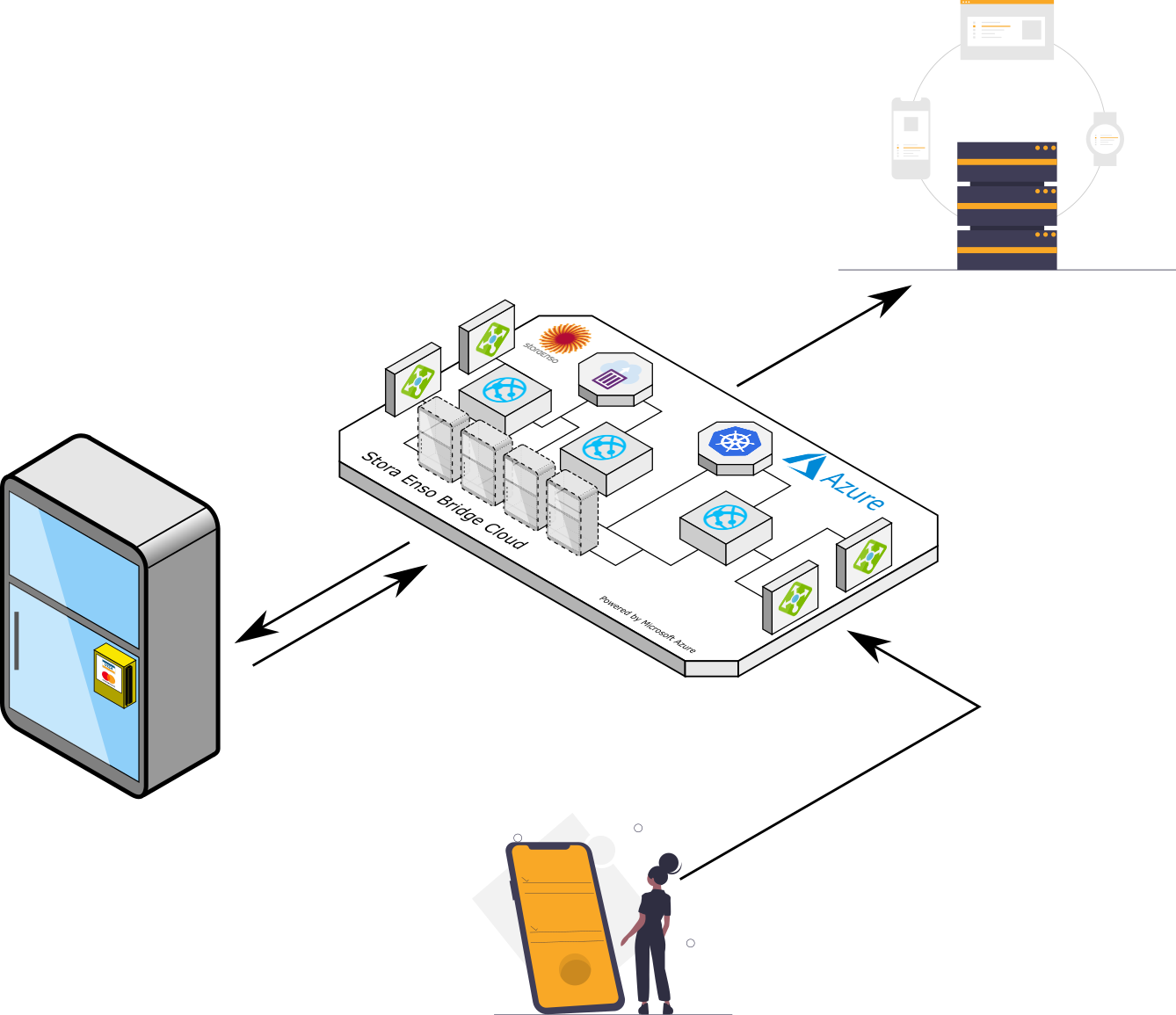
This chapter demonstrates how to integrate own mobile application so it can unlock the cabinet door and receive the purchase data for the checked in user.
Developer can test the API with any API testing tool, for instance Postman, but eventually the API can be executed from the application.
Application Authentication
User name and password
Each application must authenticate in the same way as any other user, the user name and password must be granted for the application. Also application's user must belong to the same tenant as the cabinets it must integrate with.
We recommend to grant user name as a fake email address with complex random name, and password of minimum 20 characters. Tenant administrators can perform the application user registration in the user management portal
Administrator must make sure that the application user is belonging to the same tenant as targeted cabinets by specifying the correct group ID. If the administrator manages only one tenant, easy step is to copy and paste own group to the new user. Otherwise, if the administrator is responsible for multiple tenants, make sure to copy only those groups or one group that the application would be able to unlock and receive the purchase transactions data.
Administrator may activate application user email in the profile edit page. As well as set up complex password.
Once activated and once password is set, the application user is ready to be used in API.
Example of application user name and password
Note! Below is the recommended example only. Use your own credentials for real integration. The example demonstrated the desired complexity of the application integration credentials access.
Username: my-app.gwAxvThecYrBdEf5wvZ48B@my-domain.com
Password: Q!dt:v*2eK}j'YtK}XXMbq9GeJ8"SJu/\x[(S2AN]qN2%X]4cQ
Application authentication key header
As a extra mean of protection, the application, when performing user check in, must include a special header to the POST request.
| Header | Description |
|---|---|
X-Application-Access-Key |
The access key. Set for each cabinet individually in the cabinet settings page. The check in POST request header must match to the one the cabinet settings has, if header and setting are not the same, the cabinet door will not be opened. |
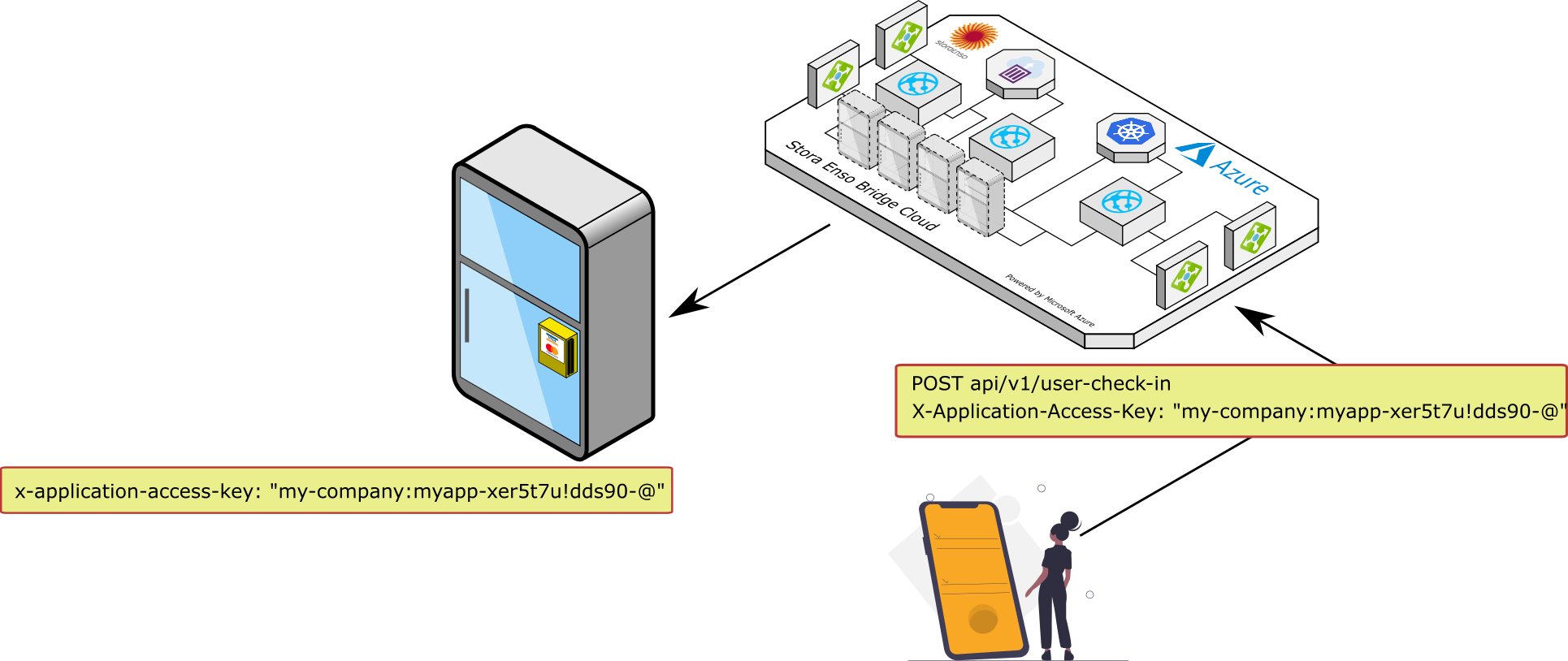
The header consists of two parts:
<tenant_id>:<app_identifier>
<tenant_id>- must be the same as cabinet tenant ID or the administrator tenant ID.<app_identifier>- any sequence of characters developers can create to identify the application, for instance"my-app-1234567890!@#$%". It should be unique for each application that is suppose to unlock the doors of the cabinet.
Parts of the header are separated with : character.
Each cabinet that the application must control should have the same value it it's settings under "x-application-access-key" setting.
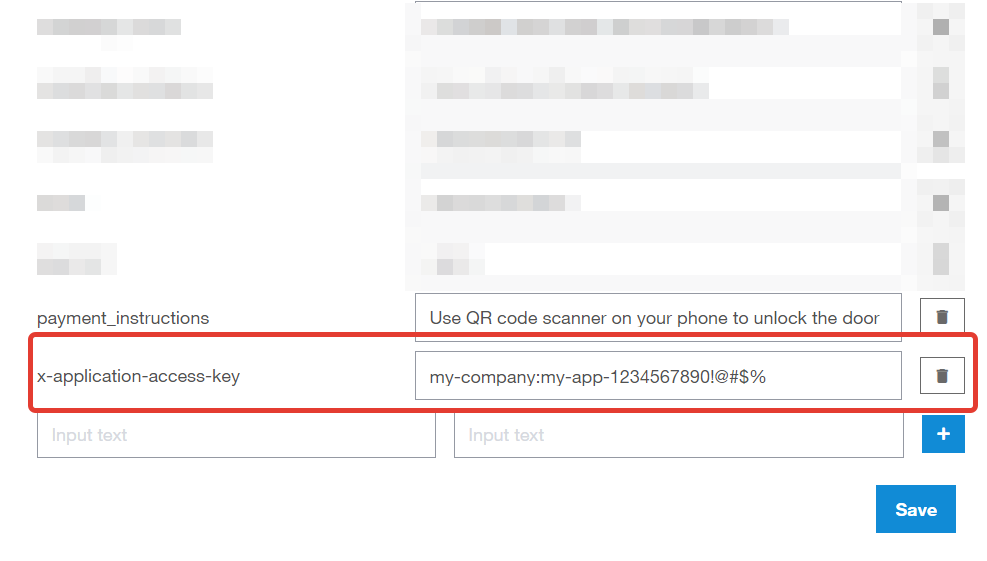
Cabinet settings can be edited in the eCommerce portal under Device management, by selecting each cabinet individually.
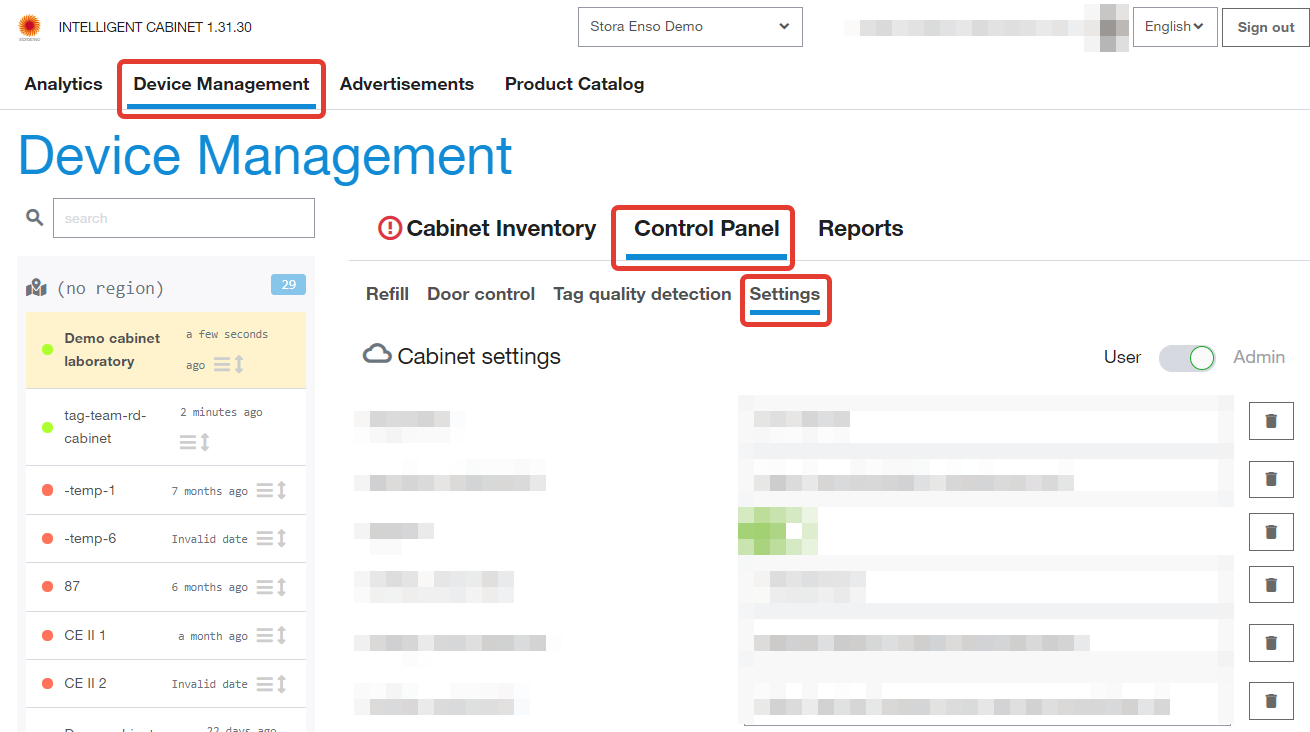
Example of the application access key
Header:
'X-Application-Access-Key': 'my-company:my-app-1234567890!@#$%'

Cabinet setting:
'x-application-access-key': 'my-company:my-app-1234567890!@#$%'
User Check In
Once user is checked in, the cabinet door is unlocked and user can take products out. API call must provide cabinet ID and usr ID to check in to. The process of fetching the cabinet ID see in the QR Code testing part below.
Request body
| Name | Type | Explanation |
|---|---|---|
deviceCode |
string | The code of the cabinet. |
userId |
string | The user ID who was just checked in |
transactionReference |
string | Reference of the transaction |
Response
Response is having the code 201 (Created).
| Name | Type | Explanation |
|---|---|---|
deviceCode |
string | The code of the cabinet. |
userId |
string | The user ID who was just checked in |
transactionReference |
string | Reference of the transaction |
Example request
curl --location --request POST 'https://api.selflystore.com/api/v1/user-check-in' \
--header 'Authorization: Bearer eyJhbGciOiJSUzI1NiIsImtpZCI6IjY0ZW.....' \
--header 'X-Application-Access-Key: my-company:super-secret-application-12345xyz' \
--header 'Content-Type: application/json' \
--data-raw '{
	"deviceCode": "12-06-2020-2157",
	"userId": "777",
  "transactionReference":"55632BD45"
}'
Example body
{
  "deviceCode": "12-06-2020-2157",
  "userId": "777",
  "transactionReference": "55632BD45"
}
Example response
{
  "deviceCode": "12-06-2020-2157",
  "userId": "777",
  "transactionReference": "55632BD45"
}
User Check Out
User can be checked out programmatically if, for instance, he/she decides to cancel the purchase. Before the door is opened it will force the cabinet to lock the door and stop the user session.
The API is similar to user check in API.
Request body
| Name | Type | Explanation |
|---|---|---|
deviceCode |
string | The code of the cabinet. |
userId |
string | The user ID who was just checked out |
Response
Response is having the code 201 (Created).
| Name | Type | Explanation |
|---|---|---|
deviceCode |
string | The code of the cabinet. |
userId |
string | The user ID who was just checked out |
Example request
curl --location --request POST 'https://api.selflystore.com/api/v1/user-check-out' \
--header 'Authorization: Bearer eyJhbGciOiJSUzI1NiIsImtpZCI6IjY0ZW.....' \
--header 'X-Application-Access-Key: my-company:super-secret-application-12345xyz' \
--header 'Content-Type: application/json' \
--data-raw '{
	"deviceCode": "12-06-2020-2157",
	"userId": "777"
}'
Example body
{
  "deviceCode": "12-06-2020-2157",
  "userId": "777"
}
Example response
{
  "deviceCode": "12-06-2020-2157",
  "userId": "777"
}
QR Code Testing
As a general rule, the cabinet displays the QR code based on the configured payment system. For testing purposes, when developer is integrating own mobile application, it is possible to set up custom QR code for cabinet.
In order to enable cabinet to be in testing and development mode, in the cabinet settings the "payment" setting must be set up to "own_webhook".
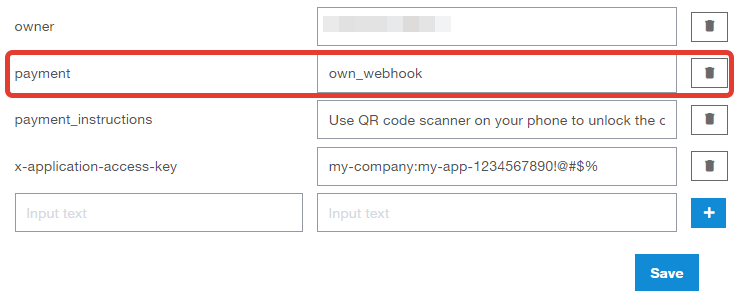
Once the payment is changed to "own_webhook" it takes about 30 seconds for the cabinet to react on that change. If on the cabinet screen you see that QR code disappeared, this means that the cabinet is now in development mode.
| Setting | Value | Description |
|---|---|---|
payment |
own_webhook |
This payment value switches cabinet to the development mode, where user can define QR code visibility, QR code content and webhook where to post the payment data. |
In development mode by default, there it no QR code defined. User can see only version information, the payment method logo and the payment instructions text.
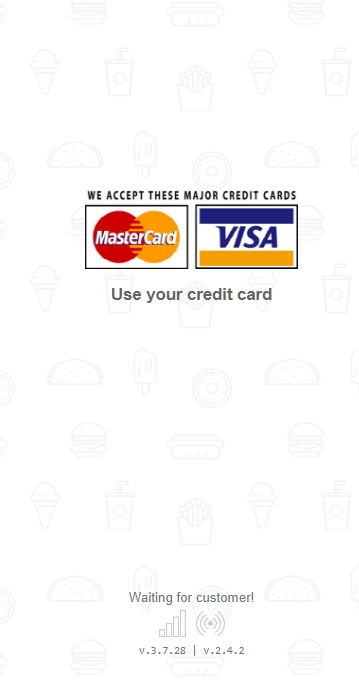
Setting up own qr code
There are two settings that user must apply in cabinet settings screen in order to show qr code and set it's content.
| Setting | Value | Description |
|---|---|---|
own_webhook_isQrCodeRequired |
true |
If defined, the QR code will be shown on screen of the cabinet. The default value of the QR code is "own_webhook://<cabinetCode>" where <cabinetCode> is the unique cabinet ID. |
own_webhook_qrCodePrefix |
prefix for QR code | If defined, the prefix is used instead of the default prefix, which is |
For instance, developer has own web app that is deployed at https://app.my-company.com and QR code must contain this as a prefix with cabinet ID as query argument. Then the prefix can be defined as "https://app.my-company.com?cabinet_id=". The resulting QR code will be having value
https://app.my-company.com?cabinet_id=<cabinetCode>
Note! <cabinetCode> is always appended to the end of the QR code.
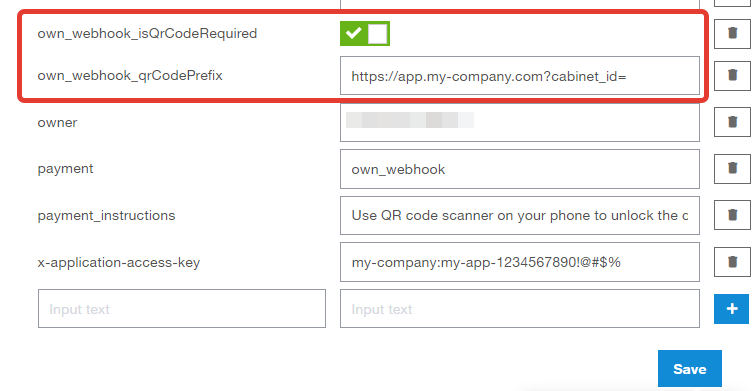
After saving the settings, it takes bout 30 seconds for the cabinet to apply new QR code value. New QR code will be shown on screen automatically.
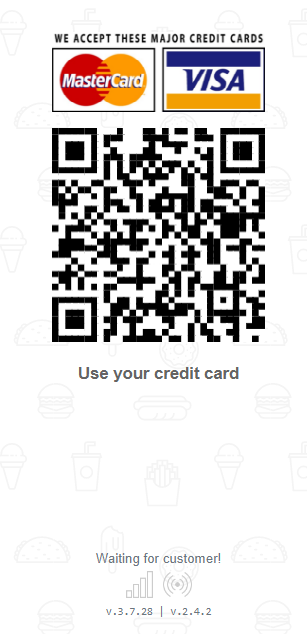
To delete the QR code, you must delete the "own_webhook_isQrCodeRequired" setting or set it to false.
Webhook Testing
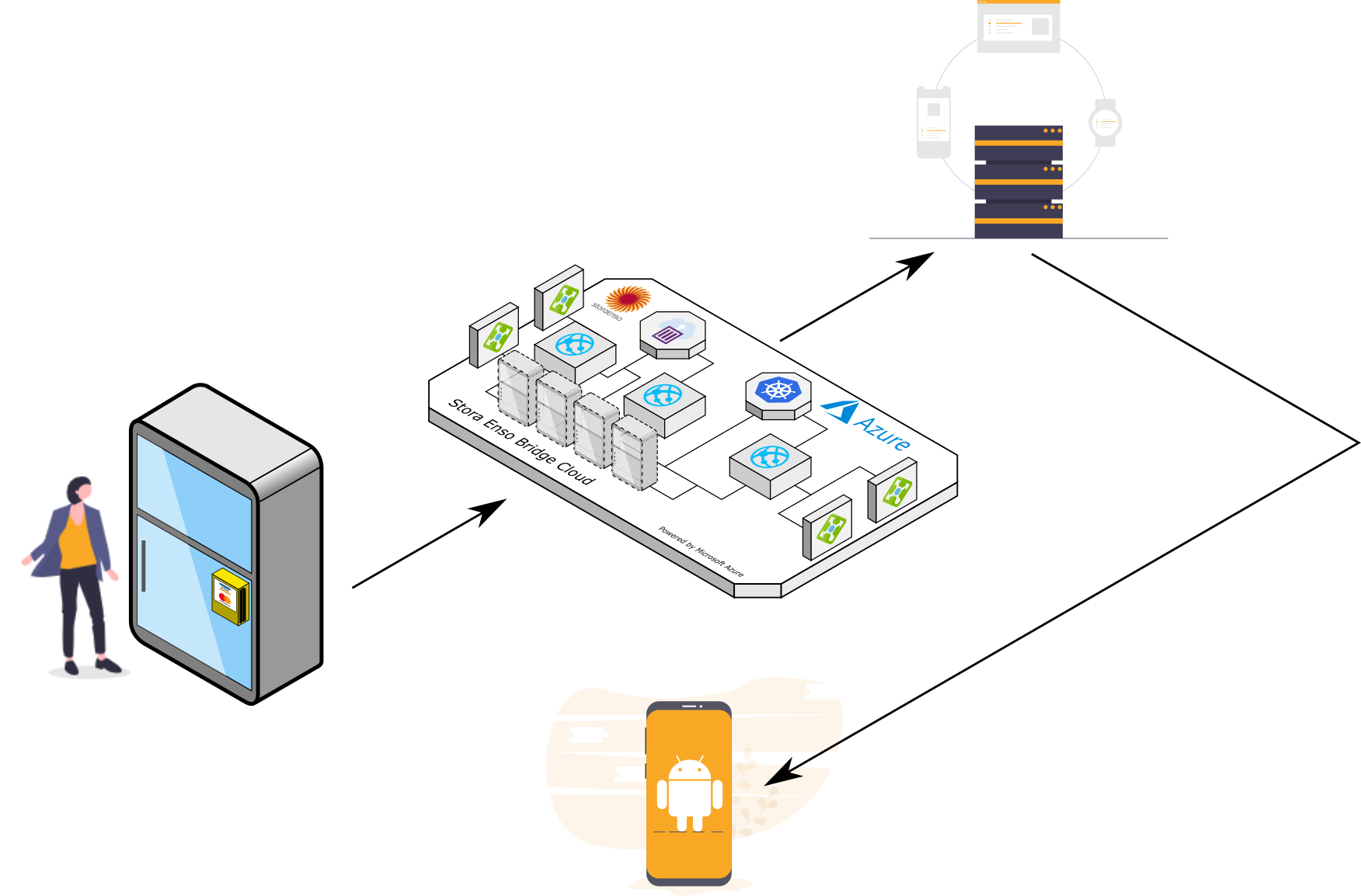
Cabinet will report the purchase data to the webhook URL defined by user in the "own_webhook_paymentReportWebHookUrl" setting. If this setting is not defined, the payment data will not be reported anywhere.
| Setting | Value | Description |
|---|---|---|
own_webhook_paymentReportWebHookUrl |
URL to make a POST request to | The URL where the payment data will be posted at the time when user closes the door and finalizes the transaction. |
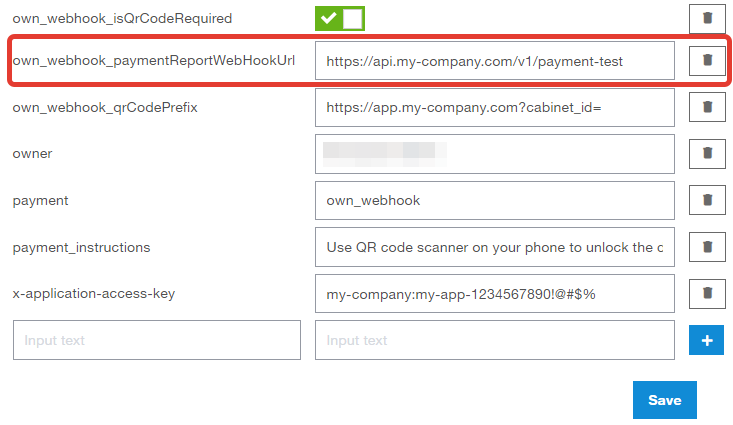
Webhook payload
| Field Name | Value | Explanation |
|---|---|---|
orderId |
string | The unique ID of the order. |
deviceCode |
string | The ID of the cabinet that transaction happened in. |
customerId |
string | The ID of the user who checked in to the cabinet and made a purchase. |
timestamp |
date as ISO string | Time of the transaction in UTC ISO string format. |
purchases |
object | List of purchased items and total sum of the purchase. |
meta |
object | Additional metadata. Not in use yet, always be the empty object. |
purchasedTags |
array | List of purchased RFID tags, unique IDs of the purchased items. |
totalSum |
number | The total transaction sum. |
paidAmount |
number | The amount client actually paid during purchase |
currency |
string | The currency of transaction |
status |
string | The status of transaction |
transactionDetails |
Object | The reference of the transaction |
Purchases data
| Name | Type | Explanation |
|---|---|---|
purchase |
Array of objects | List of the items user has purchased. |
purchase.barcode |
number | Purchased products barcode, that is printed on the package. A unique SKU number. |
purchase.count |
number | Number of purchased products. |
purchase.vatValue |
number | VAT value of product |
purchase.price |
float | The unit price of Purchased product. |
purchase.image |
string | URL to product's image. |
purchase.currency |
string | The currency of product's price. |
purchase.epc |
List of string | List of EPC value for item has been purchased |
purchase.name |
string | The name of the product. |
purchase.isDiscounted |
boolean | If the product was discounted or not. |
purchase.discountAmount |
number | The percentage of the discount. |
purchase.discountName |
string | The name under which the discount is set. |
Example payment payload
{
  "purchases": [
    {
      "barcode": "5053990101818",
      "vatValue": 32.5,
      "epc": ["303534789809F140A914AD92", "303534789809F140A914ADB7"],
      "name": "Chips",
      "price": 2.9,
      "currency": "€",
      "image": "https://cabinetdemo.blob.core.windows.net/demofiles/jaffa.png",
      "imageUrl": "https://cabinetdemo.blob.core.windows.net/demofiles/jaffa.png",
      "count": 2
    },
    {
      "barcode": "5449000014535",
      "vatValue": 32.5,
      "epc": ["30354C94A0016B40A914B194"],
      "name": "Soft drink",
      "price": 200000,
      "currency": "€",
      "image": "https://cabinetdemo.blob.core.windows.net/demofiles/kismet.png",
      "imageUrl": "https://cabinetdemo.blob.core.windows.net/demofiles/kismet.png",
      "count": 1
    }
  ],
  "totalSum": 200005.8,
  "paidAmount": 200005.8,
  "currency": "€",
  "status": "DONE",
  "meta": {},
  "purchasedTags": [
    "303534789809F140A914AD92",
    "303534789809F140A914ADB7",
    "30354C94A0016B40A914B194",
    "E280689400004010A914B41B"
  ],
  "transactionDetails": {
    "transactionReference": "55632BD45"
  },
  "orderId": "Order-1638342942095",
  "customerId": "1212",
  "deviceCode": "mypos-usb-adb0",
  "timestamp": "2021-12-01T07:15:42.096Z"
}
Webhook custom header
Client can define static header when reporting the purchase data to the webhook URL defined by user in the "own_webhook_paymentReportWebHookUrl" setting.
| Header Key | Header Value | Description |
|---|---|---|
own_webhook_customer_header_key |
Custom header key | The custom header key where the payment data will be posted at the time when user closes the door and finalizes the transaction. |
own_webhook_customer_header_value |
Custom header value | The custom header value where the payment data will be posted at the time when user closes the door and finalizes the transaction. |
Cloud Payment Integration - Introduction
Operators or payment providers can integrate new payment methods using Selfly Cloud API. This chapter shows how to authenticate and get access token from user management portal and how to use it while sending a request to APIs. It is possible to unlock the cabinet door using initiate session endpoint. Then user can take products and close the door, after which Selfly Cloud calculates the total amount and calls the payment provider's capture endpoint. Finally, it shows the purchased items on the cabinet UI.
Authentication
To send a request to Selfly Cloud endpoints, payment provider needs username and password. To get username and password please contact with Selfly Store Support Team. Payment provider needs to get access token using the received credentials, and use the access token while sending request to endpoints. The details about access token can be found from Authentication section.
Selfly Store Support Team Contacts:
| [support@selflystore.com] |
Cabinet Settings
There are certain parameters which are specific to each cabinet. These parameters can be set from the Selfly Cloud Portal. If not set, default values will be used.
Parameter List
| Term | Meaning | Default Value |
|---|---|---|
| showPaymentV3QrCode | Whether to show a QR code on screen for payment provider to start the session | false |
| paymentV3UrlPrefix | If QR code is enabled, its format will be {paymentV3UrlPrefix}{deviceCode} | v3_payment:// |
| preAuthAmount | The pre-Authorization amount for the current payment provider (in 1/100 unit). | 5000 |
| preAuthCurrency | The pre-Authorization currency for the current payment provider. | EUR |
The preAuthAmount is represented by 1/100 unit, the default value is 5000 EUR cents which means 50 EUR. Also, the preAuthCurrency parameter complies with ISO-4217 standard. This parameter can be set by alphabetic code of the ISO standard.
Selfly Cloud Endpoints
Transactional Endpoints
The following endpoints can be used to start a new transaction, capture payment for the transaction and complete or fail the transaction from Selfly Cloud side.
| Name | Description |
|---|---|
| POST /api/v3/payment/sessions | Starts a new session for the current user operation. |
| POST /api/v3/payment/sessions/capture | Completes the current session if remaining amount is zero. |
| POST /api/v3/payment/sessions/reversal | Reverses the current session if user does not take any product. |
| POST /api/v3/payment/sessions/failure | Fails the current session. |
| POST /api/v3/payment/sessions/purchase | Completes the previous session if remaining amount is zero. |
Transactional Endpoint Details
To start a new purchase session (transaction) on the Selfly cloud, the following endpoint needs to be called.
| Name | Description |
|---|---|
| POST /api/v3/payment/sessions | Starts a new session for the current user operation. |
When calling the initial session endpoint, the body should contain the following properties:
| Property Name | Type | Status | Description |
|---|---|---|---|
deviceCode |
string |
required |
Current device (cabinet) code. |
transactionId |
string |
required |
Transaction id for the new session. |
transactionReference |
string |
required |
Unique identifier for the whole transaction operation. |
transactionType |
string |
required |
Type of the transaction. |
paymentProvider |
string |
required |
Payment provider name. |
authorizationStatus |
string |
optional |
Authorization status property. |
cardIdentifier |
object |
optional |
Includes customer and card related information. |
language |
string |
optional |
Current language of the payment provider. |
This endpoint return 201 success response with additional properties in response. In success case, cabinet unlocks the door and users can take products.
After closing the door, cabinet calculates the total sum and calls payment provider capture endpoint. If user does not take any products, cabinet
calls payment provider reversal endpoint. After that, the payment provider needs to call Selfly Cloud capture, reversal or failure endpoint.
| Name | Description |
|---|---|
| POST /api/v3/payment/capture | Completes the current session if remaining amount is zero. |
When calling the capture endpoint, the body should contain the following properties:
| Property Name | Type | Status | Description |
|---|---|---|---|
paymentProvider |
string |
required |
Payment provider name. |
transactionId |
string |
required |
Transaction id for the capture operation of current session. |
transactionReference |
string |
required |
Unique identifier for the whole transaction operation. |
deviceCode |
string |
required |
Current device (cabinet) code. |
error |
string |
optional |
Includes error message. |
chargedAmount |
object |
optional |
Includes currency, amount, exponent and vat information. |
receiptItems |
object |
optional |
Includes product properties. |
remainingAmount |
object |
optional |
Includes remaining amount information like amount, exponent, reason and currency. |
If the remaining amount equals to zero, then the purchased products and success message is shown on the cabinet UI to the user.
| Name | Description |
|---|---|
| POST /api/v3/payment/reversal | Reverses the current session if user does not take any products. |
When calling the reversal endpoint, body should contain the following properties:
| Property Name | Type | Status | Description |
|---|---|---|---|
deviceCode |
string |
required |
Current device (cabinet) code. |
transactionId |
string |
required |
Transaction id for the reversal operation of current session. |
transactionReference |
string |
required |
Unique identifier for the whole transaction operation. |
paymentProvider |
string |
required |
Payment provider name. |
error |
string |
optional |
Includes error message. |
This endpoint can be used when user does not take any products. If it returns 201 success response, the cabinet basically shows zero amount and success message on the screen.
| Name | Description |
|---|---|
| POST /api/v3/payment/sessions/failure | Can be used to finish the current transaction as failed. |
When calling the failure endpoint, body should contain the following properties:
| Property Name | Type | Status | Description |
|---|---|---|---|
transactionId |
string |
required |
Transaction id for the failure operation of current session. |
transactionReference |
string |
required |
Unique identifier for the whole transaction operation. |
deviceCode |
string |
required |
Current device (cabinet) code. |
error |
string |
required |
Includes error message. |
paymentProvider |
string |
required |
Payment provider name. |
This endpoint can be used to fail the current transaction. The error property can be used to set the failure reason. If it returns 201 success response, the cabinet shows total price, purchased items and error message on the screen.
| Name | Description |
|---|---|
| POST /api/v3/payment/sessions/purchase | Completes the previous session if remaining amount is zero. |
The purchase endpoint can be used when the total amount exceeds the preAuth amount. In this case, the remaining amount can be sent to capture endpoint with reason AuthorizedAmountExceeded, then Selfly Cloud will call payment provider's transactions endpoint to get new transactionId for the remaining amount and starts to listen purchase endpoint to get acknowledge.
| Property Name | Type | Status | Description |
|---|---|---|---|
paymentProvider |
string |
required |
Payment provider name. |
transactionId |
string |
required |
Transaction id for the remaining amount of current session. |
transactionReference |
string |
required |
Unique identifier for the whole transaction operation. |
deviceCode |
string |
required |
Current device (cabinet) code. |
error |
string |
optional |
Includes error message. |
chargedAmount |
object |
optional |
Charged amount from the customer. Includes currency, amount, exponent and vat. |
receiptItems |
object |
optional |
Includes product properties. |
remainingAmount |
object |
optional |
Includes remaining amount information like amount, exponent, reason and currency. |
Device Specific Endpoints
The following endpoints can be used to update the device status or it is last alive time. If some error happens on payment provider, these endpoints can be used to update the current status of the cabinet.
| Name | Description |
|---|---|
| POST /api/v3/payment/pos/{deviceCode} | Updates the status of the cabinet. |
| POST /api/v3/payment/heartBeat | Updates the latest alive time of the cabinet. |
Device Specific Endpoint Details
Payment provider can send some messages to the Selfly Cloud to change the current status of the cabinet. If there are errors on the payment provider side, OutOfService message can be sent to the following endpoint so that specified cabinet can change the status to OutOfService state. When a Normal message arrives for the same cabinet, it will change the status and goes to idle state where purchasing is enabled for consumers.
| Name | Description |
|---|---|
| POST /api/v3/payment/pos/{deviceCode} | Updates the status of the cabinet. |
When calling this endpoint, body should contain the following properties:
| Property Name | Type | Status | Description |
|---|---|---|---|
operation |
string |
required |
New status of the cabinet. |
message |
string |
optional |
Represents the current status message. |
paymentProvider |
string |
required |
Payment provider name. |
authorizationSettings |
object |
optional |
Authorization settings for the cabinet, includes currency, exponent and amount. |
terminals |
object |
optional |
Terminals connected to current cabinet. |
To send a heart beat message to the cabinet the following heartBeat endpoint can be used. This endpoint basically notifies specified cabinet that the terminal connected to this device is working fine.
| Name | Description |
|---|---|
| POST /api/v3/payment/heartBeat | Updates the latest alive time of the cabinet. |
When calling this heartBeat endpoint, the body should contain the following properties:
| Property Name | Type | Status | Description |
|---|---|---|---|
deviceCode |
string |
required |
Represents the cabinet |
requestDate |
string |
optional |
Represents the current date for this request. |
status |
string |
optional |
Represents the status information. |
message |
object |
optional |
Message field. |
paymentProvider |
object |
required |
Payment provider name. |
payment provider's Endpoints
Transactional Endpoints
The following endpoints can be used to complete, reverse or cancel the transaction on payment provider side.
| Name | Description |
|---|---|
| POST /api/v1/devices/{deviceCode}/transactions | Instructs the device to perform a capture. |
| POST /api/v1/devices/{deviceCode}/transactions/{transactionId}/capture | Instructs the device to capture the ongoing transaction. |
| POST /api/v1/devices/{deviceCode}/transactions/{transactionId}/reversal | Instructs the device to reverse the ongoing transaction. |
| POST /api/v1/devices/{deviceCode}/transactions/{transactionId}/cancel | Instructs the terminal to attempt to cancel the ongoing transaction. |
Transactional Endpoint Details
To check the details of these transactional endpoints, Payment Provider's swagger documentation can be reviewed.
Device Specific Endpoints
The following endpoints can be used to get or update the device information on payment provider side.
| Name | Description |
|---|---|
| GET /api/v1/devices/{deviceCode} | Can be used to get information about device. |
| PUT /api/v1/devices/{deviceCode} | Can be used to update current status of the device. |
| POST /api/v1/devices/{deviceCode}/ping | Can be used to send a ping message for the specified device. |
Device Specific Endpoint Details
Selfly Cloud can send messages to the payment provider to change the current status of the cabinet. If there are errors on the Selfly Cloud, it can send OutOfService to the following endpoint so that payment provider can change status to OutOfService state and stop the purchasing operation. When a Normal message arrives to the payment provider for specific cabinet, it will change the status of device to able process payment.
| Name | Description |
|---|---|
| GET /api/v1/devices/{deviceCode} | Gets the status of the device and connected terminals. |
When calling this endpoint, body payload is not needed. Only deviceCode of cabinet is needed as parameter.
| Name | Description |
|---|---|
| PUT /api/v1/devices/{deviceCode} | Updates the status of the device. |
When calling this endpoint, body should contain the following properties:
| Property Name | Type | Status | Description |
|---|---|---|---|
operation |
string |
required |
New status of the device. |
message |
string |
optional |
Represents the current status message. |
authorizationSettings |
object |
required |
Authorization settings for the terminal, includes currency, exponent and amount. |
To ping a payment terminal the following endpoint can be used. This endpoint basically requests notification from payment provider for specified cabinet, whether the terminal connected to this device is working fine.
| Name | Description |
|---|---|
| POST /api/v1/devices/{deviceCode}/ping | Sends heartbeat request to payment provider. |
When calling this endpoint, body payload is not needed. Only deviceCode of cabinet is needed as parameter.
To check the details of these device specific endpoints, Payment provider's swagger documentation can be reviewed.
Selfly Cloud - Payment provider Integration
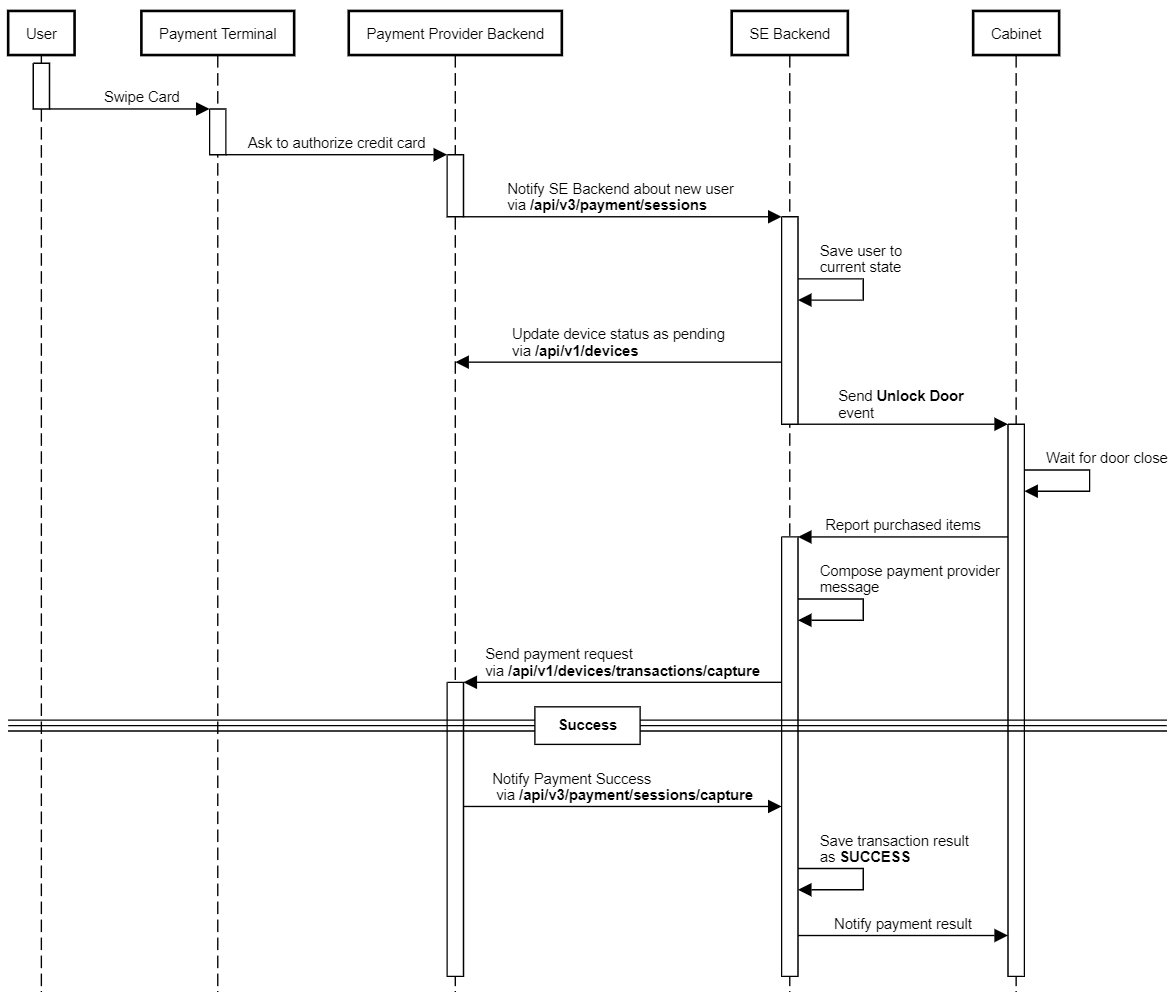
- User shows the credit card to the card reader.
- Card terminal pre-authorizes a fixed sum that is predefined on Selfly cloud portal
- After preauthorisation is successful, cabinet door is unlocked.
- User takes the goods he/she wants, then closes the door.
- Cabinet calculates the total amount to be paid by checking the inventory difference between the inventory before the door opened and after it's closed.
- Cabinet sends the total sum to the card terminal to complete the transaction.
- If the total sum is equal or lower than the pre-authorised amount, payment is successfully completed.
Remaining Amount Case
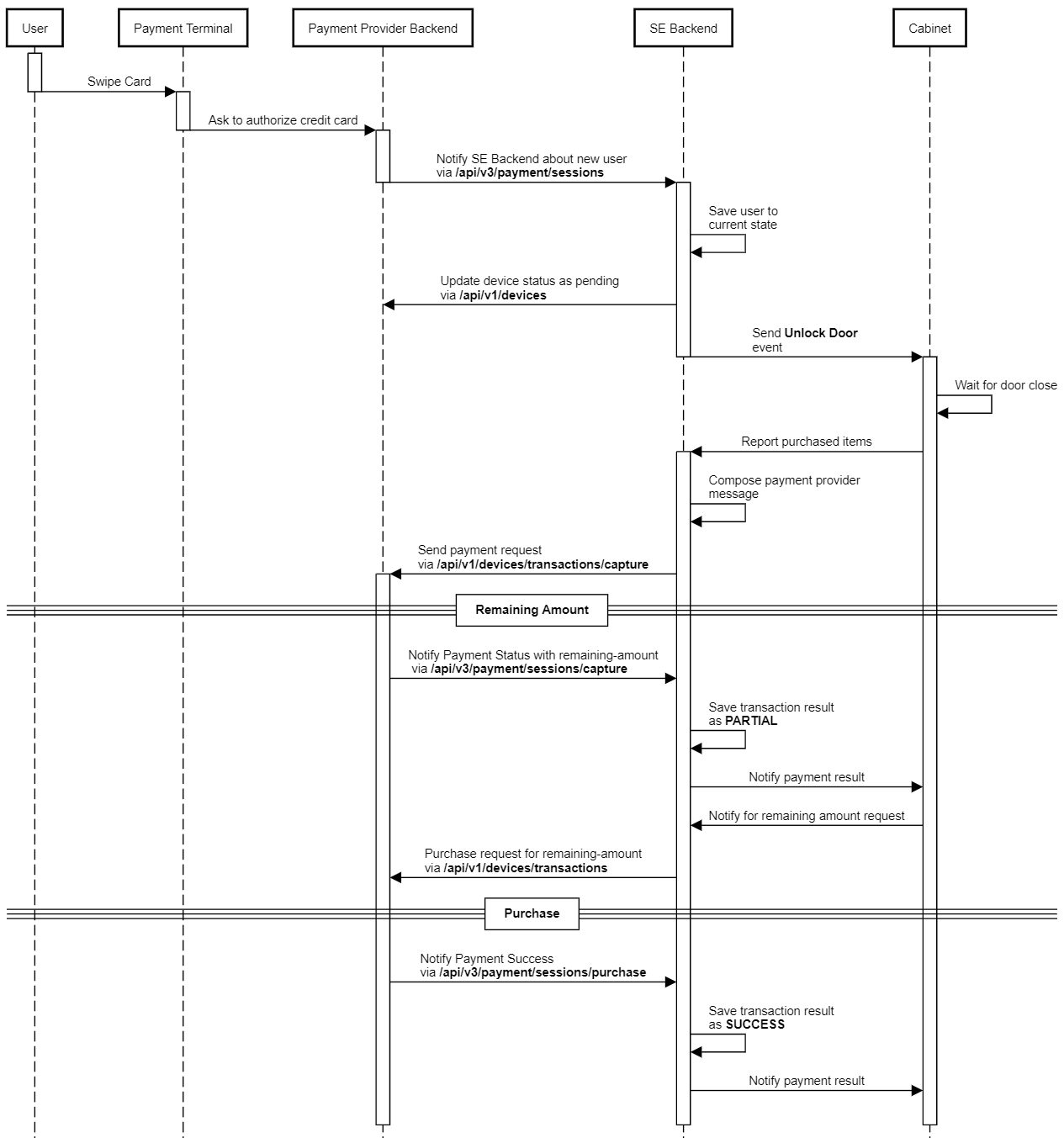
If total amount exceeds authorized amount, cabinet asks the user to pay the remaining sum. If the user pays the remaining sum within a pre-defined interval, then the payment is marked as successfull. Otherwise transaction will be marked with PARTIAL status.
Reversal Case
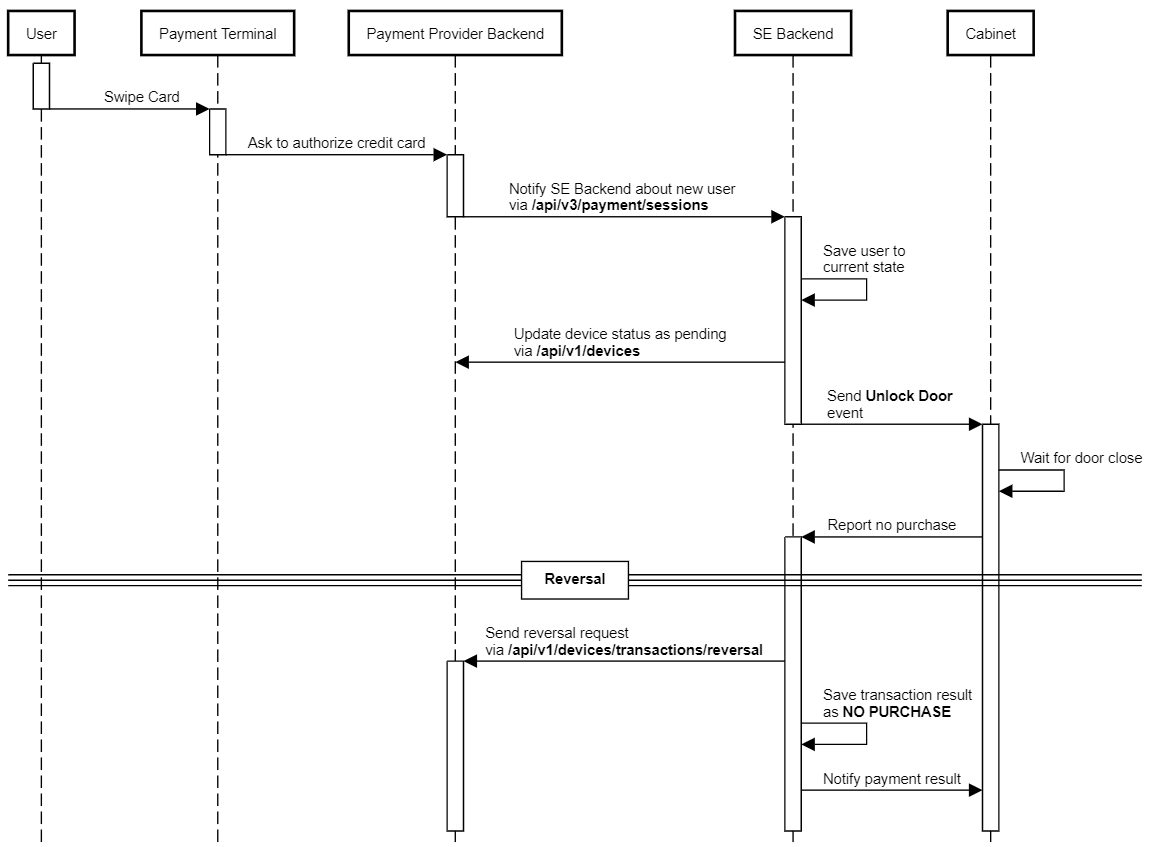
If user doesn't takes any good after opening the door, reversal will begin when door is closed. Payment provider reversal endpoint will be called and transaction will be marked as NO PURCHASE.
Failure Case
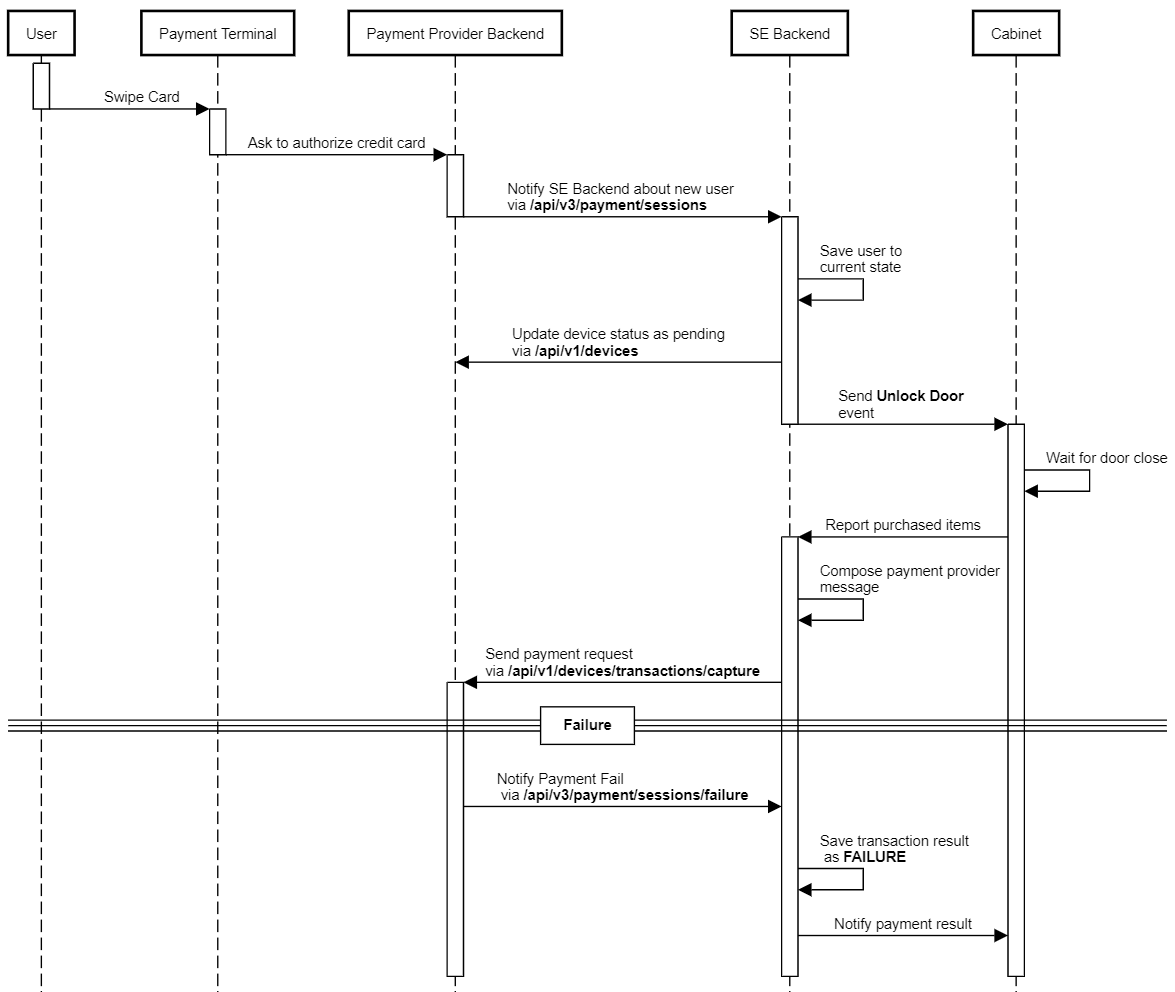
If any problem occurs on payment provider side for a purchase, it acknowledgse payment as failure to Selfly Cloud and transaction will be marked as FAILURE.
How to Change Cabinet Settings
To be able to Change the cabinet's settings, the user can go to E-commerce Portal, navigate to device management tab and then select settings.
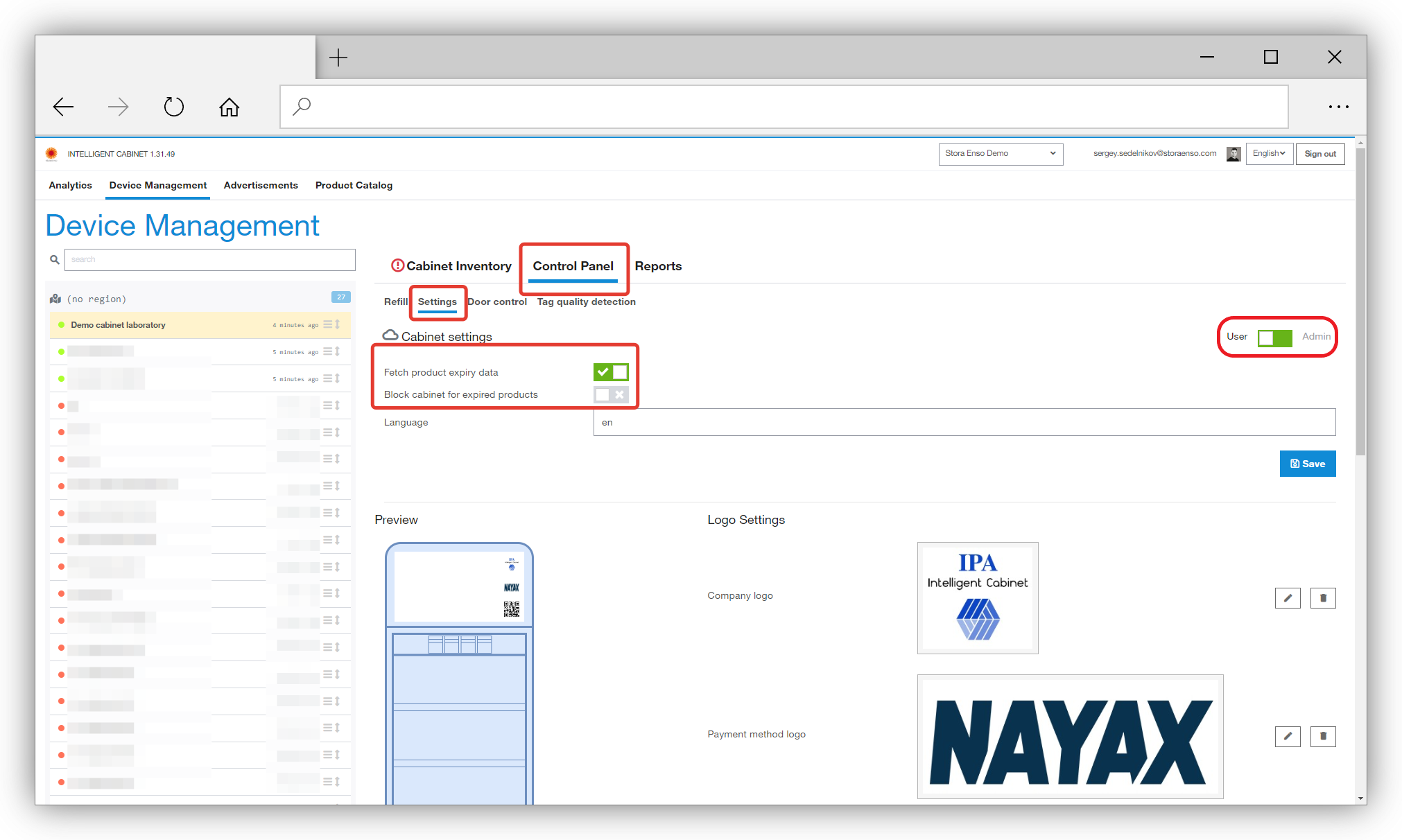
Settings related to expired products are available for all users and can be seen in settings view. Other settings of the cabinet can only be seen by users with Administrator role. These settings can be accessed by toggling the switch on the right side from User to Admin.
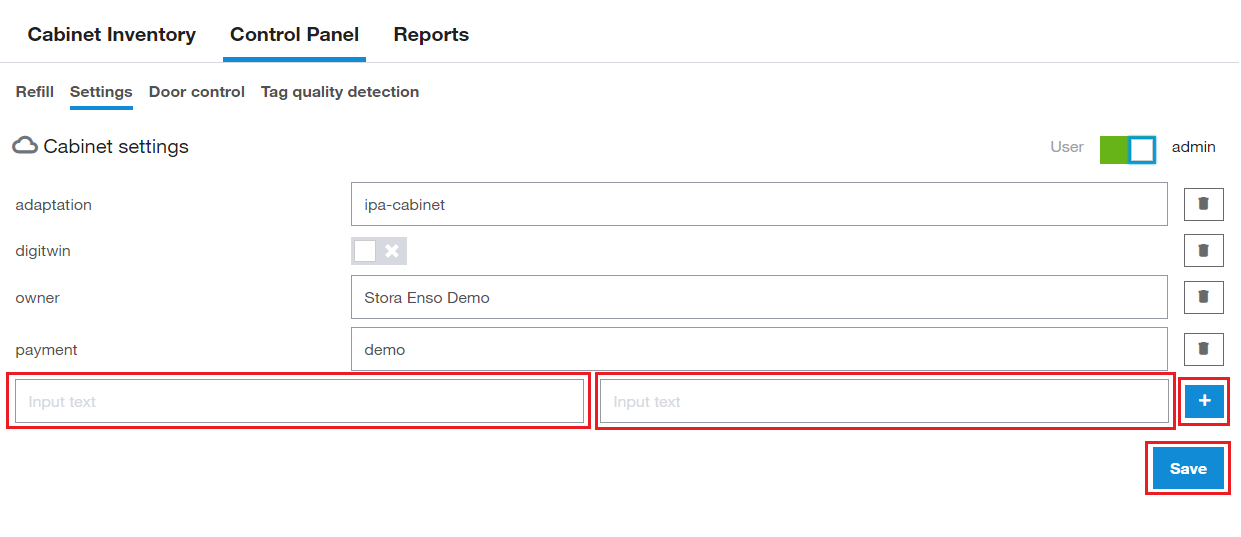
To add a new setting, the user can use the blank setting row on the button of the settings list. After entering the name of the setting on the left input box and its corresponding value in the right input box, the user must click on the plus button to add the setting to the list and create a new blank row. In the next step, the settings should be saved. by clicking on the save button and confirming the operation, the settings will be saved.
To remove a setting, the user can click on the trashcan button on the right side of each setting row to mark them for deleting. then by clicking on save button and confirming the operation, the setting will be deleted.
The user can add or remove several settings before saving them.
Note that the setting will NOT be saved if the save button is not clicked
Expired Products Settings
When a cabinet detects an expired product inside, it shows a notification and then can act in two ways
- Block the cabinet from sales so user can’t open the door to purchase anything;
- Keep the cabinet in service but notify the user about expired products and asking them to check expiry date on the package before buying the item.
| Setting Definition | Description |
|---|---|
Fetch product expiry data |
Turn this option ON if your cabinet contains tags with written expiry date, this will enable the process of reading expiry date from the tag’s memory. |
Block cabinet for expired products |
If this setting is ON, the cabinet will go to “Out of Service” state and user will not be able to purchase anything from the cabinet. |
Expired products setting can work in three different modes.
Expired product notification – cabinet stays active and user can purchase.
If the setting Fetch product expiry data is ON, but Block cabinet for expired products is OFF
The following notification message in yellow color will be shown on the cabinet screen if there exists an expired product in the cabinet.
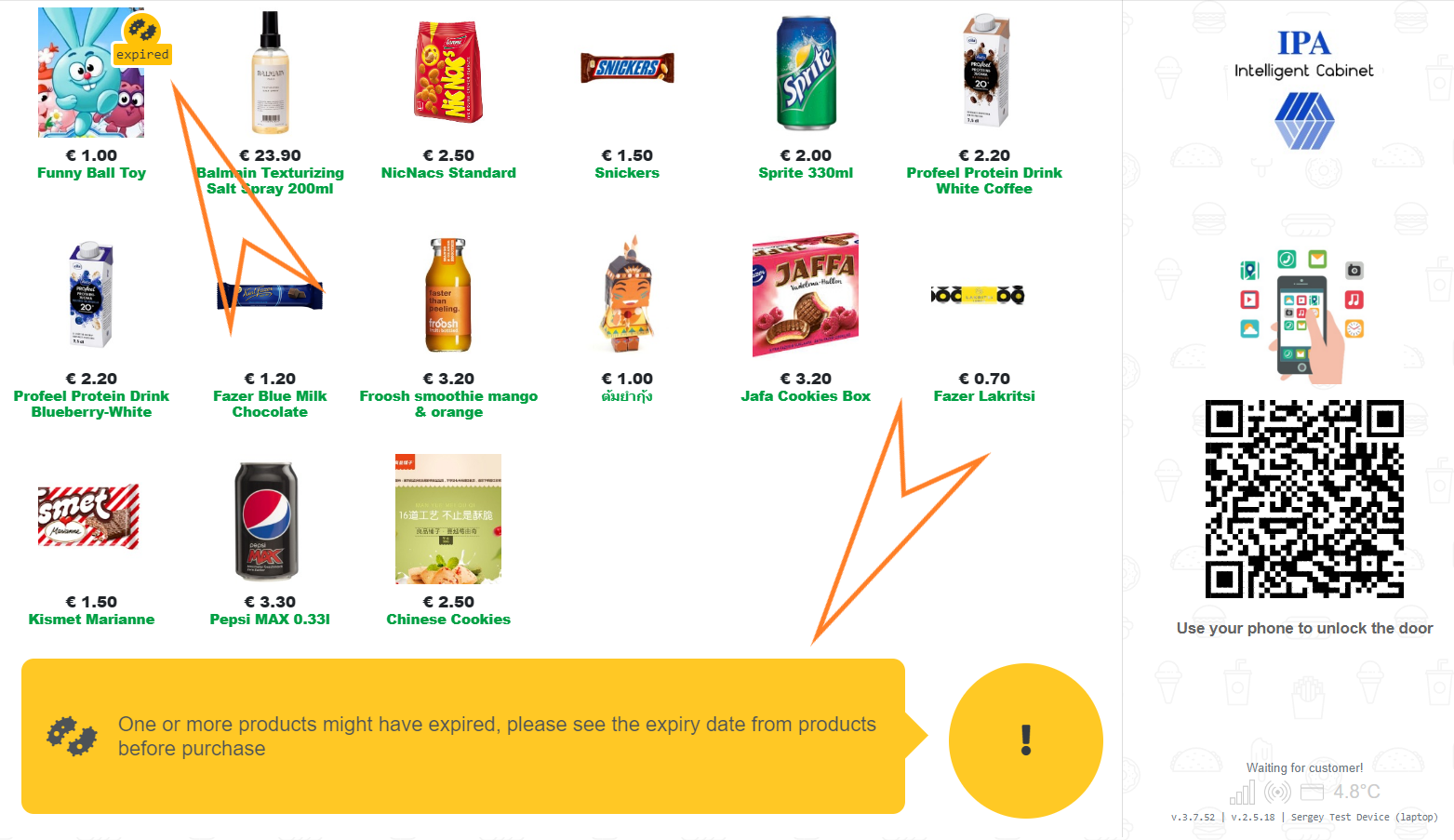
Note that in this case, cabinet is still active for sales, and then user is responsible for checking the expiry date of the product before purchasing.
Expired products warning - cause cabinet to be Out of Service
If both the Fetch product expiry data and Block cabinet for expired products settings are set to ON
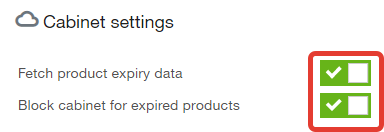
The following warning message in red color will be shown in the cabinet
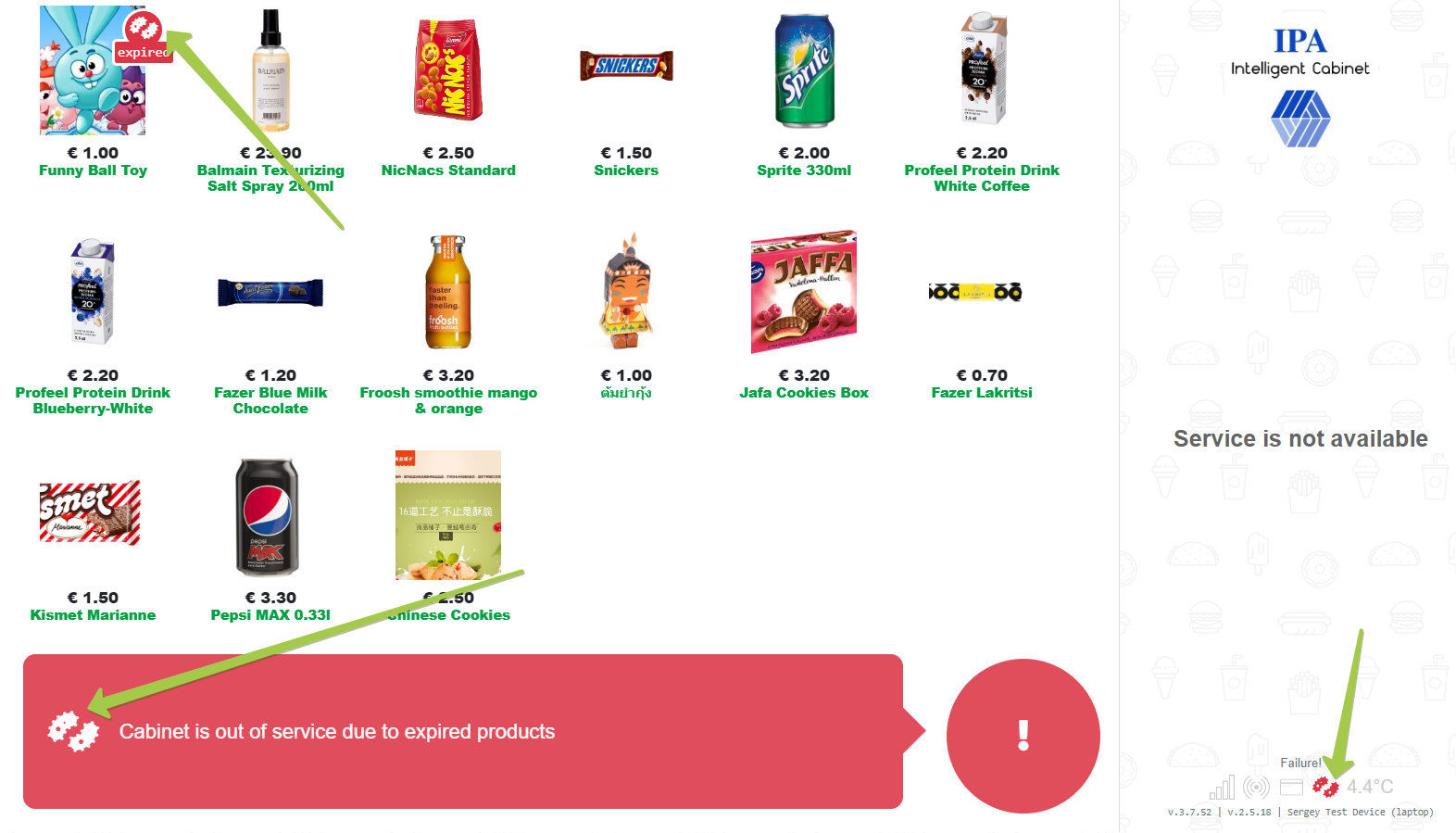
Note that in this case the cabinet goes to out of service state and the message at the bottom of the screen is in red color.The cabinet is in “Out of Service” state.
In order to remove expired products, an administrator or a cabinet operator must use the Refill procedure.
Ignoring expired date information
If the cabinet must ignore the expired product information, switch both of the following settings to OFF.
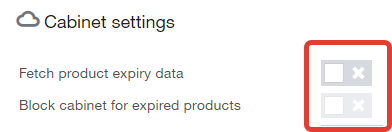
The UI will not show anything about expired products in the cabinet.
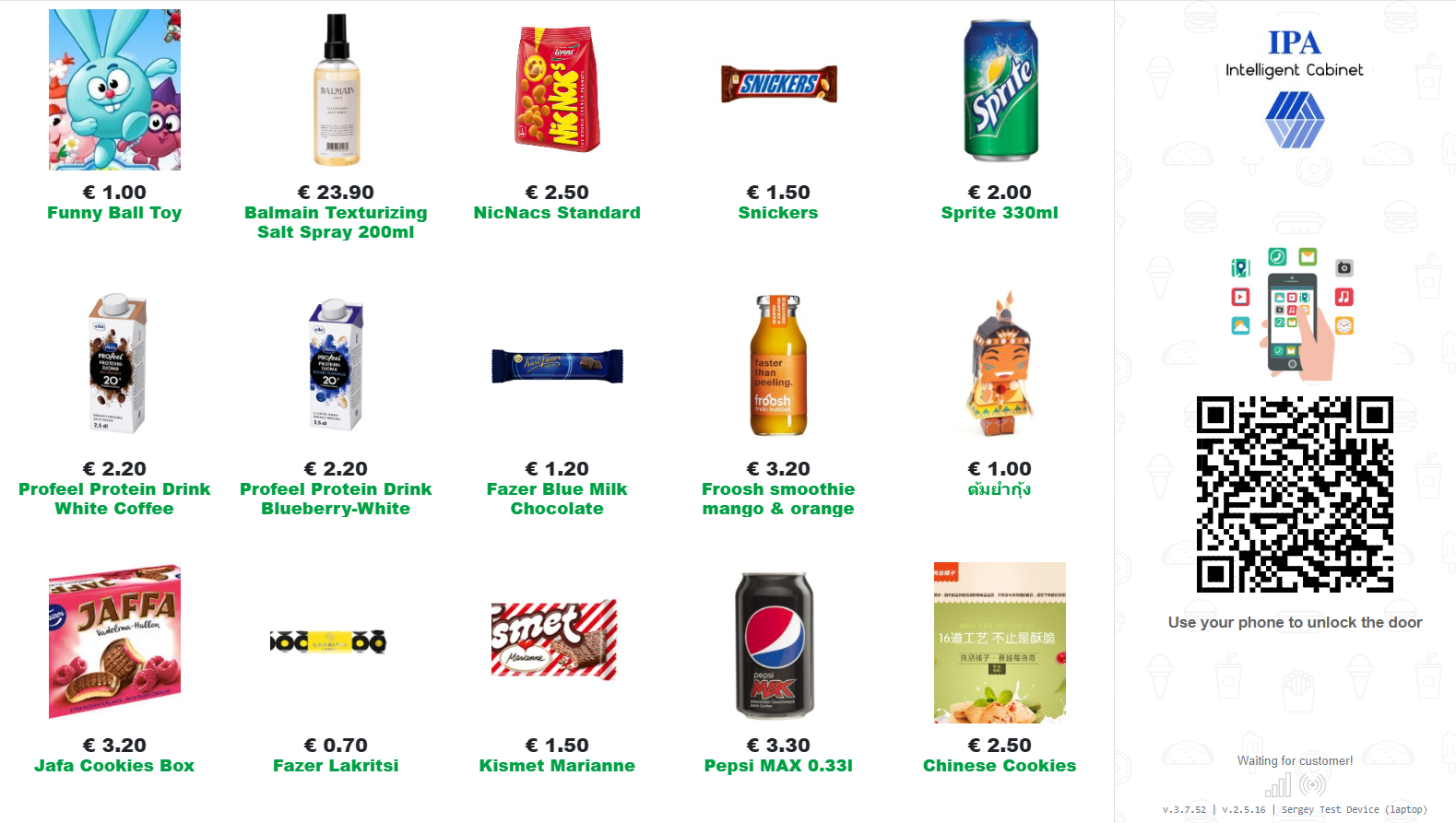
Note that if expiry date related settings are turned OFF, the expiry date information is ignored, and no additional messages are shown on screen.
Cabinet UI Settings
Set the following settings in order to affect UI behavior. These settings are available only for users with administrator privileges.
Goodbye Screen text
The following settings can be used to change goodbye screen text and the duration of showing it.
| Setting | Type | Default Value | Definition |
|---|---|---|---|
ui_goodbye_screen_text |
String | null | Text that user sees after the transaction finalization, see image below. If value is set to null, then the default text is used, the default text is defined in the UI project and says "Please accept payment on your mobile phone" |
ui_goodbye_screen_timeout |
Number | 7000 | Delay in milliseconds for how long the Goodbye screen is shown. 7 sec is the default. |
These settings will result in changes in goodbye text and duration of showing goodbye text in cabinets' UI:
Footer info text
The following setting can be used to change info text in the cabinet footer.
| Setting | Type | Default Value | Definition |
|---|---|---|---|
footerInfoText |
String | null | The info text is displyed on the footer section of the cabinet screen. If value is not set, then the default text is displayed which instructs users to open cabinet door by following the pay payment method available on the cabinet. |
SKUs Auto Scrolling(obsolete from 2023)
Cabinets' UI screen has enough space to contain 24 SKUs (product types). In case the number of SKUs are more than 24, cabinet UI automatically scroll down to show all of the SKUs available in the cabinet. the scroll functionality can be adjusted through the following settings. These settings are available only for users with administrator privileges.
| Setting | Type | Default Value | Definition |
|---|---|---|---|
ui_skus_scroll_top_bottom_delay_ms |
Number | 2000 | Delay in milliseconds for how long to stop at top and bottom of SKUs scroll animation. |
ui_skus_scroll_easing_weight |
Number | 1 | Value from 0 to 1 defining how much easing to apply in SKUs scroll animation. 0 is no easing while 1 is full easing. |
ui_skus_scroll_speed_adjustment_for_less_products_weight |
Number | 0.75 | Value from 0 to 1 affecting amount of slowdown of SKUs animation scroll when there are fewer products. 1 slows down most while 0 does no slow down. |
ui_skus_scroll_speed_pixel_per_ms |
Number | 0.1 | Defines SKUs animation average scroll speed in pixels per ms. |
SKUs sorting
The SKUs (products) in the cabinet UI can be sorted based on their names or their barcode. By default, they are sorted based on their barcodes.
| Setting | Type | Default Value | Definition |
|---|---|---|---|
ui_skus_sort_by |
String | null | The key with which the skus are sorted and shown on the cabinet UI. values can be name, productcategory, supplier or barcode. |
Cabinet pages display settings
To change the duration of showing individual carousel items such as advertisements, products, deals, expired products and expiring products, the following settings can be used. These settings are available only for users with administrator privileges.
| Setting | Type | Default Value | Minimum Value | Maximum Value | Definition |
|---|---|---|---|---|---|
adsInterval |
Number | 5000 | 5000 | 30000 | How long to display each ad. |
bundleDiscountInterval |
Number | 10000 | 5000 | 30000 | How long to display each bundle discount. |
productsInterval |
Number | 10000 | 5000 | 30000 | How long to display products page. |
expiryProductsInterval |
Number | 10000 | 5000 | 30000 | How long to display expired andexpiring products page. |
purchaseInstructionInterval |
Number | 10000 | 5000 | 30000 | How long to display the purchase instruction page. |
logoInterval |
Number | 8000 | 5000 | 30000 | How long to display logos in left footer section. |
imagedDiscountInterval |
Number | 5000 | 5000 | 30000 | How long to display product discount image |
expiredProductsInterval |
Number | 10000 | - | - | How long to display expired products page. (obsolete after 2023) |
expiringProductsInterval |
Number | 10000 | - | - | How long to display expiring products page. (obsolete after 2023) |
dealsInterval |
Number | 10000 | - | - | How long to display deals page. (obsolete after 2023) |
Cabinet's door open timer
You can configure how long a cabinet's door remain unlocked for consumers after they sign in for purchase. After the timeout, if the door is not opened, the door will be locked automatically.
| Setting | Type | Default Value | Definition |
|---|---|---|---|
doorNotOpenedTimeout |
Number | 30000 | How long a cabinet's door remain unlocked after consumer signs in. |
Temperature Alarm Service Settings
Cabinets' record their internal temperature reading values for a certain amount of time in their internal memory. If the temperature of the cabinet exceeds a minimum or maximum temperature, for a certain amount of time, the cabinet can send an alarm to inform the users about the incident. The following settings are available to control this service.
| Property | Type | Default Value | Description |
|---|---|---|---|
temperature_maxTimeToKeepRecords |
Number | 120 | Maximum time to keep temperature record. If temperature_maximumTimeAboveMaximum or temperature_maximumTimeBelowMinimum has a bigger value, their value plus 10 minutes will be used. |
temperature_maximumTimeAboveMaximum |
Number | 31 | Maximum time time that the temperature can exceed maximum temperature. Should be less than temperature_maxTimeToKeepRecords, but if it is more, the temperature_maxTimeToKeepRecords will be equal to temperature_maximumTimeAboveMaximum + 10 minutes. |
temperature_maximumTimeBelowMinimum |
Number | 31 | Maximum time time that the temperature can be below minimum temperature. Should be less than temperature_maxTimeToKeepRecords, but if it is more, the temperature_maxTimeToKeepRecords will be equal to temperature_maximumTimeBelowMinimum + 10 minutes. |
temperature_cabinetTemperature |
Number | 4 | The temperature which is set for the cabinet from cabinet controller. |
temperature_acceptableDegreesOverNormal |
Number | 3 | Temperature degrees which the cabinet temperature can go above its set temperature. |
temperature_acceptableDegreesBelowNormal |
Number | 3 | Temperature degrees which the cabinet temperature can go below its set temperature. |
temperature_disableAlarmService |
Boolean | If set to "true" it disables the temperature alarm service. Used when cabinet is used as an unrefrigerated cabinet. | |
blockCabinetWhenTempExceedsThreshold |
Boolean | false | If set to 'true,' the cabinet will go out of service if the temperature remains above the maximum threshold. |
Nayax Decimal Place Setting
You can configure nayax decimal place setting in our SCP setting page. However in order to apply this setting in nayax terminal, you need to update same setting in Nayax portal as well.
| Property | Type | Default Value | Description |
|---|---|---|---|
decimalPlaces |
Number | 2 | If you want lowest digit to be euro, decimalPlaces should be 0 |
Nayax incremental authorization Settings
You can enable incremental authorization from Nayax portal. In addition, you need to update following settings from our SCP portal. Unit is in cents if no other decimal place settings.
Note: please contact Selfly Store support team for guidance to setup nayax incremental authorization since this is merchant specific settings.
| Property | Type | Default Value | Description |
|---|---|---|---|
nayaxIncrementalAuth |
Boolean | false | Enable nayax incremental authorization if this set to true |
nayaxMaxTransactionAmount |
number | 5000 | Maximun amount consumer can be charged per transaction, nayaxMaxTransactionAmount is applied only when nayaxIncrementalAuth has been set to true. nayaxMaxTransactionAmount should be same value as in nayax portal |
Mifare card as discount in Nayax terminal
If you want to use Mifare(prepaid) card as discount card in Nayax terminal, you need to apply following settings. You need to also enable User restrict toggle when you create discounts in Selfly Portal.
In addtion, you need to also enable prepaid payment in Nayax portal and add you Mifare cards under Card management in Nayax portal.
| Property | Type | Default Value | Description |
|---|---|---|---|
isNayaxUserDiscount |
Boolean | false | Set it to true if you want to enable this feature |
Axis Ingenico Payment Settings
When cabinet is using Axis ingenico terminal, you need to set setting payment/cardPayment to "Axis-ingenico". You also need to set following settings in SCP. Among all of these settings, antenorTPVnr is mandatory which is required to provision the terminal.
Note: once any of these settings has been modified, you need to reboot the cabinet to make sure these settings are correctly applied, otherwise the solution will fail.
| Property | Type | Default Value | Description |
|---|---|---|---|
antenorTPVnr |
String | - | TPV number, this is mandatory field |
cabinetCurrency |
String | EUR | Terminal currency |
preAuthAmountInCents |
Number | 700 | pre authorization amount, unit in cent |
maxIncrementalAuthAmountInCents |
Number | 5000 | max incremental auth amount terminal can charge on top of preAuth amount, unit in cent |
antenorTerminalIPAdr |
String | 192.168.1.3 | Terminal IP Address, not needed normally |
Wipay Payment Settings
During the provisioning process of a new cabinet, you need to set setting wipayTerminalId and its value should be Wipay terminal Id that you get from the Wipay support team (soportesw@wipay.es). Also, you need to set payment or cardPayment setting as wipay.
| Property | Type | Default Value | Description |
|---|---|---|---|
wipayTerminalId |
String | - | Wipay terminal Id |
preAuthAmount |
Number | 1000 | preAuthorization amount |
preAuthExponent |
Number | 2 | preAuthorization exponent |
preAuthCurrency |
String | EUR | preAuthorization currency |
Skip Tags from Inventory Reading
This setting can be used to skip tags during the inventory reading. This can be useful for tags that may be lost inside the cabinet.
| Property | Type | Default Value | Description |
|---|---|---|---|
skipEPCs |
String | null | Input the EPC of each tag to be skipped, separated by commas. (Example: 30144B790C57C00002F20001, 30144B790C57C00002F20002, ...) |
Notifications Beta version
The notifications feature is currently released as a beta version. It provides the current state of cabinet and returns the following information:
| Name | Description |
|---|---|
| eventType | Event type name. |
| name | Specific event name. |
| deviceCode | Code of the cabinet. |
There are different kind of event types and names, you can find all of them in the following table:
| Event Type | Event Name |
|---|---|
| status | alarm |
| cabinetState | readyForPurchase, purchaseEnter, purchaseExit, maintenanceModeEnter, maintenanceModeExit, refillStart, refillEnd, outOfServiceEnter, outOfServiceExit |
| door | opened, closed, locked, unlocked |
| inventoryChange | - |
How to listen to cabinet notifications
- Set cabinet setting "sendNotificationMessages" to true.
- Use "POST /api/v3/notification_subscriptions" endpoint to create a subscription.
| Name | Description |
|---|---|
| POST /api/v3/notification_subscriptions | Creates a new notification subscription. |
Endpoint specifications:
| Property Name | Type | Status | Location | Description | Example |
|---|---|---|---|---|---|
group |
string |
required |
in the query | Organization name. | "organizationA" |
subscriptionField |
array |
required |
in the body | Contains event types. | ["status", "cabinetState", "inventoryChange"] |
devicesScope |
array |
optional |
in the body | Contains device codes. | ["deviceCode1", "deviceCode2"] |
- Get subscription connection details with "GET /api/v3/notification_subscriptions" endpoint.
Endpoint specifications:
| Property Name | Type | Status | Location | Description | Example |
|---|---|---|---|---|---|
group |
string |
required |
in the query | Organization name. | "organizationA" |
It returns a list of subscription information. You can use the following fields to receive the messages from the specific subscription:
| Property Name | Description |
|---|---|
| topicConnectionString | Connection string for the specific subscription. |
| topicName | Topic name for the specific subscription. |
| subscriptionName | Subscription name for the specific subscription. |
- Follow Azure Service Bus guide (https://learn.microsoft.com/en-us/azure/service-bus-messaging/ under "Quickstarts/Service Bus topics and subscriptions/Publish and subscribe for messages") to connect to subscription.
How to remove notification subscription
- Use "DELETE /api/v3/notification_subscriptions" endpoint to remove the notification subscription.
Endpoint specifications:
| Property Name | Type | Status | Location | Description | Example |
|---|---|---|---|---|---|
id |
string |
required |
in the path | Id of the subscription. | "42546898-87de-4d4a-bf35-c3f2f1f75578" |
group |
string |
required |
in the query | Organization name. | "organizationA" |
It returns the id of the removed subscription.
Send notifications cabinet setting
Individual Selfly cabinets need to have the following cabinet setting set to true in Selfly Cloud Portal in order for them to send notification messages: sendNotificationMessages.
Subscribing to Selfly notification messages
You can subscribe to notification messages arriving in Azure Service Bus Subscriptions from cabinets.
First you need to create a subscription in Selfly Cloud API. When creating a subscription you may also filter the arriving messages' topics and by what cabinet sent message. Valid message topics that can be subscribed to are "door" (opened, closed, locked and unlocked), "status" (alarm), "cabinetState" (readyForPurchase, purchaseEnter, purchaseExit, maintenanceModeEnter, maintenanceModeExit, refillStart, refillEnd, outOfServiceEnter, outOfServiceExit), and "inventoryChange".
The API endpoint in Selfly Cloud API for creating a subscription is POST /api/v3/notification_subscriptions. For details check the API documentation.
You can view your subscriptions and the connection details with the GET /api/v3/notification_subscriptions endpoint.
To subscribe to messages from subscriptions, you need to use the relevant Azure Service Bus package in .NET, Java, Javascript or Python. The quickstart guides for connecting to Service Bus Subscriptions can be found at Microsoft Learn Azure Service Bus Messaging Documentation (https://learn.microsoft.com/en-us/azure/service-bus-messaging/) under "Quickstarts/Service Bus topics and subscriptions/Publish and subscribe for messages". The connection string, topic name and subscription name needed to subscribe to Service Bus Subscription can be acquired with Selfly Cloud API "GET /api/v3/notification_subscriptions" endpoint.
Example subsctiption listener code
// Select Python, JavaScript or Java from the options above for an example code !